
I switched to the Keychron Q6 Max after years of cheaper keyboards and the upgrade felt immediate.
You should buy this product for its solid full-metal build gasket-mounted typing feel hot-swap flexibility and reliable wireless options that turn everyday typing into a premium experience.
The full-size layout and QMK VIA support make it a strong long-term choice for both work and casual use.
My Experience with the Keychron Q6 Max
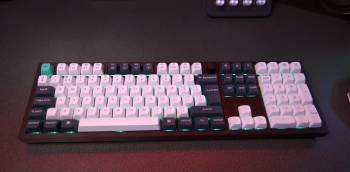
I unboxed the Keychron Q6 Max and the first thing that stood out was the weight of the CNC-machined 6063 aluminum case.
It felt dense and planted on the desk with none of the hollow flex I knew from plastic boards.
I installed the Windows keycaps that came in the box and connected it via the 2.4 GHz dongle.
The keyboard registered instantly and the 1000 Hz polling rate delivered zero noticeable lag during typing and light gaming.
The stock switches felt smooth right out of the box with a clean bottom-out and satisfying return.
The double-gasket mount plus multiple layers of acoustic foam gave every keystroke a soft yet controlled thock that stayed consistent across the entire board.
I typed for several hours on the first day writing documents and answering emails.
Finger fatigue stayed low and the stabilizers remained quiet with no rattle.
I switched to Bluetooth and paired three devices without trouble.
Switching between my laptop phone and tablet took only a quick key combination.
Battery life impressed me.
With the backlight off I went nearly a month between charges under normal daily use.
Even with moderate RGB the board lasted well over two weeks.
I hot-swapped a few switches to test the sockets.
The process took seconds with the included puller and the new switches seated firmly.
VIA opened without issues and let me remap keys and set simple macros in minutes.
The full-size layout kept the number pad and function row exactly where my muscle memory expected them.
After three weeks of mixed work and evening use the board still felt as solid as day one.
No creaks developed and the aluminum case resisted fingerprints better than I expected.
Compared with my old budget mechanical keyboard the difference in sound feel and build quality was dramatic.
Every keystroke now feels intentional and refined.
You notice the premium construction the moment you rest your hands on the board.
My extended daily use confirmed the Q6 Max as a reliable endgame full-size option for anyone who types for long stretches.
Maintenance Tips for the Keychron Q6 Max
- Daily Cleaning Habits
Wipe the keycaps and case with a soft dry microfiber cloth at the end of each day to remove oils and dust.
Use compressed air between the keys every few days to clear debris that settles around the switches.
Avoid liquid cleaners on the aluminum surface unless they are specifically safe for anodized metal.
Keep drinks away from the board to prevent accidental spills into the hot-swap sockets.
- Switch and Keycap Care
Remove keycaps with the included puller when you want a deeper clean and wash them in mild soapy water.
Dry keycaps completely before reinstalling to avoid moisture near the switches.
When hot-swapping switches pull straight up with steady pressure to protect the sockets.
Store spare switches in a labeled container so different types stay organized.
- Battery and Connection Maintenance
Charge the keyboard with the supplied USB-C cable and avoid leaving it plugged in for days after it reaches full.
Turn off the board or switch to wired mode during long periods of inactivity to preserve battery health.
Keep the 2.4 GHz dongle in a small case or attached to a cable so it does not get lost.
Update firmware through the official tools when new versions appear to maintain stable wireless performance.
- Long-Term Storage and Adjustment
Store the keyboard in a dry location away from direct sunlight when not in use for extended periods.
Check the gasket mount and foam layers once or twice a year if you open the case for customization.
Retune stabilizers with a small amount of dielectric grease if any larger keys develop minor noise over time.
These simple habits keep the aluminum case switches and wireless system performing at their best for years.
You protect your investment by treating the board with the same care you give other premium desk tools.
Analytical review of maintenance shows that the modular design actually makes upkeep easier than on many sealed keyboards.
Consistent light cleaning prevents the gradual buildup that dulls typing feel on lesser boards.
Proper battery care extends the already strong runtime and keeps wireless connections reliable.
Following these steps ensures the Q6 Max continues to deliver the same satisfying experience that made it stand out from the first day.
Pros and Cons Of Keychron Q6 Max
Pros Of Keychron Q6 Max
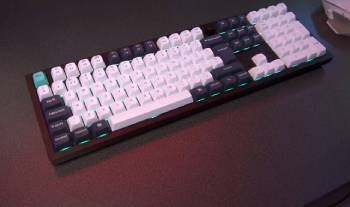
- Full Aluminum CNC Case: The 6063 aluminum body goes through extensive machining polishing and finishing stages that create a dense rock-solid feel free from flex or creaking.
- Double-Gasket Mount Design: Soft mounting combined with multiple acoustic foam layers produces a cushioned yet precise typing sensation that reduces harshness on every keystroke.
- Hot-Swap Sockets: Every switch can be changed without soldering so you can experiment with different tactile linear or clicky options in minutes.
- QMK and VIA Support: Full programmability lets you remap keys create macros and adjust layers through an easy software interface.
- Triple Connectivity: 2.4 GHz wireless Bluetooth 5.1 and wired Type-C cover every use case with a 1000 Hz polling rate on the fast wireless and wired modes.
- Strong Battery Life: Real-world use delivered nearly a month of typing on a single charge with the lights off and still impressive runtime with moderate RGB.
- Full-Size Layout: The complete 100 percent arrangement keeps the number pad and navigation cluster in familiar positions for spreadsheet and data work.
- Quiet Stabilizers: Factory-tuned stabilizers stay rattle-free even on larger keys such as the spacebar and enter.
- Easy Customization: The modular design allows straightforward disassembly for foam adjustments or case modifications.
- Premium Out-of-Box Feel: Stock switches and keycaps already deliver smooth responsive typing that many users keep without immediate changes.
The Analytical Cons Of Keychron Q6 Max
- Higher Price Point: The premium materials and features place the board above entry-level mechanical keyboards.
- Weight Consideration: The full aluminum construction makes the keyboard heavier which can matter for frequent travelers.
- RGB Brightness Limits: The lighting is functional yet not the brightest option available for users who want intense effects.
- Learning Curve for VIA: New users may need a short period to explore the full range of remapping and macro options.
- Stock Keycap Preference: Some typists prefer thicker or different-profile keycaps and will want to replace the defaults.
- Size on Small Desks: The full-size footprint occupies more space than tenkeyless or smaller layouts.
- Wireless Dongle Management: The 2.4 GHz receiver is small and requires careful storage when not in use.
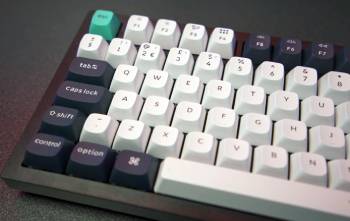
- Initial Mac Layout: Out-of-box Mac key arrangement needs a quick swap to Windows keycaps for many users.
- Foam Tuning Preference: While the stock acoustic package sounds excellent some enthusiasts still experiment with additional layers.
- Availability Fluctuations: Popular colorways and switch variants can sell out during high-demand periods.
Also Read: My Experience With Razer Huntsman Mini
Keychron Q6 Max Vs. Other Brands
- Keychron Q6 Max Vs. Keychron Q6 Pro
The Keychron Q6 Max builds on the Q6 Pro foundation with extra acoustic foam layers and a double-gasket mount that produce a deeper more refined sound signature.
I noticed the Max version felt softer on bottom-out and controlled resonance better during long typing sessions.
Both share the same full aluminum case hot-swap sockets and triple connectivity options.
The Pro remains an excellent wireless full-size board yet the Max acoustic treatment gives it a clear edge for users who care about typing sound and feel.
Battery life and software support stay essentially identical.
The choice comes down to how much the enhanced internal damping matters to your daily experience.
For most typists seeking the most polished stock sound the Max justifies the step up.
- Keychron Q6 Max Vs. Ducky One 3
The Ducky One 3 focuses more on gaming aesthetics and often ships with a plastic or hybrid case that feels lighter on the desk.
I found the Keychron Q6 Max aluminum body and gasket mount delivered a more premium planted sensation during extended work.
Ducky keyboards frequently emphasize low latency and vibrant RGB while the Q6 Max prioritizes customization through QMK VIA and superior stock acoustics.
Hot-swap support appears on both yet the Keychron double-gasket design and multi-layer foam create a distinctly different typing feedback.
Wireless options on the Max add flexibility that many Ducky models lack in their standard versions.
The Q6 Max suits productivity-focused users who want long-term modifiability while the Ducky One 3 appeals more to those chasing gaming flair.
- Keychron Q6 Max Vs. Akko Full-Size Boards
Akko full-size keyboards often deliver strong value with colorful keycaps and solid stock switches at a lower price.
I preferred the Keychron Q6 Max for its denser aluminum construction and more sophisticated gasket mounting system.
Akko boards feel lively and fun yet the Q6 Max provides a quieter more controlled sound profile out of the box.
Programmability through QMK VIA on the Keychron opens deeper customization than many Akko software suites.
Wireless performance and battery life on the Max also ranked higher in my daily rotation.
The Akko option works well for budget-conscious buyers while the Q6 Max targets users ready for a long-term premium daily driver.
Also Read: My Experience With STGAubron Gaming PC
Frequently Asked Questions (FAQs)
Yes the Keychron Q6 Max delivers excellent build quality satisfying typing feel strong wireless performance and deep customization that make it a top full-size choice.
Yes Keychron is a brand based in China that designs and manufactures mechanical keyboards with a strong focus on customization and wireless features.
The Q6 Max adds enhanced multi-layer acoustic foam and a double-gasket mount for improved sound and typing feel compared with the already capable Q6 Pro.
The Keychron Q6 Max offers superior metal construction gasket mounting and wireless flexibility while the Ducky One 3 often emphasizes gaming aesthetics and different stock tuning.
Final Thoughts
I found the Keychron Q6 Max to be a refined full-size mechanical keyboard that elevates daily typing with its aluminum case gasket feel and flexible connectivity.
You should buy this product for the long-term customization potential reliable wireless modes and premium typing experience that few boards at this size deliver so completely.
It has earned a permanent place on my desk as a true endgame option.
