
Finding a device that balances raw competitive performance with a clean, space-saving layout is tough, but this compact machine manages to do exactly that without breaking your budget.
You will notice an immediate difference in how your hands rest and how quickly your commands register on the screen.
It cuts out all the fat of a traditional keyboard, leaving you with nothing but pure performance.
This layout is specifically optimized for gamers who want to maximize their mouse movement area.
By eliminating the numpad and the arrow keys, you can bring your hands closer together for a much more natural posture.
The build quality feels exceptionally premium, utilizing an aluminum top plate that resists flexing even during intense gaming sessions.
It is a highly specialized weapon designed to give you a clear unfair advantage in fast-paced titles.
My Personal Experience With This Ultra Compact Beast
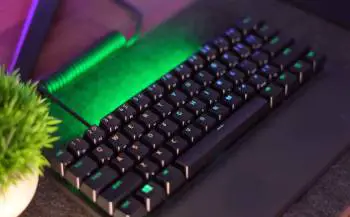
Switching from a traditional full-sized membrane deck to this form factor felt like stepping into a completely different world during my testing.
My journey started when I grew tired of smashing my mouse against the side of my old keyboard during frantic flick shots in first-person shooters.
I needed a solution that would give my right hand complete freedom of movement without forcing me to sit at an awkward angle.
The very first time I unboxed this miniature powerhouse, its incredibly tiny footprint blew me away.
It looked so elegant sitting on my desk, leaving an enormous amount of open space for my mousepad.
When I first placed my fingers on the keys, the unique texture of the doubleshot PBT caps caught my attention.
They have a slightly rough, scratchable feel that gives you incredible grip, ensuring your fingers never slip off the home row during intense matches.
Pushing down on the first key, I was shocked by how instantaneous the response felt.
There is absolutely no mechanical delay because a physical leaf spring does not need to touch a metal contact.
Instead, a precise infrared light beam handles everything, registering the input the exact millisecond you initiate a press.
I spent several weeks playing competitive shooters on this board, and my movement felt immediately snappier.
Strafing back and forth felt crisp, and I found myself hitting complex movement combos with much greater consistency.
I opted for the linear red switches, which feature a dampened bottom-out design that sounds beautifully elegant.
The acoustic profile is wonderfully deep and quiet, meaning my microphone never picked up any clicking sounds while I was communicating with my team on voice chat.
My wife could sit in the same room reading a book without being disturbed by my frantic typing.
When my gaming sessions ended, the portability of the board became its best feature.
I could simply unplug the sturdy braided Type-C cable, wrap it up, and slide the tiny keyboard straight into a desk drawer.
This routine completely cleared my workspace for my daytime job, where I prefer using a full-sized board.
The hardware never exhibited any strange connection bugs or key-chattering issues throughout my extensive testing period.
It operates exactly as intended, delivering raw speed without putting up a single fuss.
How to Clean and Maintain Your Razer Huntsman Mini
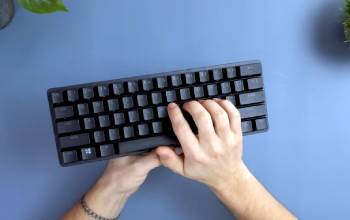
Maintaining the clean appearance of your premium optical gaming keyboard requires a regular care routine to prevent dust buildup from interfering with the internal light sensors.
You should never spray liquid cleaning solutions directly onto the keycaps while the device remains plugged into your computer.
The electrical current can cause a short circuit, while the liquid can seep down into the optical housing and block the infrared beams.
When you notice crumbs, hairs, or dust particles collecting beneath the switches, always unplug the detachable braided USB-C cable first.
Use a dedicated plastic keycap puller to gently lift the PBT caps straight up off their stems, taking care not to twist them sideways as this can bend the wire stabilizers.
Once the caps are removed, flip the aluminum frame upside down over a trash can and tap the back gently to dislodge large debris.
Take a can of compressed air and blow it across the exposed deck using short, controlled bursts to clear out fine dust particles from the sensor paths.
Mix a few drops of mild, clear dish soap into a bowl of lukewarm water to create a gentle cleaning solution for the dirty keycaps.
Drop the removed plastic caps into the soapy water and let them soak for roughly fifteen minutes to loosen accumulated finger oils and skin cells.
Avoid using boiling water or harsh chemical solvents like acetone because extreme heat and strong chemicals will warp the plastic shape and destroy the matte texture.
Use a soft-bristled toothbrush to gently scrub the surface of each individual cap, then rinse them thoroughly under cold running water to remove all soap residue.
Lay the clean keycaps face down on a dry microfiber towel and allow them to air dry completely for at least twelve hours before reassembling them.
To clean the main keyboard deck, take a slightly damp, lint-free cloth and carefully wipe down the aluminum top plate.
Ensure no moisture drips into the open switch housings where the electronic surface-mounted diodes sit.
If a sticky beverage spills directly onto the board, you can use a cotton swab dipped in high-purity isopropyl alcohol to clean the sticky switches individually.
The alcohol will quickly dissolve the sugar residue and evaporate rapidly without leaving harmful moisture behind or damaging the internal optical mechanisms.
Once every component is completely dry, press the keycaps firmly back onto the cross-shaped stems until they snap into place smoothly.
Plug the braided cable back into the rear port, launch your configuration software to verify all keys actuate perfectly, and enjoy your fresh setup.
Pros and Cons Razer Huntsman Mini
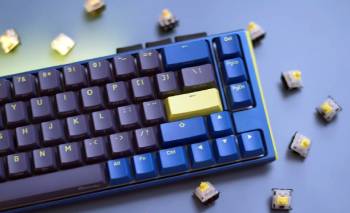
Razer Huntsman Mini Pros:
- Comfortable and featherlight: The overall weight of this keyboard is incredibly minimal, making it a dream for traveling gamers. You can toss it into a backpack and barely notice it is there, freeing up physical space and reducing shoulder fatigue during long trips.
- Innovative optical technology: The custom switches utilize an infrared light beam to actuate commands at the speed of light. This completely eliminates debounce delay, giving you the fastest possible response time during competitive online matches where milliseconds matter.
- Premium textured keycaps: The pre-installed doubleshot PBT caps feature a rugged, matte surface that feels amazing under your fingertips. They are incredibly durable and completely resist the greasy shine that usually ruins cheaper ABS plastic caps over time.
- Detachable braided cable: Having a removable USB-C power cord makes storage and cable management incredibly simple. If the wire ever gets damaged by a pet or caught in a drawer, you can easily replace it without buying a whole new keyboard.
- Brilliant onboard lighting profiles: The RGB lighting is exceptionally vibrant and shines clearly through the keycap legends. You can toggle through several beautiful lighting presets directly using hardware shortcuts, allowing you to skip installing bloated software on your system.
- Robust aluminum construction: The top plate is crafted from solid aircraft-grade aluminum, providing excellent structural rigidity. This prevents the frame from bending or creaking when you press down hard during high-stress moments.
Razer Huntsman Mini Cons:
- Lacks rigid internal acoustic dampening: The internal cavity of the plastic bottom shell is entirely hollow, which causes a slight metallic pinging sound when you strike the spacebar with force: this hollow echoing can become annoying if you type in a completely silent room.
- Deceptive secondary layer layout: Navigating the secondary function shortcuts requires you to memorize a massive web of side-printed legends: because you cannot easily remap these factory assignments inside the software, you are forced to adapt to Razer’s specific layout choices.
- Absence of a dedicated wrist rest: The front edge of the keyboard sits relatively high off the desk surface, which can put your wrists at an aggressive upward angle: if you do not purchase a separate wrist support, you might experience mild forearm fatigue during marathon typing sessions.
- Strap clasp placement software dependency: The advanced custom lighting effects and macro profiles will completely stop working the moment you close the desktop application: because the onboard memory only saves basic key bindings, you are forced to keep the resource-heavy Synapse software running constantly in your background processes.
- Noticeable key stem wobble stabilizer issues: The larger keys like the spacebar and shift inputs suffer from a loose, shaky sensation when pressed off-center: this happens because the underlying stabilizing bars have loose tolerances, creating an inconsistent tactile feel across the board.
Also Read: My Experience With Razer BlackShark V2 X
Razer Huntsman Mini Vs. Other Brands
- Razer Huntsman Mini Vs. Wooting 60HE
When you put these two compact titans head-to-head, the backend software experience highlights a completely different approach to user control.
The Wooting competitor features an incredible web-based interface known as Wootility, which runs directly inside your browser without requiring any local installations.
Every single lighting adjustment, rapid trigger setting, and macro configuration saves directly onto the keyboard’s internal hardware memory, allowing you to plug it into any computer and retain your exact preferences instantly.
The Razer unit relies heavily on the desktop Synapse application, which requires a substantial installation footprint and constant background processing power.
If you close the application or use the keyboard on a device without the software installed, your complex custom lighting profiles will immediately default back to standard color waves.
Furthermore, the competitor allows you to completely remap the function layer keys to any position you desire, whereas the Razer ecosystem keeps the primary system shortcuts locked to their factory-printed locations, severely limiting your layout flexibility.
- Razer Huntsman Mini Vs. Ducky One 3 Mini
Comparing these two popular enthusiast options showcases a clear division between pure gaming optimization and traditional typing comfort.
The Ducky challenger places a heavy emphasis on structural acoustics, featuring multiple layers of dense silicone dampening foam packed inside the chassis to absorb unwanted vibrations.
This creates a remarkably solid, heavy typing platform that remains firmly planted on your desk and produces a clean sound completely free of metallic pings.
The Razer board uses a much thinner, lighter plastic lower shell combined with an aluminum top deck, prioritizing portability over acoustic mass.
While it is much easier to carry around, it feels noticeably hollower when you type rapidly compared to the dampened competitor.
Additionally, the rival keyboard features adjustable two-stage rubber feet that allow you to choose between three distinct typing angles, whereas the Huntsman frame offers a fixed slope that might feel too aggressive for users who prefer a flatter ergonomic profile.
Also Read: My Experience With Razer DeathAdder V3 Pro
Frequently Asked Questions (FAQs)
The ultimate selection depends entirely on your primary usage, but for pure competitive gaming performance, custom magnetic boards like the Wooting series or optical decks like the Huntsman line reign supreme due to their near-zero input latency.
The Wooting variant wins handily if you want complete software freedom, hot-swappable analog switches, and advanced rapid trigger configurations, while the Huntsman is the superior choice if you want instant out-of-the-box speed at a more accessible price point.
Yes, that specific lightweight pointer remains an absolute legendary budget option for claw-grip gamers who want high-tier sensor accuracy without paying a massive premium.
The clicky optical configuration produces a sharp, high-pitched mechanical snap, whereas the linear version is pleasantly quiet and elegant enough to use around others without causing an annoying acoustic distraction.
Final Thoughts
When you want to clean up your gaming desk and unlock true lightning-fast inputs, you should buy this product to secure an absolute competitive edge.
It strips away all unnecessary keys to keep your focus entirely on high-stakes performance and seamless spatial freedom.
The optical switches deliver unmatched responsiveness, ensuring your reactions translate instantly onto the screen during intense matches.
Combined with its rugged doubleshot PBT keycaps and ultra-portable profile, it stands as a brilliant asset for any competitive player.
Investing in this sleek powerhouse guarantees that your setup remains clean, fast, and entirely unburdened.
