
I want to help you clear up the confusion around choosing between the standard hybrid console and its smaller, dedicated sibling by comparing the Nintendo Switch vs Nintendo Switch Lite to figure out which one fits your daily lifestyle.
Technical and Functional Specifications Comparison
| Feature | Standard Nintendo Switch | Nintendo Switch Lite |
| Play Modes | TV Mode, Tabletop Mode, Handheld Mode | Handheld Mode Only |
| Controllers | Detachable Joy-Cons with HD Rumble | Integrated Controls with Traditional D-Pad |
| Screen Size | 6.2-inch LCD Screen | 5.5-inch LCD Screen |
| Weight | 0.88 pounds with Joy-Cons attached | 0.61 pounds total weight |
| Dock Compatibility | Fully compatible with included dock | Not compatible with TV output docks |
| Storage Capacity | 32GB expandable via microSD card | 32GB expandable via microSD card |
| Battery Endurance | 4.5 to 9 hours depending on titles | 3 to 7 hours depending on titles |
Form Factor and Portable Usability
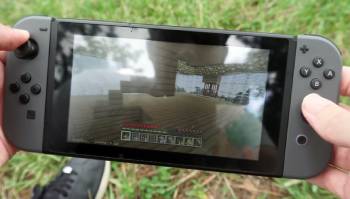
When I first held both devices in my hands, the structural contrast felt immediately apparent.
The standard model feels like a substantial piece of technology because of its wider footprint and the extra mechanical joints required to hold the detachable controllers in place.
You will notice a distinct heft when pulling it out of your backpack for a quick session during a commute.
The smaller handheld version presents an entirely different physical experience on the go.
It feels extraordinarily solid and unified because the entire outer shell is stamped out of a single piece of dense matte plastic.
I found that this lack of moving seams completely removes the slight flexing sensation that can sometimes plague the larger version when you grip it tightly during intense action sequences.
The weight reduction plays a massive role if you enjoy extended gaming marathons in bed or on long flights.
My wrists frequently grew fatigued after holding the primary hybrid up for more than an hour while lying down.
The miniature alternative feels featherlight by comparison, allowing you to sustain your play sessions for hours without experiencing physical strain.
Fitting the gear into a standard jacket pocket highlights another huge win for the integrated design.
The flagship hybrid requires a dedicated carrying case if you want to keep the analog sticks safe from catching on loose fabric.
The compact unit slides effortlessly into smaller pockets, making it the ultimate tool for casual daily travel.
Display Quality and Visual Presentation
Both systems utilize an identical display resolution of twelve hundred and eighty pixels by seven hundred and twenty pixels.
However, the physical distribution of those pixels changes the crispness of your favorite virtual worlds.
The flagship unit stretches that resolution across a six point two inch liquid crystal display panel.
The smaller model condenses the exact same number of pixels onto a tighter five point five inch screen real estate.
This density boost creates a noticeably higher concentration of pixels per inch on the smaller screen.
I immediately noticed that text menus in complex strategy games look sharper and easier to read without squinting.
Color reproduction and screen brightness levels stay largely uniform across both versions.
You will get bright, punchy visuals when playing indoors under standard lighting conditions.
The anti-reflective properties remain minimal on both devices, meaning you will struggle to see the action clearly if you sit directly under harsh summer sunlight in a local park.
The compromise of the smaller screen shows up clearly when you try to enjoy epic role-playing games filled with tiny interface elements.
Text boxes can feel incredibly crowded, and distant environmental details can sometimes blur together into a single pixelated cluster.
If your eyesight demands large, legible graphical elements, the wider screen of the modular option offers a massive practical advantage.
Controller Engineering and Input Responsiveness
The tactile feedback of your inputs changes dramatically depending on which device you select.
The primary model ships with two independent controllers that slide onto the sides of the core tablet unit.
These accessories feature individual internal battery supplies, gyro sensors, and advanced haptic motors.
The integrated alternative dispenses with all detachable hardware in favor of direct, face-mounted controls.
The standout feature here remains the inclusion of a proper, interconnected directional pad on the left side.
I found that executing precise movements in traditional platformers or fighting games feels infinitely better on this setup than on the separate button cluster of the hybrid.
The face buttons on the smaller machine have a softer, slightly more membrane-like travel when you press them down.
The modular controllers have a clicky, micro-switch feel that gives a very loud and sharp acoustic response.
Your preference will depend entirely on whether you prefer a quiet, cushioned tap or a mechanical click during gameplay.
A massive point of concern for long-term ownership involves the vulnerability of the analog joysticks.
Because the compact model has its joysticks soldered directly to the main internal circuit board, repairing worn-out sticks proves incredibly difficult for an average user.
If a modular controller develops input drift, you can simply mail that single piece to a repair center or buy a replacement pair at a local retail store.
Audio Fidelity and Haptic Feedback
Sound design can completely make or break your immersion when traversing expansive open environments.
The standard machine features downward-firing stereo speakers that deliver decent separation and adequate volume levels.
When the console sits docked on a entertainment center, it can output full surround sound audio to a home theater system.
The dedicated portable utilizes smaller speaker grilles positioned along the bottom edge of its unibody chassis.
The audio output feels noticeably thinner and lacks low-end bass frequencies when turned up to maximum volume.
I highly recommend pairing it with a high-quality pair of headphones via the headphone jack or integrated wireless audio support.
Haptic technology represents another major area where the two units diverge completely.
The original system includes advanced tactile feedback motors that can simulate the precise sensation of objects shaking inside a container.
This feature adds a beautiful layer of physical storytelling to first-party titles designed around the mechanism.
The budget-focused model completely drops all internal vibration motors to save on manufacturing costs and preserve physical battery space.
Playing action-packed adventures without any physical feedback feels remarkably sterile if you are accustomed to modern console controllers.
You will lose the physical warnings that indicate incoming enemy attacks or subtle environmental clues hidden within the terrain.
Power Management and Battery Endurance
The internal power cells differ significantly in capacity due to the physical space constraints of each housing.
The hybrid model boasts a large four thousand three hundred and ten milliampere-hour battery pack.
The streamlined option relies on a smaller three thousand five hundred and seventy milliampere-hour power reservoir.
In my practical testing scenarios, the larger system easily wins the endurance race during real-world travel.
When running demanding three-dimensional adventure games at medium brightness, the main unit consistently survived for roughly five hours before demanding a wall outlet.
The travel-sized version consistently drained its reserves within three and a half hours under the exact same software loads.
Charging times remain identical across the board, taking roughly three hours to reach full capacity from an entirely dead state.
Both devices utilize a universal connection interface for power delivery, which means you can use your standard phone chargers when traveling light.
However, the power intake parameters differ slightly if you try to use third-party charging docks.
The smaller system lacks the internal video routing chips required to communicate with a television screen.
Plugs designed to mirror video files will only deliver slow charging current to the compact unit without pushing a signal outward.
If you want a device that can survive an entire afternoon away from an outlet, the base model justifies its heavier chassis.
Home Entertainment and Television Connectivity
The defining feature of the primary hybrid system remains its ability to transform into a traditional home theater console instantly.
The box includes a plastic media dock that links directly to your television via an interface cable.
Dropping the screen into the cradle immediately scales the video output up to full high-definition resolution.
This process also triggers an internal boost in operating frequencies, allowing games to run at more stable frame rates on your big screen.
I loved the seamless transition of playing a game on the train, walking into my living room, and finishing the level on a massive panel.
It provides an unmatched level of versatility for a family household.
The smaller alternative completely removes all television communication architecture from its motherboard.
The bottom port serves exclusively as a power intake pathway for charging the internal cell.
Even if you physically force the smaller unit into a standard media cradle, no video signal will ever reach your external monitor.
This hardware limitation permanently confines your gaming experiences to the attached five point five inch display panel.
You cannot participate in traditional couch multiplayer sessions on a shared screen with your friends or family.
It functions strictly as a personal, isolated window into your interactive digital library.
Also Read: My Experience With Elite Tac Flashlight
Multiplayer Versatility and Local Party Support
The modular nature of the standard hybrid console turns it into an instant party machine out of the box.
You can slide the two controllers off the sides, hand one to a friend, and start a two-player racing match anywhere.
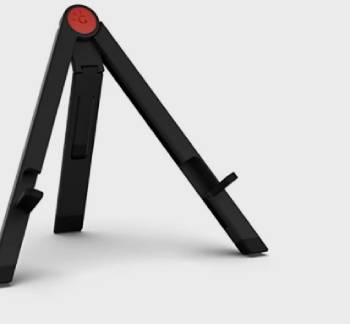
The built-in plastic kickstand on the rear allows the screen to stand upright on any flat table surface.
This feature makes the flagship unit an incredible companion for social gatherings or casual office breaks.
The kickstand on the original model feels admittedly brittle, but it serves its purpose well when handled with care.
You can easily link multiple independent systems together for local wireless tournaments without internet access.
The unibody handheld model is completely stripped of these social sharing features out of the package.
Because the controllers cannot be detached from the screen, local multiplayer requires you to purchase separate wireless controllers.
You will also need to find a creative way to prop the console upright since it lacks a built-in kickstand.
Trying to share a tiny five point five inch screen with another player while using external controllers is an exercise in frustration.
The text becomes completely unreadable, and tracking your character in split-screen layouts is nearly impossible.
This device is explicitly engineered for solo players who prefer to keep their gaming experiences private.
Pros and Cons Nintendo Switch
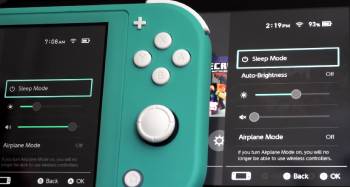
Nintendo Switch Pros:
- Exceptional versatility allows you to play on a massive television screen or on a crowded subway train.
- Detachable controllers provide instant local multiplayer capabilities wherever you go.
- Significantly longer battery life keeps you playing for hours during extended travel.
- Removable controllers make replacing drifting analog joysticks incredibly simple and inexpensive.
- Built-in kickstand enables comfortable tabletop viewing on flights or flat desks.
- Higher television resolution enhances overall graphical clarity and text legibility.
Nintendo Switch Cons:
- Notably heavier and wider footprint can cause hand fatigue during long handheld sessions.
- Multiple moving parts introduce extra points of structural wear over extended periods.
- Plastic screen lens remains highly susceptible to scratching when inserting the unit into the dock.
- Carrying case is mandatory due to the vulnerable nature of the sliding controller rails.
- Significantly more expensive initial investment required compared to the streamlined handheld alternative.
- Included kickstand feels remarkably flimsy and can easily snap off if forced down.
Pros and Cons Nintendo Switch Lite
Nintendo Switch Lite Pros:
- Incredibly solid unibody construction eliminates physical creaking and structural flex entirely.
- Exceptionally lightweight design ensures comfortable handling during marathon gaming sessions.
- Traditional integrated directional pad offers superior accuracy for classic arcade titles.
- Vibrant color options allow you to choose a shell that matches your personal style.
- Tighter pixel density delivers a noticeably sharper image on the smaller screen panel.
- Much more affordable price tag makes it an excellent entry point into the ecosystem.
Nintendo Switch Lite Cons:
- Permanently locked to handheld mode with zero capability to output video to a television.
- Shorter internal battery longevity requires more frequent trips to a power outlet.
- Worn out or drifting analog joysticks require complex disassembly or full console replacement.
- Lacks internal haptic motors, robbing games of immersive rumble feedback patterns.
- Incompatible out of the box with specific physical interactive toy accessories.
- Sharing the small screen for local multiplayer is incredibly difficult and impractical.
Also Read: Comparison Of Grayl Geopress Vs. Ultrapress
Frequently Asked Questions (FAQs)
The biggest drawbacks are the total inability to connect to a television screen, the lack of built-in rumble motors for physical feedback, and shorter overall battery endurance. Additionally, the integrated controllers mean that if your joysticks start to drift, you must repair or replace the entire system rather than just swapping out a single controller.
It is better to buy the standard Switch if you want to play games on your living room television with family and value a larger screen with longer battery endurance. Choose the Lite if you have a tight budget, intend to play exclusively on the go, and prefer a lighter, more durable unibody device.
The Switch Lite can play the vast majority of titles, but it is limited to games that officially support handheld mode. For games that require detached motion controls, you will need to purchase separate wireless controllers to play them on the smaller screen.
Games that require physical motion tracking hardware or structural accessories out of the box cannot be played without buying extra controllers. Notable examples include fitness titles like Ring Fit Adventure, party games like 1-2-Switch, and the interactive cardboard kits from the Nintendo Labo series.
Final Thoughts
I hope this breakdown gives you absolute clarity on the distinct differences between these two hardware options so you can choose the perfect companion for your daily gaming habits.
Finding the right balance between big-screen utility and lightweight portability is essential for maximizing your entertainment budget.
