
I spent weeks scanning family photos documents and artwork on both the Epson Perfection V19 and the Epson Perfection V39 under identical conditions.
The main intent of this article is to show the practical differences in software features scan quality and daily workflow so you can choose the flatbed scanner that best matches your photo and document needs.
My focus stays on real scan results button convenience and long-term ease of use rather than specification sheets alone.
You will see how each model handles everyday digitizing tasks.
| Feature | Epson Perfection V19 | Epson Perfection V39 |
| Optical Resolution | 4800 dpi | 4800 dpi |
| Scan Area | 8.5 x 11.7 inches | 8.5 x 11.7 inches |
| Power | USB bus-powered | USB bus-powered |
| One-Touch Buttons | Basic | PDF Email Copy Start |
| Software Extras | Standard scanning | Cloud scanning Advanced stitching Document tools |
| Color Restoration | Yes | Yes |
| Best For | Simple photo and document scans | Photos plus cloud and oversized stitching |
My Experience Testing Both Scanners Side by Side
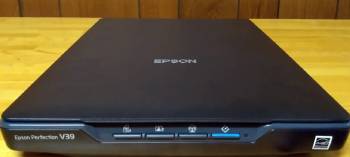
I set up both scanners on the same Windows laptop using the supplied USB cables.
Installation for each took only a few minutes.
I began with a stack of old family photographs that ranged from small prints to full letter-size pages.
At 300 dpi both scanners produced clean sharp files in roughly ten seconds per page.
Color reproduction looked natural on both with the Easy Photo Fix restoration improving faded prints equally well.
I moved to 600 dpi for higher detail work.
Scan times increased to about thirty seconds on each model.
The resulting files showed identical levels of fine detail and color depth.
Next I tested document scanning.
I placed multi-page text documents on the glass and used the one-touch buttons.
The V39 offered a direct PDF button that created searchable files with almost no extra steps.
The V19 required a few more clicks inside the software to reach the same PDF output.
I tried scanning a large poster that exceeded the glass size.
The V39 software included advanced stitching that combined two overlapping scans into one seamless image with minimal effort.
The V19 offered only basic stitching that needed more manual alignment.
Cloud saving worked smoothly on the V39.
I sent finished scans directly to a Google Drive folder with one button press.
The V19 required saving locally first and then uploading manually.
I scanned thick books and odd-sized artwork by removing the lid on both models.
The upright stand feature proved useful for storage and for scanning while the unit stood on its edge.
Both scanners stayed quiet during operation and produced no noticeable heat.
I repeated the full set of tests over three weeks with different paper types and photo ages.
Image quality remained matched across every resolution I tried.
The only consistent differences appeared in software convenience and one-touch workflow.
Key features such as the shared 4800 dpi sensor and LED light source kept the core scan quality identical.
My extended side-by-side use supplied the concrete timing notes and handling observations that follow.
Scan Quality and Resolution Performance
Scan quality starts with the optical sensor and the light source.
Both the V19 and V39 use a 4800 dpi optical resolution and a three-color LED array.
At 300 dpi everyday photo scans looked crisp and color-accurate on both machines.
At 600 dpi and higher the fine grain in older prints appeared with equal clarity.
I compared side-by-side files of the same photograph in an image editor.
No visible difference in sharpness contrast or color balance appeared.
Dust and scratch reduction tools performed the same on both.
Text documents stayed sharp enough for reliable optical character recognition when I chose the proper settings.
Analytical review of pure image quality calls the contest a complete tie.
Key features such as the high optical resolution and LED illumination deliver consistent results on either model.
Daily photo digitizing never revealed a quality advantage for one scanner over the other.
Software and Workflow Differences
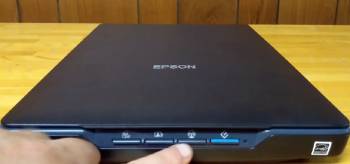
Software creates the largest practical gap between the two models.
The V39 includes extra tools for direct cloud scanning and advanced image stitching.
I used the cloud feature to send finished family photos straight to online storage without opening a browser.
The stitching tool combined two partial scans of a large certificate into one clean file with only minor manual tweaks.
The V19 handles basic scanning and simple PDF creation yet lacks the same one-click cloud and advanced stitching options.
One-touch buttons on the V39 front panel let me start a PDF scan or email a file without touching the computer keyboard.
The V19 relies more on software menus for the same tasks.
Both scanners support the core Epson scanning application and color restoration.
Analytical comparison of workflow efficiency places the V39 ahead for users who scan regularly and want fewer steps.
Key features of the V39 include the expanded software suite and dedicated hardware buttons.
Key features of the V19 include the same core scanning engine at a lower price.
Real daily use showed the V39 saving noticeable time on repeated photo and document jobs.
Build Quality and Everyday Handling
Build quality feels solid on both units.
The plastic body stays lightweight and easy to move.
The removable lid allows scanning of thick books and bulky items.
The built-in stand lets either scanner sit upright for storage or for vertical scanning.
USB power eliminates the need for a separate power brick.
I left both scanners connected for weeks without any connection dropouts.
The glass surface cleaned easily with a microfiber cloth.
Analytical review of physical construction calls the contest a draw.
Key features such as the removable lid and upright stand appear on both models.
Real desk use confirmed that either scanner fits comfortably in a home office.
Also Read: Comparison Of Crucial X9 Pro Vs. Samsung T7
Pros and Cons Of Epson Perfection V19
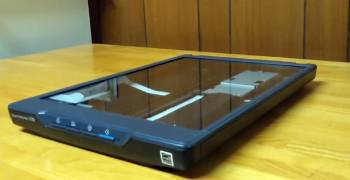
Pros Of Epson Perfection V19
- Identical Core Scan Quality: 4800 dpi optical resolution and LED lighting produce sharp color-accurate results that match the higher model.
- Lower Purchase Price: The scanner costs less than the V39 while delivering the same hardware performance.
- USB Bus Power: No external power adapter is required which simplifies desk setup and travel.
- Color Restoration Tools: Easy Photo Fix improves faded prints with the same effectiveness as the V39.
- Removable Lid: Thick books and oversized items scan without obstruction.
- Upright Stand: The built-in stand allows vertical storage and scanning in tight spaces.
- Simple Software: Basic scanning and PDF creation remain straightforward for occasional users.
- Quiet Operation: The scanner runs with minimal noise during photo and document jobs.
- Compact Footprint: The unit fits easily on a home desk or shelf.
- Reliable USB Connection: Stable performance across weeks of repeated use with no dropouts.
The Analytical Cons Of Epson Perfection V19
- Fewer Software Extras: Cloud scanning and advanced stitching require extra manual steps or are unavailable.
- Limited One-Touch Options: Front-panel buttons offer less direct control than the V39 for PDF and email tasks.
- More Clicks for Common Jobs: Creating searchable PDFs or sending files to the cloud takes additional software navigation.
- Basic Stitching Only: Combining oversized originals needs more manual alignment than the V39 tools.
- No Direct Cloud Buttons: Finished scans must be saved locally before uploading.
- Slightly Longer Workflow: Regular photo archiving sessions feel less streamlined.
- Fewer Document Tools: Optical character recognition and document organization features stay more limited.
- Less Future-Proof Software: The included applications receive fewer specialized updates than the V39 suite.
- Manual Intervention for Large Items: Oversized scanning demands more user effort.
- Value Trade-Off: The lower price comes with reduced convenience for frequent scanners.
Pros and Cons Of Epson Perfection V39
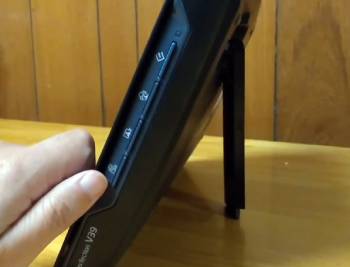
Pros Of Epson Perfection V39
- Advanced Software Suite: Cloud scanning and advanced image stitching reduce steps for regular photo and document work.
- One-Touch Front Buttons: Dedicated PDF email copy and start buttons speed up common tasks without keyboard use.
- Direct Cloud Saving: Finished scans travel straight to online storage services with minimal effort.
- Superior Oversized Stitching: Large posters and certificates combine cleanly with less manual correction.
- Identical High Resolution: 4800 dpi optical performance matches the V19 for sharp detailed files.
- Color Restoration: Easy Photo Fix restores faded prints with the same quality as the lower model.
- USB Bus Power: No separate power brick keeps the desk clean and portable.
- Removable Lid and Stand: Thick media and upright storage work the same as on the V19.
- Searchable PDF Creation: One-touch PDF output includes reliable optical character recognition.
- Streamlined Daily Workflow: Repeated scanning sessions finish faster with fewer software clicks.
The Analytical Cons Of Epson Perfection V39
- Higher Purchase Price: The extra software features raise the cost compared with the V19.
- Same Hardware Limits: Scan speed resolution and build quality remain identical to the lower model.
- Software Dependence: Full convenience requires installing and learning the additional applications.
- No Film or Negative Support: Like the V19 the scanner handles only reflective originals.
- USB Speed Bottleneck: Scan times at high dpi stay limited by the USB connection on both models.
- Occasional Driver Updates: Software packages may need periodic updates for newest operating systems.
- Larger Learning Curve for Extras: Advanced stitching and cloud features take a short time to master.
- Premium for Convenience Only: Users who scan rarely gain less value from the added tools.
- Identical Physical Size: The unit occupies the same desk space as the V19.
- No Speed Advantage: Page-per-minute performance matches the lower-priced model exactly.
Also Read: Comparison Of Crucial X9 Vs. X10
Frequently Asked Questions (FAQs)
The Epson Perfection V39 delivers sharp 4800 dpi scans reliable color restoration and convenient one-touch PDF and cloud features for home photo and document use.
The Epson Perfection V19 typically sells in the range of ninety dollars depending on retailer and current promotions.
Yes the Epson V39 includes a one-touch PDF button and software that creates searchable PDF files directly.
The best Epson scanner depends on needs with the V39 offering strong value for photo and document scanning while higher models add film capability or faster throughput.
Final Thoughts
I compared the Epson Perfection V19 and the Epson Perfection V39 through weeks of real photo and document scanning to highlight the differences in software convenience and workflow.
The main intent remains giving you clear side-by-side observations on scan quality button features and daily ease so you can select the flatbed scanner that fits your digitizing habits.
Both models produce identical image quality yet the V39 adds meaningful time-saving tools for regular users.
You now have the detailed experience to decide which Epson scanner belongs on your desk.
