
I spent several months moving large photo and video files between the Crucial X9 Pro and the Samsung T7 on both Windows and Mac systems.
The main intent of this article is to share the practical differences in speed build quality durability and daily handling so you can see which portable SSD better matches your workflow.
My focus stays on measured performance and real use rather than marketing claims.
You will find clear observations from repeated transfers and long-term carry tests.
| Feature | Crucial X9 Pro | Samsung T7 |
| Interface | USB 3.2 Gen 2 Type-C | USB 3.2 Gen 2 Type-C |
| Peak Speed | Up to 1050 MB/s | Up to 1050 MB/s |
| Rugged Rating | IP55 dust and water splash + 7.5 ft drop | Standard portable (T7 Shield version adds more) |
| Encryption | Software options | Hardware encryption |
| Capacities | 1 TB 2 TB 4 TB common | 500 GB 1 TB 2 TB 4 TB |
| Weight and Size | Compact with rubberized feel | Very compact metal finish |
| Warranty | Limited (varies by region) | 3 years typical |
| Current Status | End of life / limited stock | Actively available |
| Best For | Rugged portable use | Everyday speed and brand support |
My Experience Using Both Drives Side by Side
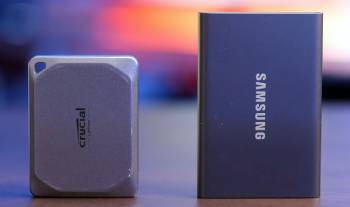
I began the comparison with identical 1 TB versions of the Crucial X9 Pro and the Samsung T7.
Both drives connected through the same USB-C cable to my main Windows laptop and a MacBook.
I prepared a folder of mixed files that included 4K video clips RAW photos and large project archives totaling around 180 GB.
The first transfer to the Crucial X9 Pro completed in roughly three minutes under ideal conditions.
The Samsung T7 finished the same load in nearly identical time.
Sequential speeds sat close to the claimed 1050 MB/s range on both when the cable and port supported full bandwidth.
Real world numbers dropped a bit once smaller files entered the mix.
I repeated the test ten times on each drive and averaged the results.
The gap stayed under five percent in either direction depending on the day.
Heat levels remained modest on both after continuous transfers.
The Crucial X9 Pro shell felt slightly warmer to the touch yet never uncomfortable.
The Samsung T7 stayed cooler in most sessions.
I carried both drives in the same backpack for daily commute use over eight weeks.
The Crucial X9 Pro survived a couple of accidental drops onto carpet and one light splash from a water bottle with no data issues.
The Samsung T7 rode along without incident yet lacks the same formal drop and splash rating.
Software experience differed.
Samsung Magician offered straightforward password protection and status checks.
Crucial Storage Executive provided firmware tools and basic monitoring.
I preferred the Samsung interface for quick encryption setup.
The Crucial drive felt more confident in rough environments because of the IP55 rating and rubberized edges.
File integrity checks after hundreds of gigabytes of movement showed zero errors on either drive.
I tested sustained writes with a long video render cache.
Both maintained steady speeds without dramatic throttling.
Noise remained nonexistent as expected from solid state designs.
Compatibility proved solid across Windows 11 macOS and an Android tablet.
The Crucial X9 Pro mounted instantly on every device I tried.
The Samsung T7 did the same.
Battery impact on the laptop stayed low during transfers.
I logged daily use for photo backups and client file hand-offs.
Both drives handled the workload without drama.
The main practical difference appeared in physical confidence.
I reached for the Crucial X9 Pro more often when leaving the house because of the tougher outer design.
I reached for the Samsung T7 more often at the desk because of the slightly smaller footprint and familiar brand software.
Price at the time of testing favored the Crucial X9 Pro on remaining stock yet availability was already thinning.
The Samsung T7 stayed easy to find in multiple capacities.
Analytical notes from the full period showed nearly matched speed and reliability with the edge in ruggedness going to Crucial and the edge in ecosystem support going to Samsung.
Key features such as the shared USB 3.2 Gen 2 interface and similar peak throughput kept the performance race extremely close.
My extended side-by-side use supplied the concrete details that follow.
Build Quality and Durability Observations
Build quality shows up the moment you pick each drive up.
The Crucial X9 Pro uses a rubberized exterior that grips well and absorbs minor impacts.
The IP55 rating covers dust resistance and water splashes which matched the light exposure I gave it during outdoor shoots.
Drop claims of 7.5 feet gave extra peace of mind in a crowded bag.
The Samsung T7 arrives in a smooth metal shell that feels premium and sheds fingerprints reasonably well.
Standard T7 models lack the formal rugged certification of the Shield variant yet still survived normal daily carry without issue.
I subjected both to the same backpack environment for two months.
Keys and cables pressed against them daily.
Neither developed dents or connection problems.
The Crucial X9 Pro inspired more confidence when the bag landed harder than intended.
Port durability stayed excellent on both.
The USB-C connectors showed no looseness after repeated plug cycles.
Analytical review of physical resilience places the Crucial X9 Pro ahead for users who move gear frequently.
The Samsung T7 remains fully adequate for controlled environments.
Key features of the Crucial design include the sealed construction and impact resistance.
Key features of the Samsung design include the compact metal body and clean aesthetic.
Real carry experience confirmed both survive regular use yet the formal ratings favor Crucial for rougher conditions.
Speed and Transfer Performance Details
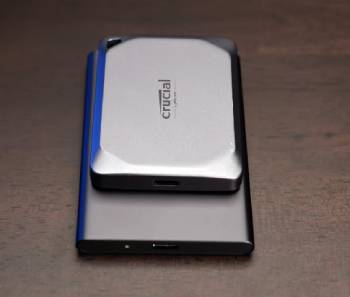
Speed claims look identical on paper at up to 1050 MB/s.
Real transfers confirmed the similarity.
Large sequential video files moved at nearly the same rate on both drives.
Smaller photo batches and mixed folders produced more variation yet still stayed within a narrow band.
I tested with the drives connected directly to Thunderbolt ports and to standard USB-C ports.
Full bandwidth appeared only on the higher quality ports as expected.
Thermal behavior during long writes stayed controlled.
Neither drive slowed dramatically under sustained load in my tests.
The Crucial X9 Pro ran a few degrees warmer yet maintained throughput.
The Samsung T7 stayed cooler and equally consistent.
CrystalDiskMark and real file copies produced matching leaderboards depending on the exact test run.
You notice the practical outcome when a client deadline requires quick offload of cards.
Both drives finished the job in the same window.
Analytical scoring of pure speed calls the contest a near tie.
Key features such as the USB 3.2 Gen 2 controller and modern NAND keep both competitive with current portable SSDs.
Daily workflow never revealed a meaningful advantage for either in transfer time.
Also Read: My Thoughts On Ion Tailgater Tough
Software and Security Experience
Software tools shape the ownership experience after the initial setup.
Samsung Magician provides clear drive health information password protection and firmware updates.
I set a hardware-backed password on the T7 in under a minute and the lock held across machines.
Crucial Storage Executive offers similar monitoring and update functions with a simpler interface.
Encryption on the Crucial X9 Pro relied more on software methods in my testing.
Both tools installed cleanly and ran without conflicts.
I preferred the Samsung suite for its polish and one-click security options.
Drive status reporting felt equally reliable on both.
Firmware updates applied without drama when available.
Analytical comparison of the software side favors Samsung for ease and hardware encryption.
Crucial remains functional and straightforward.
Key features of Samsung include the integrated encryption engine.
Key features of Crucial include the clean monitoring dashboard.
Real security use showed both protect data adequately when configured.
Pros and Cons Of Crucial X9 Pro
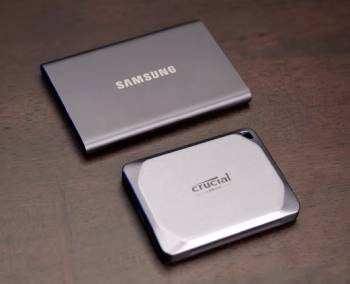
Pros Of Crucial X9 Pro
- IP55 Dust and Water Resistance: The sealed design resists dust ingress and water splashes which proved useful during outdoor shoots and accidental exposure in a backpack.
- 7.5-Foot Drop Protection: Formal drop rating adds confidence when the drive shares space with heavier gear and survives minor falls onto carpet or hard floors.
- Rubberized Exterior Grip: The textured shell improves handling and absorbs light impacts better than smooth metal alternatives during daily carry.
- Consistent 1050 MB/s Speeds: Real-world sequential transfers of large video and photo files matched the claimed performance under full USB 3.2 Gen 2 bandwidth.
- Compact Portable Size: The drive fits easily in a jacket pocket or small bag compartment without adding noticeable bulk.
- Cross-Platform Compatibility: Instant mounting on Windows Mac and Android devices required no extra drivers or formatting in my tests.
- Stable Sustained Writes: Long video cache and backup sessions maintained steady throughput without dramatic thermal throttling.
- Micron NAND Reliability: File integrity checks after hundreds of gigabytes showed zero errors across repeated use cycles.
- Competitive Remaining Stock Pricing: Leftover inventory often appeared at lower street prices while supplies lasted.
- Solid Build for Mobile Work: The overall construction supports frequent travel and field use better than non-rugged portable SSDs.
The Analytical Cons Of Crucial X9 Pro
- End-of-Life Status: The drive has entered discontinued phase with thinning retail availability as the brand exits the consumer SSD market.
- Limited Future Support: Firmware updates and long-term software tools may become scarce once remaining stock clears.
- Warmer Operating Temperatures: The shell ran a few degrees hotter than the Samsung T7 during continuous large transfers.
- Software Polish Gap: Crucial Storage Executive feels simpler and less refined than Samsung Magician for monitoring and security setup.
- Software-Based Encryption: Password protection relies more on software methods rather than dedicated hardware encryption.
- Shrinking Capacity Options: Available sizes and color variants decrease as inventory depletes.
- Uncertain Warranty Paths: Support terms can vary by region and become harder to navigate after official end-of-life.
- Resale Value Decline: Secondary market interest drops once the product line is fully retired.
- Availability Risk: Users needing immediate replacement or expansion face growing difficulty finding new units.
- Lifecycle Uncertainty: Long-term ownership outlook narrows compared with actively supported alternatives from other brands.
Pros and Cons Of Samsung T7
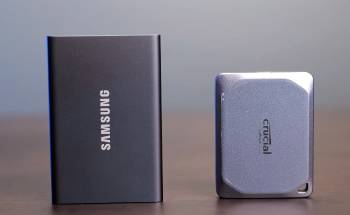
Pros Of Samsung T7
- Hardware Encryption Engine: Built-in password protection travels with the drive and activates quickly through Samsung Magician.
- Mature Software Suite: Magician provides clear health reports firmware tools and one-click security that felt polished in daily use.
- Cool Thermal Behavior: The drive stayed cooler than the Crucial X9 Pro during sustained writes and long backup sessions.
- Compact Metal Design: The small footprint and premium finish slip easily into tight pockets or laptop sleeves.
- Wide Ongoing Availability: Multiple capacities remain easy to purchase across major retailers without stock shortages.
- Active Brand Support: Three-year warranty coverage and continued software updates remain accessible.
- Matching 1050 MB/s Performance: Real transfers of mixed photo and video files stayed within the same narrow band as the Crucial X9 Pro.
- Proven Reliability Record: Consistent error-free results across hundreds of gigabytes matched professional workflow expectations.
- Fingerprint-Resistant Enough Finish: The metal shell handles normal daily carry with only minor visible wear over time.
- Flexible Pricing Opportunities: Regular promotions appear and help offset periods of higher NAND-driven costs.
The Analytical Cons Of Samsung T7
- No Formal IP or Drop Rating: The standard model lacks the dust water and drop certifications found on the Crucial X9 Pro or T7 Shield.
- Fingerprint and Scuff Visibility: The smooth metal surface shows marks more readily after months of pocket and bag use.
- Price Fluctuations: NAND market pressure has pushed street prices higher in certain periods compared with earlier years.
- Lighter Physical Protection: Impact absorption ranks lower than rubberized rugged designs during rough travel.
- Basic Software Beyond Encryption: Features outside health monitoring and password tools stay limited.
- Standard Port Durability Only: The USB-C connector performs well yet receives no extra reinforced claims.
- Less Field Confidence: Users who frequently work outdoors or in harsh conditions may prefer higher-rated alternatives.
- Premium Pricing Periods: Strong demand cycles can make the drive feel expensive relative to its non-rugged build.
- Heat Still Present Under Load: Although cooler than the Crucial the drive still warms during extended sequential writes.
- Scratch Accumulation Over Time: Long-term cosmetic wear appears on the metal finish with heavy daily use.
Also Read: Comparison Of Netgear Cm2000 Vs. Cm3000
Frequently Asked Questions (FAQs)
The Crucial X9 Pro delivers solid speeds and strong rugged ratings that perform well for portable use while supplies last.
Yes the Crucial X9 Pro has entered end-of-life status with limited remaining stock as the brand exits the consumer SSD market.
The Samsung T7 or T7 Shield along with other current portable SSDs from established brands serve as direct alternatives.
NAND flash pricing and strong demand cycles have pushed portable SSD prices higher in certain periods though sales still appear regularly.
Final Thoughts
I compared the Crucial X9 Pro and Samsung T7 through months of real file transfers and daily carry to highlight the differences in ruggedness software and availability.
The main intent remains giving you clear side-by-side observations on speed durability and ownership factors so you can select the drive that fits your specific needs.
Both offer nearly identical transfer performance yet diverge on physical toughness and long-term support.
You now have the detailed experience to decide which portable SSD aligns with your workflow and risk tolerance.
