When you need a compact, budget-friendly desktop monitor setup for music listening, home audio production, or desktop gaming, I created this detailed Edifier MR3 vs MR4 comparison to help you choose the exact speaker pair for your desk and budget.
I tested both active studio monitors extensively on my workspace to evaluate sound clarity, bass impact, cabinet build, and connectivity options.
In this guide, I will help you decide whether the newer Bluetooth-equipped Edifier MR3 or the larger, higher-powered Edifier MR4 belongs on your setup.
| Feature | Edifier MR3 | Edifier MR4 |
| Total Power Output | 36W RMS (18W + 18W) | 42W RMS (21W + 21W) |
| Mid-Low Driver Size | 3.5-Inch Woofer | 4-Inch MICA-Reinforced Woofer |
| Tweeter Size | 1-Inch Silk Dome Tweeter | 1-Inch Silk Dome Tweeter |
| Frequency Response | 52Hz – 40kHz | 60Hz – 20kHz |
| Wireless Connectivity | Bluetooth V5.4 (Multi-point) | None (Wired Only) |
| Analog Inputs | ¼-inch TRS Balanced, RCA, 3.5mm AUX | ¼-inch TRS Balanced, RCA, 3.5mm AUX |
| Front Controls & Jacks | Front 3.5mm Headphone Output | Multi-function Volume Knob, Headphone & AUX |
| App Integration | EDIFIER ConneX App (EQ & Room Compensation) | None |
| Sound Modes & Tuning | Acoustic Space & Room Tuning Knobs | Dual Sound Modes (Monitor & Music Modes) |
| Cabinet Dimensions | 125.5 x 220 x 185 mm | 140 x 228 x 197.5 mm |
| System Net Weight | 3.85 kg | 4.5 kg |
My Real World Testing Experience With Both Desktop Monitors
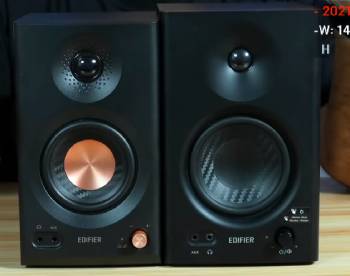
I unboxed both monitor pairs and set them up directly on my wooden studio desk to compare their daily usability and acoustic character.
My listening evaluation involved mixing acoustic tracks, watching high-definition films, streaming lossless music, and playing fast-paced games.
The Edifier MR3 surprised me right out of the box with its remarkably compact footprint and modern wireless integration.
Placing the MR3 on my cramped desk left plenty of space for my laptop and external display, while the sleek dimpled tweeter waveguide gave it a refined visual appearance.
When I paired my phone over Bluetooth V5.4, the connection remained rock-solid without any noticeable audio lag during casual media streaming.
Using the EDIFIER ConneX app on my smartphone allowed me to tweak the room compensation EQ settings directly, which helped eliminate boomy desktop reflections near my back wall.
The high frequencies produced by the 1-inch silk dome tweeter sounded airy and clear, extending all the way up to 40kHz for Hi-Res Audio playback.
When I switched over to the Edifier MR4, the physical weight and larger cabinet volume immediately made their presence felt.
The 4-inch MICA-reinforced woofer delivered a noticeably punchier, fuller mid-bass impact when listening to bass-heavy electronic tracks or film scores.
I thoroughly enjoyed using the front-mounted multi-function knob on the MR4 to switch quickly between red Monitor Mode for flat analytical editing and green Music Mode for rich daily listening.
The extra 6 watts of total RMS power allowed the MR4 to fill my room with clean volume without clipping or distorting.
However, the lack of built-in Bluetooth on the MR4 meant I had to keep a cable plugged into my desktop computer or audio interface at all times.
If you have a tight desk layout and want wireless Bluetooth convenience alongside smart app EQ controls, the MR3 is a brilliant compact solution.
If you want stronger mid-bass presence, higher raw power output, and physical sound mode toggling for audio editing, the MR4 remains a heavy hitter.
Speaker Architecture and Driver Design
Examining the driver hardware reveals how Edifier tailored each speaker pair for specific near-field environments.
The Edifier MR3 uses a fine-tuned 3.5-inch mid-low driver paired with a 1-inch silk dome tweeter housed inside an MDF wooden cabinet.
Edifier engineered a dimpled waveguide around the MR3 tweeter to broaden the horizontal sweet spot, ensuring consistent high frequencies even when you shift around in your desk chair.
Despite its smaller 3.5-inch woofer, the MR3 boasts an impressive frequency response rating from 52Hz up to 40kHz.
The Edifier MR4 opts for a larger 4-inch woofer constructed with MICA-reinforced polypropylene.
This stiffer cone material allows the MR4 driver to push more air, producing tight, authoritative mid-bass hits that give kick drums and bass guitars real physical punch.
The MR4 tweeter is also a 1-inch silk dome design, tuned using German KLIPPEL optical analysis systems to maintain a flat frequency curve across 60Hz to 20kHz.
Both cabinets utilize medium-density fiberboard construction to minimize unwanted cabinet resonances and acoustic distortion during loud playback.
Sound Performance and Audio Character
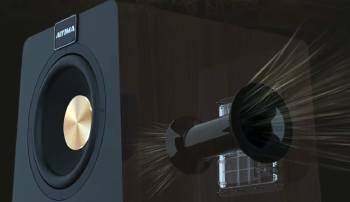
Evaluating sound reproduction side by side demonstrates how driver sizing alters the overall listening dynamic.
The Edifier MR3 focuses heavily on neutral transparency and extended treble detail.
Vocals sound crisp and present, making speech, podcasts, and acoustic guitars stand out with pristine clarity.
Because the high frequencies extend up to 40kHz, instrumental textures in acoustic and classical recordings sound smooth rather than harsh or fatigue-inducing.
However, while the MR3 reproduces clean low-frequency notes down to 52Hz, its 3.5-inch driver cannot move as much air as a larger speaker, meaning deep sub-bass feels tame rather than chest-thumping.
The Edifier MR4 provides a warmer, fuller, and more dynamic soundstage.
Its 4-inch woofer fills in the lower midrange and mid-bass frequencies with extra weight, giving movie explosions and basslines satisfying body.
In Monitor Mode, the MR4 stays remarkably flat, allowing video editors and home music producers to spot harsh frequencies or muddy mixes easily.
Switching the MR4 into Music Mode lifts the bass and treble slightly, turning the monitors into fun daily entertainment speakers.
If you prioritize sparkling high-frequency detail, vocal clarity, and near-field accuracy in a small room, the MR3 excels.
If you prefer richer bass body, higher dynamic volume, and dual acoustic modes for music production, the MR4 takes the lead.
Connectivity, Wireless Streaming, and Smart Control
Connectivity options set a clear functional boundary between these two active monitors.
The Edifier MR3 is designed as a modern hybrid monitor that bridges traditional studio gear and everyday mobile wireless audio.
On its rear panel, you will find balanced ¼-inch TRS inputs for connecting professional audio interfaces, alongside unbalanced RCA and 3.5mm AUX ports for general media players.
The MR3 also includes an integrated Bluetooth V5.4 receiver that supports multi-point connectivity, allowing you to pair two wireless devices simultaneously and switch playback effortlessly.
Furthermore, connecting the MR3 to the EDIFIER ConneX mobile app unlocks deep acoustic room compensation settings, custom EQ curves, and input selection directly from your phone.
The Edifier MR4 sticks to a traditional purely wired studio setup.
Its rear panel features balanced ¼-inch TRS jacks, unbalanced RCA inputs, and acoustic high/low frequency adjustment knobs.
Edifier placed a 3.5mm AUX input and a 3.5mm headphone output on the front panel of the main MR4 speaker for easy desktop access.
However, the standard MR4 model lacks Bluetooth streaming and app integration entirely, requiring physical cables for all media sources.
Maintenance Tips for Long-Term Speaker Health
Proper care and smart placement habits ensure your active studio monitors deliver pristine sound quality for years.You should keep your speakers operating at peak performance by following these essential maintenance steps.
- Desk Placement and Isolation
Position your monitors on foam isolation pads or desktop speaker stands to decouple the wooden MDF cabinets from your desk surface.
Decoupling prevents sound vibrations from transferring into your desk, eliminating unwanted bass boominess and mid-range mud.
Angle the tweeters inward directly toward your ear position at eye level to form an equilateral triangle with your seated listening position.
Maintain at least four to six inches of clear breathing space between the rear bass reflex ports and the wall behind your desk to prevent artificial bass build-up.
- Power Management and Cable Maintenance
Always turn down the master volume knob completely before powering the active speaker system on or off to protect internal Class-D amplifier circuits from sudden signal spikes.
Connect your active monitors to a clean surge protector power strip to shield internal power boards from electrical grid spikes and voltage fluctuations.
Wipe down the rear input jacks occasionally using a dry microfiber cloth to keep corrosion off the TRS and RCA metal contacts.
Never pull cables out by their rubber wire boots; grip the metal plug housing firmly when disconnecting audio gear.
- Cabinet Cleaning and Cone Safety
Clean the MDF wooden cabinets using a dry or slightly damp lint-free microfiber cloth to lift surface dust and fingerprints.
Never use harsh household chemical sprays, ammonia glass cleaners, or abrasive polishes on the cabinet veneer or front plastic baffles.
Keep liquid drinks, coffee mugs, and water bottles far away from the active speaker housing to avoid accidental spills inside the top vents or front headphone ports.
Avoid touching the soft silk dome tweeters or woofer rubber surrounds with bare fingers, as oils and physical pressure can crease delicate driver diaphragms permanently.
Also Read: Comparison Of JBL Flip 6 Vs. Bose SoundLink Flex
Practical Desktop Use Cases Compared
Analyzing specific daily scenarios helps determine which speaker pair fits your workflow best.
If you work in a tight home office or bedroom where space is at a premium, the Edifier MR3 is tailor-made for your environment.
Its compact 3.5-inch woofer fits cleanly beside dual monitors, while Bluetooth V5.4 lets you stream background music from your phone while working on your computer.
The EDIFIER ConneX app makes adjusting room modes easy when your desk is pushed directly against a bedroom wall.
If you spend your days editing video footage, mixing podcast audio, playing PC games, or producing music, the Edifier MR4 offers functional advantages.
Its 4-inch woofer provides the low-end authority needed to check bass levels, while the front multi-function knob lets you switch from flat editing monitor mode to music listening mode instantly.
The extra 42W RMS headroom ensures your audio stays crisp even when you crank up the volume to entertain friends in a medium-sized room.
Pros and Cons of the Edifier MR3
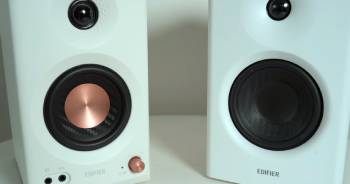
Pros of the Edifier MR3
- Bluetooth V5.4 Wireless Streaming: Features modern wireless Bluetooth V5.4 with multi-point support to connect two smartphones or laptops simultaneously.
- Extended High-Frequency Response: Certified for Hi-Res Audio, delivering crisp treble up to 40kHz via a dimpled silk dome waveguide.
- EDIFIER ConneX App Control: Unlocks custom EQ presets, room compensation settings, and firmware updates directly from your smartphone.
- Ultra-Compact Desktop Footprint: Smaller cabinet dimensions make it easy to place on crowded desks, small shelves, or dorm setups.
- Rich Input Flexibility: Includes balanced TRS, unbalanced RCA, and AUX inputs alongside a front headphone jack for complete setup versatility.
- Neutral Near-Field Precision: Fine-tuned 3.5-inch woofer delivers transparent midrange and clean vocal reproduction for near-field listening.
Cons of the Edifier MR3
- Lower Total Power Output: Delivers 36W RMS (18W x 2), which limits maximum volume in larger living rooms compared to bigger monitors.
- Lighter Low-Bass Impact: The 3.5-inch woofer cannot push as much physical air, resulting in less sub-bass rumble during action movies or heavy trap music.
- App Needed for Full EQ Tweaks: Advanced acoustic room tuning requires opening the smartphone app rather than using physical hardware switches alone.
Pros and Cons of the Edifier MR4
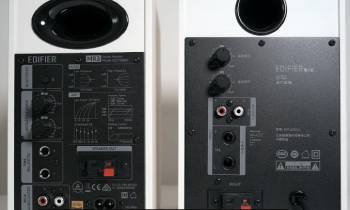
Pros of the Edifier MR4
- Larger 4-Inch Woofer Punch: MICA-reinforced 4-inch woofer produces deeper, punchier mid-bass down to 60Hz with rich low-end texture.
- Higher 42W RMS Output Power: Delivers 21W per channel, allowing higher clean volume levels without early harmonic distortion.
- Dual Sound Mode Toggle: Front multi-function knob easily toggles between flat Monitor Mode for editing and dynamic Music Mode for casual listening.
- German KLIPPEL Acoustic Tuning: Precision-tuned driver system offers accurate frequency response ideal for home music production and video editing.
- Convenient Front Panel Controls: Volume knob, sound mode button, AUX input, and headphone jack sit right on the front for instant access.
- Solid MDF Cabinet Construction: Heavy wooden enclosures minimize cabinet resonance and keep acoustic output natural and uncolored.
Cons of the Edifier MR4
- No Built-In Bluetooth Receiver: Lacks wireless connectivity on standard models, requiring wired cable runs for all phones and tablets.
- Larger Physical Desk Footprint: Takes up more desk real estate and weighs 4.5 kg, which may crowd small workspace setups.
- No Mobile App Support: Cannot be tuned using mobile software, relying strictly on rear analog knobs for treble and bass adjustments.
Also Read: My Thoughts On SVS Prime Wireless Pro
Frequently Asked Questions (FAQs)
Edifier MR3 speakers are ideal for compact desktop near-field monitoring, video editing, podcast listening, and casual daily wireless streaming via Bluetooth V5.4 in small rooms or home offices.
The Edifier MR4 is better for users wanting punchier 4-inch woofer bass, higher 42W RMS volume, and dual Monitor/Music sound modes, while the Edifier S880DB or S1000MKII offer superior power and optical digital inputs for higher budgets.
Yes, the Edifier MR3 delivers clean, accurate, and articulate bass down to 52Hz for its compact 3.5-inch driver size, though it prioritizes neutral clarity over heavy sub-bass rumble.
The best Edifier speakers depend on your use case: the MR4 and MR3 excel as budget near-field desktop monitors, the R1280DBs leads entry-level bookshelf media setups, and the S2000MKIII reigns supreme for audiophile room sound.
Final Thoughts
Choosing between these two active desktop monitor speakers comes down to your workspace constraints, desire for wireless features, and bass expectations.
If you want an ultra-compact desktop monitor pair featuring Bluetooth V5.4 wireless streaming, app-based room EQ compensation, and Hi-Res treble detail, you should buy the Edifier MR3 today.
However, if you want punchier 4-inch woofer mid-bass impact, 42W RMS power, convenient front panel controls, and dual Monitor/Music modes for editing work, you should choose the Edifier MR4 right now.
Both Edifier monitor systems deliver outstanding value and uncolored audio performance that will transform your everyday desk listening experience.