
If you want absolute top-tier PCIe 4.0 performance with dedicated DRAM for massive file transfers and heavy professional workloads, I recommend you buy the Samsung 990 Pro, but if you want incredible power efficiency and near-flagship speed at a lower price for everyday gaming, you should choose the Samsung 990 EVO Plus.
I spent weeks analyzing both of these M.2 NVMe drives in real-world benchmarks, thermal stress tests, and gaming setups.
In this comprehensive comparison, I will help you decide which drive best matches your storage needs and system budget.
| Feature | Samsung 990 Pro | Samsung 990 EVO Plus |
| Target Application | High-End Workstations, PS5, Heavy Content Creation | Mainstream Gaming, Laptops, Everyday Desktop Use |
| Interface | PCIe Gen 4.0 x4 NVMe 2.0 | PCIe Gen 4.0 x4 / 5.0 x2 NVMe 2.0 |
| Controller | Samsung Pascal (8nm Process) | Samsung Piccolo (5nm Process) |
| NAND Flash Memory | Samsung 176-Layer V7 / 236-Layer V8 TLC | Samsung 236-Layer V8 TLC |
| DRAM Cache | Onboard LPDDR4 DRAM (1GB per 1TB) | DRAM-less (Host Memory Buffer / HMB) |
| Max Sequential Read | Up to 7,450 MB/s | Up to 7,250 MB/s |
| Max Sequential Write | Up to 6,900 MB/s | Up to 6,300 MB/s |
| Max Random Read | Up to 1,600,000 IOPS | Up to 1,050,000 IOPS |
| Max Random Write | Up to 1,550,000 IOPS | Up to 1,400,000 IOPS |
| Power Efficiency | Standard High-Performance Profile | Exceptional (Up to 73% higher efficiency) |
| Thermal Management | Nickel-Coated Controller / Optional Heatsink | Nickel-Coated Controller & Heat Spreader Label |
| Form Factor | M.2 2280 Single-Sided | M.2 2280 Single-Sided |
| Capacities | 1TB, 2TB, 4TB | 1TB, 2TB, 4TB |
| Warranty & Endurance | 5 Years / 600 TBW per 1TB | 5 Years / 600 TBW per 1TB |
My Real World Testing Experience With Both Drives
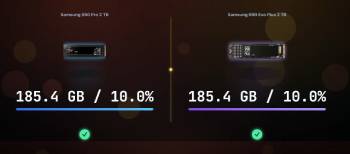
Installing both of these Samsung drives into my test rig gave me a clear perspective on how modern flash storage handles daily pressure.
I started my evaluation by fitting the Samsung 990 Pro into my primary PCIe 4.0 M.2 slot to handle high-bitrate video editing and heavy file transfers.
The drive responded instantly during raw 4K footage scrubbing, showing zero hesitation when dragging multi-gigabyte project folders across drives.
When pushing continuous write cycles over 100 gigabytes, the onboard LPDDR4 DRAM cache kept transfer speeds completely stable without dipping into thermal throttling.
Next, I swapped over to the Samsung 990 EVO Plus to evaluate its DRAM-less Host Memory Buffer architecture in daily gaming and productivity.
Booting into Windows felt identical on both drives, with desktop applications launching in the blink of an eye.
In modern PC games, level load times between the 990 Pro and the 990 EVO Plus differed by mere fractions of a second, making the real-world gaming experience virtually indistinguishable.
Where the 990 EVO Plus truly surprised me was in thermal management and idle power draw.
Running inside a compact laptop chassis without an aggressive heatsink, the 990 EVO Plus stayed remarkably cool under sustained reads.
If you render massive video projects or need an officially supported drive with a pre-installed heatsink for a PlayStation 5, the 990 Pro remains the ultimate performance pick.
If you want a cool-running, highly efficient drive for a laptop or a budget-friendly gaming rig, the 990 EVO Plus delivers incredible value.
Controller Architecture and DRAM vs HMB Technology
Examining the underlying hardware design explains why these two storage drives behave differently under sustained stress.
The Samsung 990 Pro utilizes Samsung’s 8nm Pascal controller paired with dedicated LPDDR4 DRAM cache.
Having physical DRAM on the SSD PCB allows the controller to keep the file mapping table permanently stored in ultra-fast memory.
This physical architecture prevents lookup delays when accessing millions of small scattered files during complex database queries or massive file writes.
The Samsung 990 EVO Plus takes a modern, efficiency-focused route by using the 5nm Piccolo controller.
Instead of paying the cost and power penalty of dedicated onboard DRAM, the 990 EVO Plus uses Host Memory Buffer technology.
Host Memory Buffer allows the SSD controller to borrow a tiny fraction of your main system RAM over the PCIe bus to hold its mapping table.
Combined with 236-layer V8 TLC NAND flash, the 990 EVO Plus manages to deliver speeds that rival older DRAM-equipped flagship drives.
Furthermore, the 990 EVO Plus supports a flexible hybrid interface configuration, operating natively at PCIe 4.0 x4 or PCIe 5.0 x2.
This dual-compatibility interface ensures broad platform support across laptop motherboards and modern desktop chipsets.
Sequential and Random Performance Analysis
Comparing raw benchmark figures shows how close these two drives come in peak sequential speeds while maintaining a clear separation in heavy workloads.
The Samsung 990 Pro tops out at 7,450 MB/s sequential read and 6,900 MB/s sequential write speeds.
The Samsung 990 EVO Plus closely follows with 7,250 MB/s sequential read and 6,300 MB/s sequential write metrics on 2TB and 4TB capacities.
In sequential read tests, a human user cannot perceive the minor 200 MB/s difference between these two drives during game loading.
However, when analyzing random small-file operations measured in IOPS, the 990 Pro pulls ahead.
The 990 Pro delivers up to 1.6 million random read IOPS and 1.55 million random write IOPS.
The 990 EVO Plus reaches 1.05 million random read IOPS and 1.4 million random write IOPS.
This variance in random IOPS means the 990 Pro handles heavy multi-threaded developer tasks, virtual machines, and uncompressed video rendering with greater stability.
For everyday desktop navigation, internet browsing, and launching Steam titles, both drives feel equally snappy and responsive.
Thermal Efficiency and Power Consumption
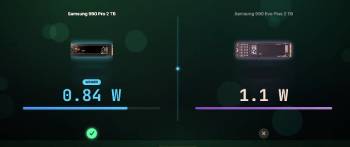
Power consumption and heat output represent a major win for the newer 990 EVO Plus architecture.
The 5nm Piccolo controller inside the 990 EVO Plus provides up to 73 percent higher power efficiency compared to the original 990 EVO.
Because it lacks dedicated DRAM chips and runs on an efficient manufacturing node, it draws significantly less wattage during active transfers.
This thermal efficiency makes the 990 EVO Plus an exceptional upgrade option for ultra-thin laptops where battery life and internal heat matter.
The 990 Pro runs hotter because its 8nm Pascal controller and high-speed LPDDR4 DRAM consume more power under full load.
Under extended write workloads without adequate airflow, the 990 Pro can generate substantial heat.
Samsung solves this thermal demand by offering a dedicated 990 Pro model with a factory-fitted aluminum heatsink and RGB lighting.
If your installation space has limited airflow, the cooler-running 990 EVO Plus provides an easier thermal footprint.
If you install the 990 Pro on a desktop motherboard, using the motherboard’s built-in metal heatsink shield keeps temperatures completely safe.
Maintenance Tips for M.2 SSD Longevity
Proper maintenance ensures your NVMe SSD retains maximum performance and reliability over many years of continuous operation. You should follow these practical care practices to safeguard your valuable data.
- Heat Dissipation and Thermal Management
Always ensure your M.2 SSD operates within safe operational temperature ranges under heavy load.
Check that your desktop motherboard’s aluminum heatsink shield is firmly screwed down over the drive with its thermal pad protective film removed.
If installing a drive in a laptop, preserve the factory nickel heat spreader label on the drive rather than peeling it off.
Monitor drive health metrics periodically using Samsung Magician software to ensure operating temperatures stay below 70 degrees Celsius during long render sessions.
- Storage Capacity and SLC Cache Management
Avoid filling your solid-state drive completely to 100 percent capacity. SSD controllers rely on empty block space to manage garbage collection, wear leveling, and pseudo-SLC caching routines efficiently.
Leaving at least 10 to 15 percent of free unallocated space allows the drive to maintain high write bursts without speed degradation. Keep your operating system TRIM function enabled so Windows automatically cleans deleted data blocks in the background.
- Firmware Updates and Magician Software
Install Samsung Magician software to keep your drive’s internal controller firmware updated.
Samsung periodically releases firmware patches that improve power management, fix bug issues, and optimize thermal throttling algorithms.
Use Magician software to run diagnostic scans, check Total Bytes Written endurance stats, and verify drive authenticity.
Enable hardware encryption features through Magician if you carry sensitive client data on mobile laptops.
Also Read: Comparison Of Samsung T7 Vs. T7 Shield
Gaming, PS5, and Workload Scenario Comparisons
Selecting between these two drives depends heavily on the specific device you intend to upgrade.
If you are upgrading a PlayStation 5 console, the Samsung 990 Pro with its factory heatsink remains the ideal turnkey choice.
Sony requires an M.2 drive with a low-profile heatsink that fits precisely inside the PS5 expansion slot, and the 990 Pro with Heatsink drops in seamlessly.
While the 990 EVO Plus meets all PS5 speed requirements, you would need to buy and install an aftermarket heatsink separately before installing it in a console.
For PC gamers building a dedicated gaming rig, the Samsung 990 EVO Plus offers the best balance of price and speed.
Modern game engines utilizing DirectStorage load assets directly into GPU memory, and both drives complete these transfers in identical timeframes.
Saving money on the 990 EVO Plus allows you to allocate more budget toward a faster graphics card or CPU.
For video editors, 3D animators, and software developers working with massive datasets, the 990 Pro is worth the extra investment.
The dedicated LPDDR4 DRAM cache ensures that writing 200GB of video assets does not result in write-speed drop-offs halfway through the transfer.
Pros and Cons of the Samsung 990 Pro

Pros of the Samsung 990 Pro
- Dedicated LPDDR4 DRAM Cache: Maintains ultra-fast transfer speeds during massive file transfers without speed drops.
- Maximum PCIe 4.0 Performance: Reaches up to 7,450 MB/s read speeds to saturate the Gen 4 interface.
- Superior Random IOPS: Delivers up to 1.6M random IOPS for heavy workstation tasks and virtual machines.
- Factory Heatsink Variant Available: Comes with an optional heat sink designed specifically to fit PS5 console slots.
- High Endurance Rating: Offers up to 2,400 TBW endurance backed by a 5-year limited warranty.
- Proven Workstation Stability: Perfect choice for 4K and 8K video editors handling multi-stream video files.
Cons of the Samsung 990 Pro
- Higher Cost Per Gigabyte: Commands a price premium over mainstream DRAM-less M.2 drives.
- Higher Power Consumption: Draws more power and generates higher heat than newer 5nm drives.
- Overkill for Casual Gaming: Everyday users will not notice a speed difference over cheaper Gen 4 drives.
Pros and Cons of the Samsung 990 EVO Plus

Pros of the Samsung 990 EVO Plus
- Outstanding Power Efficiency: Up to 73% better energy efficiency keeps laptop batteries running longer.
- Near-Flagship Sequential Speeds: Delivers up to 7,250 MB/s read speeds using latest 236-layer V8 TLC flash.
- Excellent Price-to-Performance Value: Costs significantly less than flagship DRAM drives while offering similar real-world feel.
- Hybrid PCIe 4.0 / 5.0 Interface: Operates smoothly on PCIe 4.0 x4 or PCIe 5.0 x2 configurations.
- Runs Exceptionally Cool: Advanced 5nm controller and nickel heat shield label eliminate thermal throttling risks.
- Full 4TB Capacity Option: Available in 1TB, 2TB, and 4TB configurations with identical 5-year warranties.
Cons of the Samsung 990 EVO Plus
- DRAM-less HMB Design: Relies on host system RAM, which can slow down massive sustained transfers.
- Lower Random IOPS Than Pro: Reaches 1.05M random read IOPS, slightly trailing the flagship 990 Pro.
- No Factory Heatsink Model: Sold only as a bare drive, requiring motherboard heatsinks for intensive desktop use.
Also Read: Comparison Of Samsung T7 Vs. SanDisk Extreme
Frequently Asked Questions (FAQs)
Yes, Samsung Pro SSDs are higher-tier drives featuring dedicated DRAM caches, higher random IOPS, and faster sustained write speeds for heavy professional workloads, whereas EVO models focus on mainstream efficiency and value.
Yes, the Samsung 990 EVO Plus is exceptionally well worth it, delivering up to 7,250 MB/s sequential speeds, outstanding power efficiency, and near-Pro performance at a significantly lower price point.
No, the 990 EVO Plus runs cool enough for standard laptop and desktop use thanks to its efficient 5nm controller and nickel heat spreader, though using a basic motherboard metal shield is recommended for heavy desktop workloads.
You should buy the Samsung 990 Pro if you transfer massive files regularly, edit high-resolution video, need maximum random IOPS for heavy applications, or want an official heatsink drive for a PS5.
Final Thoughts
Choosing between these two outstanding solid-state drives comes down to your personal workload demands and system hardware.
If you want maximum PCIe 4.0 performance, dedicated DRAM for heavy file rendering, and an official heatsink option for your PS5, you should buy the Samsung 990 Pro today.
However, if you want incredible power efficiency, cool operating temperatures, and near-flagship gaming speeds at a fantastic price, you should choose the Samsung 990 EVO Plus right now.
Both drives deliver industry-leading reliability backed by a 5-year warranty that will transform your computer’s storage responsiveness.
