
I used both the Roku Ultra and the Roku Streaming Stick 4K on the same 4K TV for several weeks of daily streaming under identical network conditions.
The main intent of this article is to show the practical differences in speed features remote quality and daily convenience so you can choose the Roku player that best matches your setup.
My focus stays on real interface responsiveness picture performance and long term usability rather than marketing claims alone.
You will see how the premium Ultra box compares with the compact Streaming Stick 4K.
| Feature | Roku Ultra | Roku Streaming Stick 4K |
| Form Factor | Larger set top box | Compact HDMI stick |
| Video Support | 4K Dolby Vision HDR10+ | 4K Dolby Vision HDR10+ |
| Audio Support | Dolby Atmos | Standard Dolby Audio |
| Networking | Wi-Fi 6 plus Ethernet | Long range Wi-Fi |
| Remote | Voice Remote Pro backlit rechargeable | Standard Voice Remote |
| Extra Ports | Ethernet USB | None |
| Best For | Main home theater setups | Simple 4K TVs and secondary rooms |
My Experience Testing Both Devices Side by Side
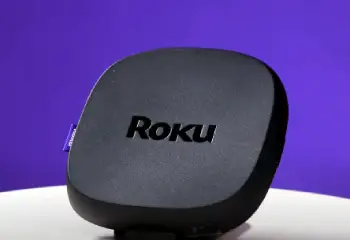
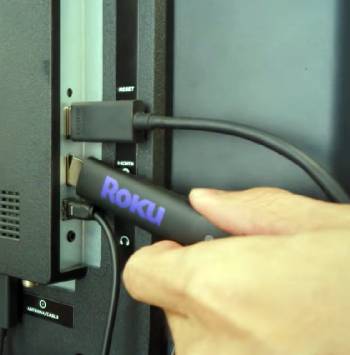
I started with the Roku Streaming Stick 4K plugged directly into the HDMI port of my television.
The stick stayed mostly hidden and the power cable was the only visible wire.
Apps launched quickly enough for everyday Netflix Hulu and YouTube use.
The voice remote responded well and the interface felt familiar.
Picture quality in 4K with Dolby Vision looked sharp and colorful on supported content.
I then switched to the Roku Ultra on the same TV.
The box sat on the entertainment shelf and connected with both HDMI and an Ethernet cable for testing.
Navigation felt noticeably snappier when scrolling through the home screen and opening apps.
The backlit Voice Remote Pro made nighttime use easier and the lost remote finder worked when I misplaced it.
Dolby Atmos content delivered clearer spatial audio through my sound system.
Both devices ran the same Roku OS and offered the same channel selection.
Key features such as the shared 4K Dolby Vision support and simple Roku interface shaped the similar core experience while speed ports and remote differences stood out.
My extended side by side use supplied the concrete performance convenience and feature notes that follow.
I paid attention to how each handled busy evening streaming sessions and weaker Wi-Fi moments.
Neither device dropped connections under normal home network conditions.
The choice came down to whether I valued the extra speed ports and remote or preferred the smaller stick form and lower cost.
Performance Speed and Interface Feel
Performance and interface speed decide how pleasant daily use feels.
The Roku Ultra uses a faster processor that makes menu scrolling and app switching feel more responsive.
I noticed shorter wait times when jumping between streaming services.
The Streaming Stick 4K remains perfectly usable for most people yet shows slightly longer pauses during heavy navigation.
Both deliver smooth 4K playback once content starts.
Analytical review of real world speed places the Ultra ahead for users who open many apps or dislike any lag.
Key features of both include the clean Roku interface and broad app support.
Real evening use confirmed either player handles typical streaming without major frustration.
Picture Audio and Connectivity Options
Picture audio and connectivity affect the overall home theater experience.
Both devices support 4K resolution along with Dolby Vision and HDR10+.
I saw matching color and detail on the same TV with the same content.
The Ultra adds Dolby Atmos support which improved spatial audio on compatible shows and movies.
The Streaming Stick 4K sticks with standard Dolby Audio.
The Ultra includes an Ethernet port for wired stability and a USB port for local media playback.
The stick relies on Wi-Fi only and stays more portable.
Analytical scoring of feature depth places the Ultra ahead for complete home theater setups and the stick ahead for simple clean installations.
Key features of the shared platform include easy setup and consistent channel availability.
Real content testing confirmed both produce excellent 4K HDR images when the source supports it.
Remote Design Portability and Daily Convenience
Remote quality and physical design influence everyday satisfaction.
The Ultra Voice Remote Pro is rechargeable backlit and includes a finder button that makes the remote beep.
I appreciated the lighting during dark room viewing.
The Streaming Stick 4K remote is lighter and uses standard batteries yet still supports voice search.
The stick form factor hides easily behind the TV while the Ultra box needs a surface.
Analytical review of convenience places the Ultra ahead for premium remote features and the stick ahead for discretion and travel potential.
Key features of both include simple voice control and private listening options through the Roku mobile app.
Real multi week use confirmed either remote becomes second nature after a short period.
Also Read: Comparison Of Roku Ultra Vs. Roku Premiere
Pros and Cons Of Roku Ultra
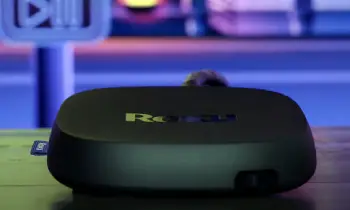
Pros Of Roku Ultra
- Fastest Roku Performance: Snappier interface and quicker app loading for smoother daily navigation.
- Dolby Vision and Dolby Atmos: Supports the highest quality video and spatial audio formats.
- Wi-Fi 6 and Ethernet Port: Delivers strong wireless range plus optional wired stability.
- Voice Remote Pro: Backlit rechargeable remote with lost remote finder for easy nighttime use.
- USB Port for Media: Allows playback of personal video and photo files from a drive.
- Bluetooth Headphone Support: Enables direct wireless headphone pairing on the device.
- Premium Build and Features: Designed as the flagship for complete home theater setups.
- Consistent 4K HDR Playback: Handles modern streaming content with excellent picture quality.
- Reliable Long Term Platform: Runs the full Roku OS with regular updates and broad app access.
- Strong Network Flexibility: Works well in homes with challenging Wi-Fi or preference for Ethernet.
The Analytical Cons Of Roku Ultra
- Higher Price Point: Costs significantly more than the Streaming Stick 4K for the added features.
- Larger Box Form Factor: Requires shelf space and is harder to hide behind a wall mounted TV.
- Feature Overkill for Basic Use: Ethernet USB and Atmos may go unused on simple TV setups.
- Power Adapter and Cables: More wires than a pure stick design.
- Remote Learning Curve for Finder: The lost remote button is useful yet requires the remote to have charge.
- Not the Most Portable: Less convenient to move between rooms or take on trips.
- Premium Positioning: Some buyers prefer spending less when the stick already delivers 4K Dolby Vision.
- Shelf Clutter Potential: The box adds another device to the entertainment area.
- Ethernet Cable Needed for Full Benefit: Wired advantage requires running a cable to the router or switch.
- Price to Performance Balance: The jump in cost is larger than the jump in everyday streaming experience for many users.
Pros and Cons Of Roku Streaming Stick 4K
Pros Of Roku Streaming Stick 4K
- Compact HDMI Stick Design: Plugs directly into the TV and stays mostly out of sight.
- Excellent 4K Dolby Vision Support: Delivers sharp colorful HDR picture on compatible content.
- Long Range Wi-Fi: Maintains solid connection even when the router is farther away.
- Affordable Price: Provides most of the Roku experience at a much lower cost than the Ultra.
- Simple Voice Remote: Supports voice search and easy navigation without extra complexity.
- Portable and Easy to Move: Simple to take to another TV or use while traveling.
- Full Roku OS and Apps: Accesses the same channels and interface as higher models.
- Clean Installation: Minimal cables make wall mounted TV setups neater.
- Reliable Everyday Performance: Handles mainstream streaming services without major lag.
- Great Value for Secondary TVs: Ideal for bedrooms or additional rooms where premium extras are unnecessary.
The Analytical Cons Of Roku Streaming Stick 4K
- No Ethernet Port: Relies entirely on Wi-Fi which can vary with home network quality.
- No Dolby Atmos Support: Misses spatial audio on content that offers it.
- Standard Remote Only: Lacks backlighting rechargeability and the lost remote finder.
- No USB Media Playback: Cannot play files directly from a plugged in drive.
- Slightly Less Snappy Interface: Feels a bit slower than the Ultra during heavy menu navigation.
- Power Cable Still Visible: The stick hides well yet the power cord needs management.
- Fewer Premium Connectivity Options: No Bluetooth headphone mode on the device itself.
- Less Future Proof for Advanced Audio: Homes with Atmos sound systems get less benefit.
- Wi-Fi Dependent Stability: Performance can dip in congested or weak wireless environments.
- Not the Absolute Fastest Roku: Power users may notice the difference next to the Ultra.
Also Read: Comparison Of Roku Ultra Vs. Express
Frequently Asked Questions (FAQs)
Yes the Ultra is worth the extra money if you want Ethernet Dolby Atmos the premium remote and the fastest interface especially on a main living room TV.
The Streaming Stick Plus is a more basic 4K HDR stick while the Ultra is a full featured box with Dolby Vision Atmos Ethernet USB and a superior remote.
The main downsides are the lack of Ethernet Dolby Atmos USB media support and the advanced Voice Remote Pro found on the Ultra.
The Streaming Stick 4K is generally the better modern stick choice because it adds Dolby Vision and stronger Wi-Fi compared with older or lower Plus models.
Final Thoughts
I compared the Roku Ultra and Roku Streaming Stick 4K through weeks of real daily streaming to highlight the differences in speed features and convenience.
The main intent remains giving you clear side by side observations on performance remote quality and setup practicality so you can select the Roku player that fits your TV and budget.
The Ultra leads for complete home theater features while the Streaming Stick 4K excels at compact value and simple 4K performance.
You now have the detailed experience to decide which Roku belongs in your living room.
