
I tested both the Roku Streaming Stick Plus and the Roku Streaming Stick 4K on the same televisions for several weeks of daily streaming.
The main intent of this article is to show the practical differences in picture formats Wi-Fi range power options and everyday performance so you can choose the stick that best matches your TV and setup.
My focus stays on real app loading picture quality and installation ease rather than specification sheets alone.
You will see how each stick performs when you sit down to watch.
| Feature | Roku Streaming Stick Plus | Roku Streaming Stick 4K |
| Resolution and HDR | 4K with HDR10 HDR10+ HLG | 4K with Dolby Vision plus HDR10 HDR10+ HLG |
| Wi-Fi | Dual-band Wi-Fi 5 | Dual-band Wi-Fi 5 with long-range booster |
| Power | TV USB port possible no adapter needed | Power adapter included higher draw |
| Remote | Voice Remote | Voice Remote |
| Best For | Budget 4K and simple power setup | Dolby Vision TVs and weaker Wi-Fi areas |
| Typical Price Position | Lower | Slightly higher |
My Experience Testing Both Sticks Side by Side
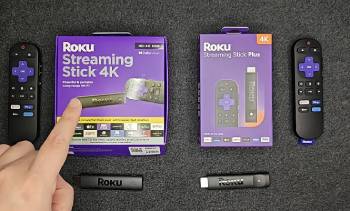
I started with the Roku Streaming Stick Plus plugged into a modern 4K television.
Power came straight from the TV USB port so no extra wall outlet was required.
Setup finished in minutes and the interface felt familiar and responsive.
4K content with HDR10 looked sharp and colorful on supported titles.
I then swapped in the Streaming Stick 4K on the same set.
The included power adapter took one outlet yet the stick itself stayed compact.
Dolby Vision titles showed deeper contrast and more refined color on compatible movies and series.
Wi-Fi stayed stable even when I moved the router farther away thanks to the long-range design.
App launching and menu scrolling felt similar on both sticks during normal use.
Voice search worked cleanly with either remote.
I repeated the tests on a second television with average Wi-Fi coverage.
The Stick 4K maintained a more consistent connection in that room.
The Plus still performed well yet showed occasional buffering on higher bitrate streams when signal dropped.
Key features such as Dolby Vision support and the Wi-Fi booster on the 4K model shaped the clear differences.
My extended side by side use supplied the concrete picture stability and convenience notes that follow.
Picture Quality and Format Support
Picture quality depends on what formats your television and content support.
The Streaming Stick 4K adds Dolby Vision alongside the standard HDR10 HDR10+ and HLG options.
I watched several Dolby Vision titles and saw richer highlights and more accurate shadow detail.
The Streaming Stick Plus handles 4K with HDR10 HDR10+ and HLG effectively.
On non Dolby Vision content the two sticks looked nearly identical.
Both delivered clean upscaling of HD streams.
Analytical review of visual performance places the Stick 4K ahead when Dolby Vision material is available.
Key features of the Stick 4K include full premium HDR format coverage.
Key features of the Stick Plus include solid 4K HDR support at a lower cost.
Real content tests confirmed the Stick 4K unlocked extra picture depth on compatible sets while the Plus covered most everyday viewing needs.
Wi-Fi Stability and Power Options
Wi-Fi range and power setup affect daily reliability.
The Streaming Stick 4K includes a long-range Wi-Fi design with a booster in the power cable.
I placed the router farther from the television and still maintained steady 4K streams.
The Streaming Stick Plus uses standard dual-band Wi-Fi 5.
It performed well in strong signal areas yet needed closer router placement for consistent high bitrate playback.
Power differences stood out during installation.
The Plus drew less power and ran reliably from the television USB port.
The Stick 4K preferred its included wall adapter for full performance.
Analytical scoring of connectivity and setup places the Stick 4K ahead for difficult Wi-Fi locations and the Plus ahead for clean cable free power.
Key features of the Stick 4K include the extended range antenna system.
Key features of the Stick Plus include lower power draw and USB powering flexibility.
Real household tests showed the Stick 4K reduced dropouts in weaker signal rooms while the Plus simplified setup near the television.
Everyday Performance and Value
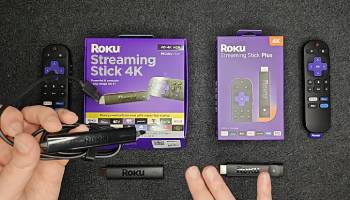
Everyday performance and value decide which stick stays in the living room.
Both sticks share the same Roku operating system and channel library.
Menu navigation and app switching felt equally responsive under normal conditions.
Voice search accuracy matched on both remotes.
The Stick Plus costs less and covers 4K HDR needs for many users.
The Stick 4K justifies its small premium through Dolby Vision and stronger Wi-Fi.
Analytical review of daily value places the Stick Plus ahead for most households and the Stick 4K ahead for specific premium picture or range needs.
Key features of both include compact stick design and simple remote control.
Real long term use confirmed both delivered reliable streaming with the choice depending on television capabilities and room layout.
Pros and Cons Of Roku Streaming Stick Plus
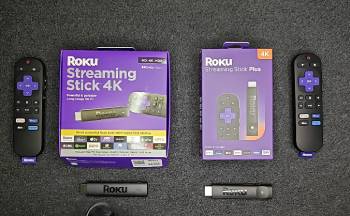
Pros Of Roku Streaming Stick Plus
- Lower Price Point: Delivers full 4K HDR streaming at a more accessible cost than the higher model.
- USB Power Flexibility: Runs from the television USB port and needs no wall adapter in most setups.
- Solid 4K HDR Support: Handles HDR10 HDR10+ and HLG for vibrant picture on compatible content.
- Compact Stick Design: Stays out of sight behind the television with minimal bulk.
- Familiar Roku Interface: Provides the same easy channel store and navigation as other Roku devices.
- Voice Remote Included: Supports voice search and basic television controls out of the box.
- Efficient Power Draw: Lower consumption makes USB powering reliable and travel friendly.
- Good Everyday Performance: App loading and menu response feel smooth for regular streaming.
- Simple Installation: Fewer cables and no extra power brick speed up setup.
- Strong Value Balance: Covers the majority of 4K viewing needs without extra cost.
The Analytical Cons Of Roku Streaming Stick Plus
- No Dolby Vision Support: Misses the premium HDR format used by many streaming services and discs.
- Standard Wi-Fi Range: Dual-band Wi-Fi 5 can struggle in rooms far from the router.
- Limited Future Proofing for Premium HDR: Lacks the format some newer televisions and content emphasize.
- Potential Buffering in Weak Signal Areas: Higher bitrate 4K streams may pause when Wi-Fi is marginal.
- No Long-Range Booster: Relies on basic antenna design compared with the 4K model.
- Power Dependent on TV USB: Some older televisions supply insufficient power and still need an adapter.
- Slightly Fewer Premium Features: Omits the extras that justify the higher model for certain users.
- HDR Format Gaps: HDR10+ and HLG cover many titles yet not the full premium range.
- Room Placement Sensitivity: Works best when the television sits relatively close to the router.
- Upgrade Path Consideration: Users with Dolby Vision televisions may later want the 4K stick.
Also Read: Comparison Of Roku Ultra Vs. Streaming Stick 4K
Pros and Cons Of Roku Streaming Stick 4K
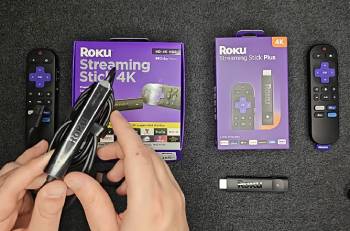
Pros Of Roku Streaming Stick 4K
- Dolby Vision Support: Adds the premium HDR format for deeper contrast and richer color on compatible content.
- Long-Range Wi-Fi Design: Booster in the power cable improves stability in larger homes or distant rooms.
- Full 4K HDR Coverage: Handles Dolby Vision alongside HDR10 HDR10+ and HLG.
- Reliable High Bitrate Streaming: Maintains smoother playback when network conditions vary.
- Included Power Adapter: Ensures consistent power delivery regardless of television USB capability.
- Compact Stick Form: Still hides easily behind the television.
- Same Roku Experience: Full access to the channel store voice search and interface.
- Voice Remote Standard: Delivers convenient search and television control.
- Better Weak Signal Performance: Reduces buffering in challenging Wi-Fi environments.
- Premium Picture Ready: Matches modern television capabilities more completely.
The Analytical Cons Of Roku Streaming Stick 4K
- Higher Price: Costs more than the Plus for the added formats and range.
- Requires Wall Adapter: Takes an extra outlet and adds one more cable.
- Higher Power Draw: Needs more energy than the USB friendly Plus model.
- Overkill for Basic Setups: Dolby Vision and long-range features go unused on simple televisions or strong Wi-Fi homes.
- Slightly Older Design Base: Some core components date to earlier hardware generations.
- Adapter Bulk: The power brick and cable take more space than a pure USB powered stick.
- Marginal Benefit in Ideal Conditions: Gains shrink when the router sits close and content lacks Dolby Vision.
- No Major Interface Advantage: Daily navigation speed matches the Plus under normal use.
- Feature Specific Value: Worth the extra mainly for Dolby Vision owners or weak Wi-Fi rooms.
- Potential Redundancy: Many households find the Plus sufficient for their actual viewing.
Also Read: Comparison Of Roku Ultra Vs. Roku Premiere
Frequently Asked Questions (FAQs)
The better stick depends on needs with the Streaming Stick 4K preferred for Dolby Vision and longer Wi-Fi range and the Plus preferred for lower cost and USB power simplicity.
The Roku Streaming Stick 4K is worth it when your television supports Dolby Vision or when the television sits far from the router.
The main differences lie in the operating system interface app selection and remote style with each platform offering its own content store and user experience.
Upgrading to the Streaming Stick Plus adds 4K HDR support faster performance and better Wi-Fi compared with basic HD sticks while keeping the price accessible.
Final Thoughts
I compared the Roku Streaming Stick Plus and the Roku Streaming Stick 4K through weeks of real streaming to highlight the differences in picture formats range and power setup.
The main intent remains giving you clear side by side observations on HDR support Wi-Fi stability and daily convenience so you can select the stick that fits your television and room.
The Stick 4K leads for Dolby Vision and challenging Wi-Fi while the Plus excels at affordable 4K with simple powering.
You now have the detailed experience to decide which Roku stick belongs behind your television.
