
If you want the ultimate MMO gaming mouse with hot-swappable side plates and customizable scroll wheel tension, I recommend you buy the Razer Naga V2 Pro, but if you want a dedicated 12-button side panel and massive AA battery life at a lower price point, I recommend you pick the Razer Naga V2 HyperSpeed.
I wrote this comprehensive comparative analysis to help you decide which wireless MMO mouse fits your personal playstyle and desk setup.
| Feature | Razer Naga V2 Pro | Razer Naga V2 HyperSpeed |
| Target Audience | Multi-genre gamers, MMO/MOBA/FPS enthusiasts | Pure MMO players, macro power users |
| Side Plate Modularity | 3 Swappable Side Plates (2, 6, 12 buttons) | Fixed 12-Button Side Plate (non-swappable) |
| Total Programmable Controls | Up to 22 (depends on attached plate) | 21 Programmable Controls (includes 2 extra top edge buttons) |
| Primary Switches | Razer Optical Mouse Switches Gen-3 | Razer Mechanical Mouse Switches Gen-2 |
| Scroll Wheel System | Razer HyperScroll Pro Wheel (Customizable tension & 6 modes) | Razer HyperScroll Technology (Tactile & Free-spin toggle) |
| Battery Type & Power Source | Rechargeable Internal Li-ion Battery | Single AA Battery (Alkaline or Lithium) |
| Battery Life (2.4 GHz HyperSpeed) | Up to 150 hours | Up to 250 hours (with AA battery) |
| Battery Life (Bluetooth) | Up to 300 hours | Up to 400 hours (with AA battery) |
| Wireless Charging Support | Supported (Razer Wireless Charging Puck / Dock Pro) | Not Supported |
| Weight (Without Cable/Battery) | Approximately 134 grams | Approximately 95 grams (118g to 124g with AA battery) |
| Onboard Memory Profiles | Stores up to 5 profiles | Stores up to 2 profiles |
| RGB Lighting | Razer Chroma RGB (Logo and side plate lighting) | No RGB Lighting (Maximized for battery efficiency) |
| Sensor Specification | Razer Focus Pro 30K Optical Sensor | Razer Focus Pro 30K Optical Sensor |
My Hands On Experience Testing Both Naga Mice

When I first unboxed the Razer Naga V2 Pro on my gaming desk, I was immediately struck by its hefty, premium feel and modular versatility.
I spent weeks switching between World of Warcraft raiding sessions and competitive First-Person Shooter matches by simply popping off the magnetic 12-button side plate and snapping on the streamlined 2-button plate.
The optical switches felt crisp, instantly responsive, and completely immune to the dreaded double-clicking issue that plagues older mechanical designs.
Adjusting the HyperScroll Pro wheel through Razer Synapse allowed me to create custom tactile resistance profiles for different weapon wheels and inventory scrolling in my favorite games.
When I transitioned to testing the Razer Naga V2 HyperSpeed, I noticed how much lighter the chassis felt in my hand before inserting the AA battery.
It retains the exact ergonomic silhouette of the Pro model, fitting my palm comfortably during extended raid nights.
The fixed 12-button side layout worked flawlessly for my rotational macros, and I actually grew to love the two additional buttons placed right next to the left click.
While the mechanical switches feel slightly different from the optical ones on the Pro, they provide a very satisfying tactile bump that never felt mushy.
If you frequently swap between different gaming genres and desire wireless charging, the Naga V2 Pro justifies its premium price.
If you are a dedicated MMO or strategy player who wants insane battery life without worrying about internal lithium degradation, the HyperSpeed model offers incredible real-world performance.
Sensor Precision and Tracking Performance
At the heart of both gaming mice sits the flagship Razer Focus Pro 30K Optical Sensor.
This sensor delivers exceptional tracking accuracy, up to 30,000 DPI, 750 IPS tracking speed, and 70G maximum acceleration.
In my competitive testing across high-DPI flicks and micro-adjustments, both mice tracked movement without any smoothing, filtering, or acceleration anomalies.
Smart Tracking automatically calibrates the sensor across glass, wood, and cloth surfaces without requiring manual surface tuning inside software.
Asymmetric Cut-off allows you to set independent lift-off and landing distances to match your lifting habits during quick re-centering motions.
Motion Sync synchronizes signals between the sensor and your PC for liquid-smooth cursor responsiveness on high refresh rate monitors.
Whether you choose the flagship Pro or the budget-friendly HyperSpeed, you receive identical top-tier sensor tracking accuracy.
Modular Versatility Versus Dedicated Efficiency
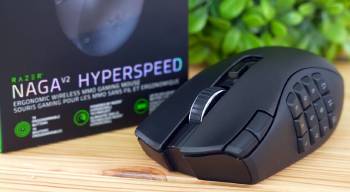
The physical button configuration represents the most significant design deviation between these two wireless mice.
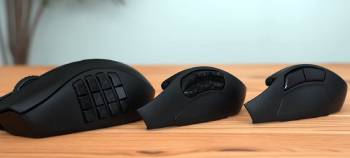
The Naga V2 Pro includes three interchangeable magnetic side plates featuring 2-button, 6-button, and 12-button layouts.
The 2-button plate transforms the mouse into a comfortable ergonomic option for FPS games where light grip and low distraction matter most.
The 6-button layout arranges buttons in two neat rows, perfect for MOBA abilities, battle royale items, and action-RPG hotkeys.
The 12-button panel gives you full access to action bars and complex macro sequences across complex online games.
The Naga V2 HyperSpeed discards swappable plates in favor of a permanently fixed 12-button side panel.
To compensate for the lack of swappable plates, Razer added two dedicated top-edge buttons right beside the main left-click button.
These extra top buttons are easily accessible for utility macros, push-to-talk keys, or DPI toggles without taking your thumb off the main side grid.
If you play exclusively MMOs, the fixed panel on the HyperSpeed feels remarkably solid with zero flex or seam movement under your thumb.
Switch Technology and Click Dynamics
Under the main left and right mouse buttons, Razer implemented two completely different switch architectures.
The Naga V2 Pro utilizes Razer 3rd-Generation Optical Mouse Switches rated for up to 90 million clicks.
Optical switches light-actuate using an infrared light beam, eliminating bounce delay and completely preventing accidental double-clicking over time.
The click feel is sharp, tactile, and extremely fast, making it ideal for rapid button-mashing in intense combat scenarios.
The Naga V2 HyperSpeed features Razer 2nd-Generation Mechanical Mouse Switches rated for up to 60 million clicks.
These mechanical switches use gold-plated contacts to deliver a slightly firmer, springier tactile feedback under your fingers.
While mechanical switches consume substantially less power than optical switches, they carry a minor theoretical risk of wear over millions of actuation cycles.
In everyday gaming practice, both switch types feel crisp, but the optical switches on the Pro offer a slightly lighter and faster actuation response.
Scroll Wheel Customization and HyperScroll Mechanics
Scroll wheel functionality on these two mice showcases two distinct levels of hardware engineering.
The Naga V2 Pro features the electronic Razer HyperScroll Pro Wheel, which is fully customizable through software.
You can electronically adjust scroll resistance, steps per revolution, and force curves across six distinct presets.
Standard Tactile mode delivers distinct notched steps for weapon swapping, while Free-Spin mode spins smoothly for fast web scrolling.
Custom mode lets you fine-tune the exact force required for each notch, letting you create a personalized scroll feel.
Auto-Deflect mode automatically switches from tactile to free-spin when you flick the wheel quickly.
The Naga V2 HyperSpeed features a mechanical Razer HyperScroll wheel with two manual modes.
A physical toggle button behind the wheel lets you switch between tactile notched mode and smooth free-spin mode.
While you lose electronic customization and step tuning on the HyperSpeed, the physical toggle works reliably without needing software running in the background.
Power Delivery and Battery Systems
Power management is another area where these two mice branch off in dramatically different directions.
The Naga V2 Pro runs on an internal rechargeable lithium-ion battery recharged via USB Type-C cable.
It provides up to 150 hours of continuous gameplay over 2.4 GHz HyperSpeed wireless and up to 300 hours over Bluetooth.
The Pro also supports wireless inductive charging if you purchase the optional Razer Wireless Charging Puck or Mouse Dock Pro.
The Naga V2 HyperSpeed operates on a single AA battery inserted into an angled battery bay inside the chassis.
Using a standard alkaline AA battery, it achieves up to 250 hours on 2.4 GHz wireless and an incredible 400 hours on Bluetooth.
Using a lightweight lithium AA battery reduces overall mouse weight while extending operational battery life even further.
If you hate plugging in cables and prefer swapping a fresh battery every few months, the HyperSpeed offers unbelievable convenience.
Maintenance Tips for Long Term Performance
- Shell Cleaning and Sensor Lens Care
To keep your wireless mouse performing like new, routine physical cleaning is essential. Unplug the receiver and turn off the power switch before cleaning.
Wipe down the outer shell and side buttons using a microfiber cloth lightly dampened with water or a mild electronic cleanser.
Never spray liquids directly onto the body. Use a soft cotton swab dipped in isopropyl alcohol to gently clean the optical sensor lens on the bottom plate.
Remove dust, hair, and debris from around the PTFE feet to prevent scratchy movement across your mousepad.
- Side Plate Contacts and Wheel Servicing
For the Naga V2 Pro, clean the pogo pins and gold contact pads on the side plates regularly using an alcohol swab.
Dust and skin oils on these contacts can cause intermittent side button disconnects during gameplay.
On both models, use a soft brush or canned compressed air to clear hair and lint out of the scroll wheel cavity.
Avoid blowing high-pressure air directly into the wheel optical encoder from close range to prevent shifting small internal components out of alignment.
- Battery Care and Firmware Optimization
Proper power management extends the operational life of your gaming peripheral. For the Naga V2 Pro, avoid draining the internal lithium battery completely down to zero percent before recharging.
Store the battery between 20 percent and 80 percent charge if you plan to store the mouse unused for extended periods.
For the Naga V2 HyperSpeed, remove the AA battery if you are traveling to prevent corrosion inside the battery compartment.
Periodically check Razer Synapse for firmware updates to ensure optimal wireless stability and sensor tracking efficiency.
Deep Dive into Pros and Cons:
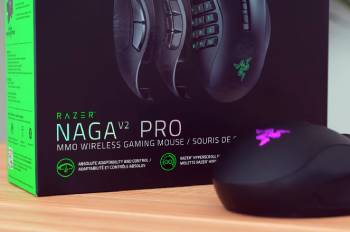
Pros:
- Three Swappable Magnetic Side Plates: The Naga V2 Pro includes 2-button, 6-button, and 12-button side panels that instantly reconfigure the mouse for FPS, MOBA, or MMO games.
- HyperScroll Pro Electronic Customization: The scroll wheel offers customizable resistance, step count, and force curves with six distinct presets controllable via software.
- Gen-3 Optical Switches: Third-generation optical switches actuate at light speed with zero debounce delay, eliminating double-click issues over a 90-million click lifespan.
- Versatile Tri-Mode Connectivity: Supports high-speed 2.4 GHz HyperSpeed wireless, Bluetooth 5.0, and wired USB Type-C operation while playing.
- Wireless Charging Compatibility: Fully supports wireless Qi charging pads and the Razer Mouse Dock Pro via an optional magnetic charging puck.
- Razer Chroma RGB Lighting: Customizable full-spectrum RGB lighting across the logo and side plate buttons provides stylish desk aesthetics.
- Unbeatable AA Battery Longevity: The Naga V2 HyperSpeed delivers up to 250 hours on HyperSpeed wireless and 400 hours on Bluetooth on a single AA battery.
- Integrated Top-Edge Macro Buttons: Two additional easy-to-reach buttons along the left-click border give you quick access to utility functions.
- Lighter Base Shell Weight: The mouse body without a battery weighs only 95 grams, making it feel lighter and easier to lift off the mousepad.
- Incredible Price to Performance Ratio: Retails at roughly half the price of the Pro model while retaining the identical 30K optical sensor.
Cons:
- Significantly Higher Retail Price: The Naga V2 Pro represents a major financial investment, especially if you add the optional wireless charging dock.
- Heavier Total Chassis Mass: At 134 grams, the Pro feels heavy in hand, which can cause minor wrist fatigue during long FPS gaming sessions.
- Lower Overall Battery Stamina: The internal lithium battery requires frequent USB-C recharging compared to the multi-month lifespan of AA batteries.
- Complex Software Dependency: Customizing the electronic scroll wheel and optical profiles requires Razer Synapse running actively on your system.
- No Swappable Side Panels: The Naga V2 HyperSpeed features a permanently fixed 12-button layout, making it less comfortable for low-button FPS titles.
- No Built-In RGB Illumination: The complete lack of RGB lighting might disappoint users who enjoy synchronized lighting effects on their desk.
- No Rechargeable USB Cable Port: The HyperSpeed cannot be plugged in or used over a wired USB cable, relying entirely on AA batteries for power.
- Gen-2 Mechanical Switches: Uses traditional mechanical switches that lack the light-speed optical actuation and immunity to wear found on the Pro.
Also Read: My Experience With Razer Huntsman Mini
Razer Naga V2 Pro Vs. Other Brands
- Razer Naga V2 Pro Vs. Razer Naga Trinity
Comparing the wireless Naga V2 Pro to the classic wired Razer Naga Trinity demonstrates a massive leap in mouse technology.
The Naga Trinity was a pioneer in swappable side plates, but it relied on an older 16,000 DPI 5G optical sensor and a stiff braided cable.
The Naga V2 Pro removes the cable entirely, offering lag-free 2.4 GHz HyperSpeed wireless and Bluetooth connectivity.
The V2 Pro features the updated Focus Pro 30K sensor, 3rd-gen optical switches, and the customizable HyperScroll Pro wheel.
The magnetic plate attachment system on the V2 Pro is much more secure, virtually eliminating side button disconnects common on older Trinity units.
If you are upgrading from a wired Naga Trinity, the Naga V2 Pro feels like a massive modern evolution across every performance metric.
- Razer Naga V2 HyperSpeed Vs. Razer Naga X
The Razer Naga V2 HyperSpeed and the Razer Naga X represent two value-focused entries in Razer’s MMO lineup.
The Razer Naga X is an ultra-lightweight wired MMO mouse weighing just 85 grams, featuring a fixed 12-button side panel and 2nd-gen optical switches.
The Naga V2 HyperSpeed drops the wire entirely, adding dual-mode wireless connectivity, a multi-mode scroll wheel, and two top-edge index finger buttons.
While the Naga X is lighter and cheaper, the Naga V2 HyperSpeed offers superior sensor precision with the Focus Pro 30K sensor compared to the 18K sensor on the Naga X.
The HyperSpeed also provides much greater desk freedom and multi-device Bluetooth switching that wired Naga X users miss out on.
If you demand low weight above all else, the Naga X wins, but for wireless freedom and macro power, the Naga V2 HyperSpeed is superior.
- Razer Naga V2 Pro Vs. Logitech G600
Comparing the Razer Naga V2 Pro to the legendary Logitech G600 showcases a clash between modern premium tech and classic budget design.
The Logitech G600 remains a favorite for its third top-click button (G-Shift) and low price, but it relies on an outdated laser sensor and a heavy braided wire.
The Naga V2 Pro outclasses the aging G600 in tracking accuracy, wireless freedom, switch durability, and scroll wheel functionality.
The swappable side plates on the V2 Pro give it a level of genre versatility that the fixed, bulky shell of the G600 cannot match.
While the G600 holds nostalgic appeal for classic MMO gamers, the Naga V2 Pro represents the absolute pinnacle of modern wireless MMO mouse design.
Also Read: Comparison Of Razer Naga V2 Hyperspeed Vs. Pro
Frequently Asked Questions (FAQs)
The Naga V2 Pro features three swappable side plates, optical switches, an electronic customizable scroll wheel, RGB lighting, an internal rechargeable battery, and wireless charging support. The Naga V2 HyperSpeed features a fixed 12-button side panel, mechanical switches, a manual dual-mode scroll wheel, no RGB, and runs on a single AA battery.
Razer Pro models represent flagship tier mice with maximum features, swappable parts, optical switches, internal rechargeable batteries, and RGB illumination. HyperSpeed models focus on extreme battery endurance, fixed button layouts, mechanical switches, AA battery power, and high value without RGB extras.
The Naga V2 HyperSpeed is wireless with a fixed 12-button side plate, Focus Pro 30K sensor, and AA battery power. The Naga Trinity is a legacy wired mouse with three swappable side plates and an older 16,000 DPI sensor.
Yes, the Razer Naga V2 Pro is widely considered one of the best wireless MMO and multi-genre gaming mice available, offering top-tier tracking, swappable side plates, optical switches, and a highly customizable scroll wheel.
Final Thoughts
I hope this detailed breakdown helps you decide whether you should buy the ultra-versatile Razer Naga V2 Pro or save money with the dedicated Razer Naga V2 HyperSpeed for your gaming setup.
