
Choosing the right multi-button tool for your desktop setup comes down to a choice between premium modular features and streamlined, long-lasting performance.
I want to help you figure out exactly whether the fully modular Razer Naga V2 Pro or the simplified, battery-powered Razer Naga V2 HyperSpeed deserves a spot on your mouse pad by looking at real-world comfort, battery life, and button mechanics.
Comparison Of Razer Naga V2 Hyperspeed Vs. Pro
| Feature | Razer Naga V2 HyperSpeed | Razer Naga V2 Pro |
| Retail Price Category | Budget-Friendly / Mid-Range | Premium Enthusiast |
| Side Panel System | Fixed 12-Button Grid Layout | 3 Swappable Plates (2, 6, 12 Buttons) |
| Total Remappable Buttons | Up to 19 Buttons | Up to 22 Buttons |
| Primary Mouse Switches | Razer Gen-2 Mechanical (60M Clicks) | Razer Gen-3 Optical (90M Clicks) |
| Scroll Wheel Engineering | Mechanical HyperScroll (Free-Spin / Tactile) | Haptic HyperScroll Pro (Electronic Tension) |
| Power Source System | 1x AA Alkaline or NiMH Battery | Internal Rechargeable Lithium Battery |
| Wireless Protocols | HyperSpeed 2.4 GHz & Bluetooth | HyperSpeed 2.4 GHz, Bluetooth & Wired |
| Maximum Battery Life | Up to 400 Hours via Bluetooth | Up to 300 Hours via Bluetooth |
| Chassis Weight (No Battery) | 95 Grams base weight | 134 Grams fixed operating weight |
| RGB Chroma Illumination | None (Status LED indicator only) | Full Multi-Zone RGB Lighting |
| Charging Dock Support | No charging dock compatibility | Works with Mouse Dock Pro / Qi Puck |
| Profile Storage Capacity | 2 Profiles inside hardware memory | 5 Profiles inside hardware memory |
The Core Performance Foundation
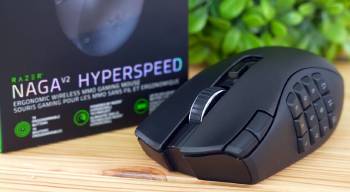
When you look past the external buttons, plates, and flashing lights, you realize that both mice share the same tracking technology.
Razer equipped both options with their premium Focus Pro 30K Optical Sensor, giving you identical tracking precision, lift-off customizability, and surface compatibility.
Whether you are sweeping across a premium cordura desk mat or a glass surface, the cursor tracking feels identical between the two devices.
The physical feeling in your hand is where the similarities end.
The Pro model relies on a dense, reinforced internal framework to support its swappable side plates, which brings its fixed weight to 134 grams.
The HyperSpeed model drops down to 95 grams before you add a power cell.
Depending on whether you use a heavy alkaline AA battery or a lightweight lithium AAA cell with a plastic adapter casing, you can fine-tune the tracking mass of the HyperSpeed to sit between 104 grams and 118 grams.
This creates a distinct difference in handling, as the lighter option minimizes wrist fatigue over long weekend raid sessions.
The heavier option provides a deliberate, stable glide that works well if you prefer a solid feel in your hand.
Side Plate Modularity Against Fixed Execution
The swappable side plate design remains the standout feature of the flagship Pro line.
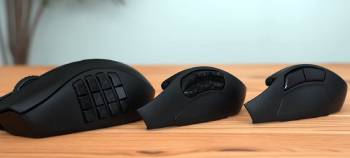
You get three distinct magnetic panels included in the box: a standard 2-button layout for shooters, a 6-button layout for arena battles, and the traditional 12-button grid for massive online role-playing titles.
If you bounce between different game genres throughout the week, you can switch layouts in seconds without unplugging the mouse.
The magnetic pins transfer your customized button configurations quickly, turning a complex layout into a simple shooter mouse instantly.
The design does have a small physical trade-off.
Because the side plate is an independent piece of plastic held by magnets, you might notice a tiny bit of flex or a slight seam along the edge when pressing hard during intense moments.
The HyperSpeed skips the modular parts entirely and features a solid, unibody shell with a permanently integrated 12-button thumb grid.
If you only buy this style of mouse for hotkeys and complex macros, you probably do not need the extra 2-button or 6-button panels anyway.
The permanent grid construction feels solid, stiff, and offers uniform shell rigidity without any creaking parts under your thumb.
Razer also added two small utility buttons directly to the left edge of the main click button on the HyperSpeed model.
These extra buttons let you adjust profiles or trigger extra keys without taking your thumb off your primary grid layout.
Mechanical Clicks Verses Optical Actuation
The type of switches used beneath the main mouse buttons introduces a noticeable difference in click feel and durability.
The premium Pro version uses Razer Gen-3 Optical Mouse Switches, which use an infrared light beam to log each click.
This design removes the physical metal contacts, eliminating the risk of accidental double-clicking caused by worn metal parts over time.
The click sound is deep and slightly muted, with a crisp feel that reacts well to quick, fast inputs.
The HyperSpeed model uses Gen-2 Mechanical Mouse Switches, which rely on physical gold-plated contact points.
These mechanical switches deliver a sharper, higher-pitched sound and a more distinct tactile click that many users prefer for clear feedback.
While mechanical switches are technically more prone to wear over long periods than optical switches, these updated gold-plated contacts are rated for 60 million clicks.
The physical side buttons on the thumb grid also feel slightly different on each model.
The buttons on the Pro version are firmer, with a distinct snap that helps prevent accidental presses when lifting the heavy mouse.
The HyperSpeed side buttons feel a bit softer, making them easier to press quickly during long gameplay sessions.
Scroll Wheel Engineering Dynamics
The scroll wheel design shows a clear split in engineering styles between these two models.
The Pro model features the HyperScroll Pro wheel, an advanced electronic system that uses internal magnets to adjust the scroll tension.
Using the Synapse software, you can change the wheel’s resistance, adjust the number of steps in a full turn, or create custom scroll profiles for individual games.
It can even switch automatically from a tactile notch feel to smooth, free-spinning scrolling when you flick the wheel quickly.
The mechanical parts inside the wheel can sometimes feel a bit loose or inconsistent if the mouse goes into a power-saving sleep mode during wireless use.
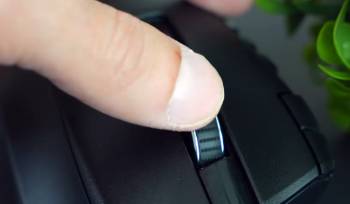
The HyperSpeed uses a traditional mechanical dual-mode scroll wheel.
You shift between a distinct tactile mode and a free-spinning mode by pressing a physical toggle button right behind the wheel.
The free-spin mode on the HyperSpeed feels loose and spins freely like a ball bearing, which is great for flying through long web pages or repeating scroll actions.
The tactile mode gives you firm, predictable, and audible notches that give you clear feedback when switching weapons or tracking items.
Power Logistics And Cable Management
The way you power these two mice will completely change your daily routine and desk management.
The Pro model uses an internal rechargeable battery system that connects through a standard USB-C cable.
A full charge gives you around 150 hours of wireless use over a 2.4 GHz connection, which drops lower if you turn the RGB lighting up to full brightness.
If the battery runs out mid-game, you can plug in the flexible cable and keep playing while it charges.
It also supports wireless charging docks and magnetic puck accessories, though you have to buy those parts separately.
The HyperSpeed model avoids internal batteries and cables entirely, running instead on a single replaceable AA battery.
To save power and stretch battery life, Razer removed all RGB lighting from this model.
This tradeoff gives you up to 250 hours of battery life on a 2.4 GHz connection, and up to 400 hours when using Bluetooth.
You never have to plug the mouse in or worry about an internal battery wearing out over the years.
When the power runs low, you just swap in a fresh AA battery to instantly reset your power to full.
You do need to keep spare batteries nearby, and you cannot use the mouse in a wired mode if you happen to run out of replacements.
Software Customization And Macro Management
Both options rely on the Razer Synapse software tool to handle button remapping, macro creation, and profile setup.
The way these two devices handle that data inside their own hardware memory is quite different.
The premium Pro version features five onboard memory storage slots.
This lets you save your complete button layouts, macros, and custom haptic scroll configurations directly onto the mouse hardware.
Once saved, you can unplug the mouse and connect it to a work laptop or a tournament computer, and all your custom keys work instantly without installing any software.
The HyperSpeed model features only two onboard memory slots.
This works fine if you only play one or two main titles regularly, but it can be limiting if you manage a large collection of games.
If you switch to a machine that does not have the Razer software installed, you may lose access to your secondary macro layers and custom sensitivity levels until you log back into your account.
Both models include Razer Hypershift technology, which lets you program a modifier key to temporarily open up a second set of commands across all your active buttons.
Also Read: My Thoughts On Razer Huntsman Mini
Maintenance Guidelines for Razer Naga V2 Hyperspeed Vs. Pro
To keep your multi-button hardware performing cleanly over years of heavy use, follow these core care practices:
- Regularly wipe down the thumb grid with a dry microfiber cloth to prevent hand oil buildup from slowing down button clicks.
- Use a wooden toothpick or a soft clean brush to gently clear away dust or debris from the small gaps between the side buttons.
- Clean the pure PTFE glide pads on the bottom of the chassis with a tiny amount of isopropyl alcohol to maintain a smooth sweep.
- For the Pro model, clean the magnetic gold contact pins on both the chassis and the swappable plates to prevent connection issues.
- For the HyperSpeed model, remove the battery if you plan to store the mouse unused for months to prevent battery leaks from damaging the main board.
Pros and Cons Razer Naga V2
Pros:
- Complete Plate Customization: The three modular side plates let you quickly adjust the mouse layout to match different game genres or daily work tasks.
- Electronic Wheel Control: The haptic scroll system allows you to adjust step settings and scroll tension through software to match your preferences.
- Long-Lasting Optical Switches: The Gen-3 optical switches eliminate double-click errors and offer a highly durable design rated for 90 million clicks.
- Expanded Memory Storage: The onboard memory holds five complete user profiles, making it easy to keep your settings when switching between different computers.
Cons:
- Heavy Structural Design: The 134-gram design can feel heavy and tiring during quick tracking movements or long gaming sessions.
- High Premium Price: The high entry cost puts it out of reach if you are looking for a simple, budget-friendly multi-button option.
- Battery Lifespan Limits: The internal battery wears down over years of use and requires frequent charging compared to long-lasting battery models.
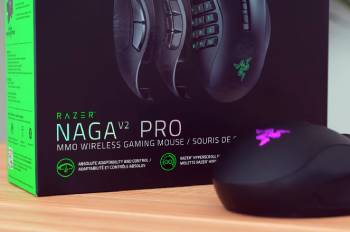
Razer Naga V2 HyperSpeed
Pros:
- Extended Wireless Lifespan: The power-efficient design gives you hundreds of hours of use from a single AA battery without any charging cables.
- Adjustable Chassis Weight: The lighter base design lets you choose between AA or AAA batteries to adjust the total weight to your preference.
- Clean Solid Build: The fixed side panel design offers a solid grip with zero flexing parts or moving panel pieces under pressure.
- Extra Front Inputs: Two extra buttons placed next to the left click give you quick access to keys without moving your thumb.
Cons:
- Mechanical Switch Wear: The mechanical switches can eventually develop double-click issues over years of heavy use compared to optical parts.
- No True Wired Mode: The lack of a USB-C data port means you cannot use the mouse as a wired device if your battery dies.
- Fewer Profiles Saved: The smaller onboard memory holds only two profiles, forcing you to rely on background software for extra layouts.
Also Read: My Thoughts On Razer DeathAdder V3 Pro
Frequently Asked Questions (FAQs)
The V2 Pro model uses internal rechargeable power cells, swappable side plates, optical switches, and a customizable haptic scroll wheel. The HyperSpeed model uses a single replaceable AA battery, a permanent 12-button grid panel, mechanical switches, and a mechanical scroll wheel toggle.
Pro models focus on premium modular additions, multi-zone RGB lighting, wired or wireless charging choices, and optical switch hardware. HyperSpeed models focus on stripping out the lights and modular parts to maximize battery life and lower the total weight.
The base Naga V2 is a traditional wired mouse with a permanent 12-button side panel. The Naga V2 Pro is a wireless model that includes three swappable side button plates and an electronically adjustable scroll wheel system.
The standard V2 version uses mechanical button switches and a traditional physical scroll wheel design. The V2 Pro upgrade uses Gen-3 optical switches, an adjustable magnetic scroll wheel, and expanded onboard storage profiles.
Final Thoughts
Choosing between these two options comes down to analyzing your actual daily setup and gaming routine.
If you want a versatile device that can adjust its physical layout to match different types of games, the Razer Naga V2 Pro offers excellent modular performance.
If you want a reliable, long-lasting multi-button mouse for online games that cuts out the cables and charging docks, the Razer Naga V2 HyperSpeed gives you great performance at a much lower weight and price.
Consider what matters most for your desk, look at your primary layout needs, and pick the tool that fits your natural playstyle.
