I mounted the Garmin DriveSmart 76 and found a bright 7-inch dedicated GPS that makes a strong choice for drivers who want clear navigation without constant phone dependence.
The main intent of this article is to show you why this larger-screen navigator with live traffic voice assist and road-trip tools belongs on your dash for daily driving and longer trips.
You will see how the high-resolution display accurate routing and useful connected features deliver practical results that justify the purchase for frequent travelers.
My Experience Using the Garmin DriveSmart 76
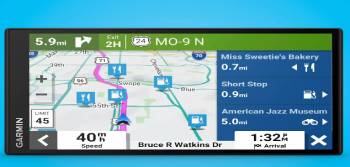
I installed the Garmin DriveSmart 76 using the included mount and completed setup by connecting to Wi-Fi for map updates and pairing my phone with the Garmin Drive app.
The 7-inch high-resolution screen immediately felt more spacious than smaller units I have used and remained readable in bright sunlight and at night.
Address entry and searches for points of interest were quick and the voice-assist function handled spoken destination requests reliably.
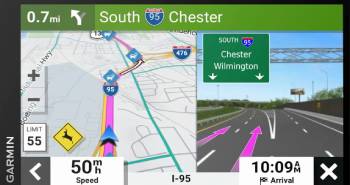
On both highway and city routes the unit delivered clear lane guidance and timely driver alerts for speed changes school zones and sharp curves.
Once paired the live traffic fuel-price and weather information helped me adjust routes and avoid delays.
In areas with little or no cell coverage the preloaded maps continued to function without interruption which remains a core advantage of a dedicated GPS.
Overall the experience confirmed a polished larger-screen navigator that balances modern connected features with dependable offline performance.
Key features such as the 7-inch display Alexa support Wi-Fi updates and road-trip content shaped a device well suited to commuting and extended travel.
My weeks of mixed urban rural and highway driving supplied the concrete observations that follow.
Screen Visibility Routing Accuracy and Daily Driving
Screen visibility routing accuracy and daily driving determine whether a GPS unit reduces stress or simply adds another screen to manage.
The Garmin DriveSmart 76’s 7-inch high-resolution display stayed clear in bright sunlight and at night without frequent brightness adjustments or distracting glare.
I positioned the mount within natural glance range and found map detail turn icons and speed information easy to interpret quickly while keeping eyes on the road.
Routing accuracy proved consistent across city streets highways and secondary roads with realistic arrival times and helpful lane guidance at complex interchanges.
Driver alerts for speed changes school zones and sharp curves appeared early enough to be useful rather than startling.
Daily commuting and errand runs became smoother because the unit handled frequent short trips re-routing and traffic-adjusted paths without hesitation.
Voice prompts remained audible over moderate road and wind noise and could be adjusted without complicated menu diving.
These traits make the DriveSmart 76 a practical everyday tool that supports safer more confident driving rather than competing for attention.
Connected Features Offline Reliability and Road Trips
Connected features offline reliability and road trips shape the longer-distance value of a dedicated navigator.
When paired with a phone and the Garmin Drive app the unit displayed live traffic fuel prices weather and parking information that helped me avoid delays on multiple regional drives.
In areas with weak or no cellular coverage the preloaded maps continued to provide uninterrupted guidance which remains one of the strongest reasons to keep a dedicated GPS.
Road-trip content including Tripadvisor ratings national-park information and HISTORY database points added useful context and occasional stop ideas without requiring extra research while driving.
Alexa Built-in and voice assist allowed hands-free requests for directions or simple information when conditions were safe.
The combination of connected data when available and dependable offline operation made the device equally useful for daily errands and multi-day trips.
Users who travel through rural zones or prefer not to drain phone batteries for navigation gain clear practical benefits from this dual capability.
Value Reliability and Long-Term Ownership
Value reliability and long-term ownership complete the practical assessment of the Garmin DriveSmart 76.
The purchase price sits above basic GPS units and reflects the larger bright screen Wi-Fi updates and modern connected features.
In return you receive a device that continues to navigate when phones lose signal and that can be kept current without a computer.
Reliability for everyday and highway use has been solid when the mount remains secure and software updates are allowed to install.
Long-term ownership benefits from Garmin’s established map-update ecosystem and widespread accessory support.
Owners who treat the unit as a permanent vehicle tool rather than an occasional gadget generally report years of useful service.
When the cost is weighed against reduced phone dependence offline confidence and useful driver alerts the value proposition becomes clear for frequent drivers.
Those who rely exclusively on phone apps and strong cellular coverage may see less advantage.
For drivers who want a larger dedicated always-ready screen with both modern data and offline strength the DriveSmart 76 supports lasting satisfaction.
Maintenance Tips for Best Results
Simple habits keep the Garmin DriveSmart 76 accurate and ready for every drive.
Connect the unit to Wi-Fi on a regular schedule so map and software updates install automatically.
Wipe the screen with a soft microfiber cloth to maintain clarity and reduce fingerprints.
Confirm that the mount stays firmly attached and that the power cable remains undamaged.
Restart the device if the interface ever becomes sluggish or unresponsive.
Avoid leaving the navigator in extreme heat for long periods when the vehicle is parked.
Keep the Garmin Drive app on your phone updated to preserve full compatibility with live features.
These quick steps support reliable routing clear visuals and continued access to traffic and other data.
Even basic attention helps the unit deliver consistent performance across years of daily and long-distance use.
Pros and Cons Of Garmin DriveSmart 76
Pros Of Garmin DriveSmart 76
- Large 7-Inch High-Resolution Display: Easy to read at a glance in varied lighting conditions.
- Reliable Offline Maps: Full navigation continues without cell coverage.
- Wi-Fi Map and Software Updates: Simple wireless updates without a computer.
- Voice Assist and Alexa Built-in: Hands-free destination requests and additional voice control.
- Driver Alerts: Warnings for school zones sharp curves and speed changes improve awareness.
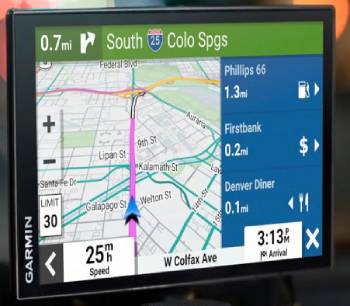
- Live Connected Data: Traffic fuel prices parking weather and traffic cams when paired with a phone.
- Road-Trip Features: Tripadvisor ratings national parks directory and HISTORY points of interest.
- Bluetooth Hands-Free Calling: Supports calls through a compatible smartphone.
- Clear Lane Guidance: Helps with complex interchanges and multi-lane roads.
- Dual USB Charger Included: Extra port for charging phones or other devices.
The Analytical Cons Of Garmin DriveSmart 76
- Phone Pairing Needed for Live Features: Traffic and smart data require a compatible smartphone and app.
- Larger Dash Footprint: The 7-inch screen occupies more space than smaller models.
- Premium Price: Costs more than basic dedicated GPS units and many phone-only solutions.
- Mount Dependence: Stability and viewing angle depend on dashboard surface and mount quality.
- Not a Full Entertainment System: Focuses on navigation rather than extensive media playback.
- Alexa Use Requires Caution: Voice functions should be used only when safe and legal.
- Occasional Software Glitches: Infrequent issues can appear after updates like most electronics.
- Learning the Full Feature Set: New users may need time to explore all menus and options.
- Battery Not for Extended Portable Use: Designed primarily for continuous vehicle power.
- Subscription Considerations: Some advanced connected services may carry limitations or costs.
Also Read: Comparison Of Garmin Edge 840 Vs. 1040
Garmin DriveSmart 76 Vs. Other Brands
- Garmin DriveSmart 76 Vs. Garmin DriveSmart 66
The DriveSmart 66 uses a smaller 6-inch screen in a more compact body.
I compared both and found the 76 offering noticeably more map detail and easier glanceability while the 66 occupied less dash space and often cost less.
Core routing quality and offline capability remain very similar.
The 66 suits drivers who want a smaller footprint.
The larger brighter display gives the 76 the advantage for most users who prioritize visibility.
- Garmin DriveSmart 76 Vs. Garmin DriveSmart 86
The DriveSmart 86 steps up further with additional refinements and in some configurations a still-larger or higher-featured design.
Side-by-side consideration showed the 86 targeting users who want the top of the current range while the 76 delivered most of the same practical benefits at a more accessible price.
Both share strong Garmin navigation and connected features.
The 86 appeals to buyers seeking the maximum feature set.
Everyday performance and value often favor the 76.
- Garmin DriveSmart 76 Vs. Smartphone Navigation Apps
Phone apps such as Google Maps and Waze provide excellent live data and frequent updates.
Direct comparison revealed phones depending entirely on cellular coverage and battery life while the Garmin continued offline and left the phone free for other tasks.
The dedicated 7-inch screen also reduced the need to look at a smaller phone display.
Apps win for pure crowdsourced traffic in strong signal areas.
Offline reliability and a larger always-ready screen make the Garmin valuable for many drivers.
- Garmin DriveSmart 76 Vs. TomTom GPS Units
TomTom remains a main competitor in dedicated automotive navigation.
I found TomTom strong in map presentation and traffic services while Garmin offered broader road-trip content and tighter voice integration on this model.
Both provide capable offline guidance.
TomTom suits users already familiar with its interface.
Garmin’s ecosystem and feature mix frequently feel more complete for North American travel.
- Garmin DriveSmart 76 Vs. Older Dedicated GPS Models
Older Garmin and competing units lack Wi-Fi updates modern voice control and rich connected services.
Side-by-side reality showed the DriveSmart 76 far easier to keep current and more helpful with live information when available.
Legacy devices can still handle basic routing.
The newer display software and feature set make the 76 a clear upgrade for most owners.
Also Read: Comparison Of Garmin Vs. Rand McNally Truck GPS
Frequently Asked Questions (FAQs)
It is a recent-generation model in the DriveSmart series released in the early-to-mid 2020s timeframe.
Some users report occasional software quirks after updates or mount-adhesion issues on certain dash surfaces. Most problems are uncommon with regular care.
The best model depends on preferred screen size and budget. The 76 offers an excellent balance of visibility and features for many drivers.
The 86 generally sits higher in the range with additional refinements while the 76 delivers most practical benefits at a lower price.
Final Thoughts
I used the Garmin DriveSmart 76 and found a clear larger-screen dedicated GPS that makes a practical choice for drivers who want reliable navigation without constant phone use.
The main intent remains showing you the real results on display quality routing and connected features so you can travel with greater confidence.
The bright 7-inch screen offline maps and useful driver alerts deliver everyday benefits that justify the purchase.
You now have the detailed experience to choose the DriveSmart 76 and enjoy smoother better-informed drives.