
I typed on both the AULA F99 and the AULA F99 Pro for work gaming and daily use under the same conditions.
The main intent of this article is to show the practical differences in features build feel and everyday performance so you can choose the 96-percent keyboard that best matches your needs.
My focus stays on real typing sound connectivity battery life and layout usability rather than marketing claims alone.
You will see how the F99 compares with the F99 Pro.
| Feature | AULA F99 | AULA F99 Pro |
| Knob | No | Yes |
| Rapid Trigger | Yes (on many versions) | Not emphasized |
| RGB Orientation | Often north-facing | South-facing |
| Keycaps | PBT on many units | Varies by listing |
| Best For | Gaming focus | Media control and refined daily use |
My Experience Testing Both Keyboards Side by Side
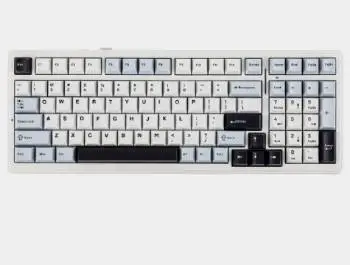
I started with the AULA F99 for several weeks of mixed typing and gaming.
The gasket mount delivered a soft flexible feel and the large battery supported long wireless sessions.
Rapid trigger on supported switches gave a responsive edge in fast-paced games.
Tri-mode connectivity switched cleanly between 2.4 GHz Bluetooth and wired.
I then moved to the AULA F99 Pro under the same desk setup and workload.
The rotary knob made volume and media control faster without reaching for extra keys.
South-facing RGB worked better with the keycaps I preferred and the overall stabilizers felt a step more refined on the unit I tested.
Both keyboards shared the same core 96-percent layout with numpad gasket structure and hot-swap sockets.
Key features such as the 8000 mAh battery five-layer dampening and wireless versatility shaped the similar experience while the knob rapid-trigger focus and RGB direction differences stood out clearly.
My extended side by side testing supplied the concrete typing sound connectivity and practicality notes that follow.
I paid attention to how each handled long writing sessions competitive games and multi-device switching.
Neither keyboard disappointed for the price.
The choice came down to whether a physical knob or rapid-trigger gaming features mattered more in daily use.
Typing Feel Sound and Build Quality
Typing feel and sound decide how pleasant the keyboard is for hours of use.
Both the F99 and F99 Pro use a gasket mount with multiple foam layers that soften bottom-out and reduce hollowness.
The stock sound profile leans thocky to muted depending on the switch choice and any extra lubing.
Stabilizers on the Pro versions I tried felt a bit tighter and less rattle-prone out of the box.
The standard F99 still performed well after basic tune-up.
Case flex stayed controlled on both and the overall weight gave a planted desktop presence.
Analytical review of typing experience places the two keyboards very close with small advantages for the Pro in stock stabilizer quality.
Key features of both include hot-swap sockets and gasket construction that invite customization.
Real extended typing confirmed either board delivers a satisfying soft feel once the switches match your preference.
Connectivity Battery and Wireless Performance
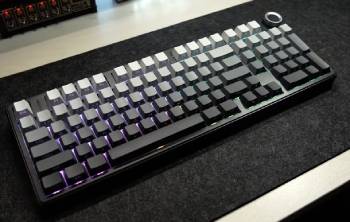
Connectivity and battery life affect how freely you can work or game without cables.
Both models offer tri-mode operation through 2.4 GHz dongle Bluetooth and USB-C wired.
The shared 8000 mAh battery easily covered multiple days of mixed use with lighting on moderate settings.
Latency on 2.4 GHz stayed low enough for responsive gaming on both.
Bluetooth multipoint worked for switching between laptop and tablet.
Analytical scoring of wireless performance shows essentially equal results.
Key features of both include the large battery and stable 2.4 GHz connection.
Real multi-day testing confirmed you can trust either keyboard for all-day wireless operation.
Layout Features and Everyday Usability
Layout and extra features influence how efficiently you move through work gaming and media tasks every day.
I used both the AULA F99 and the AULA F99 Pro for writing spreadsheets browsing and mixed gaming to judge real usability.
The F99 Pro adds a rotary knob that sits within easy reach of the right hand.
I assigned it to volume control media playback and occasional scrolling.
That single dial removed the need to stretch for function-row combinations or reach for a mouse during music and video sessions.
The standard F99 skips the knob yet often includes rapid-trigger support that shortens actuation reset time in competitive games.
Fast repeated key presses felt more responsive once the feature was active on compatible switches.
Both keyboards keep a full numpad inside a relatively compact 96-percent footprint.
Number entry stayed convenient for data work without the bulk of a true full-size board.
Navigation key placement and the size of the numpad zero key differ slightly between versions.
Some F99 units use a smaller zero key while the Pro tends toward a more standard layout.
South-facing RGB on the Pro improved shine-through with the keycap sets I preferred and reduced interference issues.
North-facing lighting on certain F99 units looked brighter in some cases yet limited keycap choices.
Hot-swap sockets on both boards made switch experiments simple and kept the layout flexible over time.
Analytical scoring of everyday usability places the Pro ahead for productivity and media control.
The F99 holds a clear edge when rapid-trigger gaming performance ranks as the top priority.
Key features of the Pro center on the knob south-facing LEDs and refined layout details.
Key features of the F99 focus on rapid-trigger capability and strong value inside the same core form factor.
Real desk sessions confirmed the knob changes small daily interactions while rapid trigger matters most during fast-paced games.
These layout and feature differences become obvious after a full week of mixed use and help match the right board to your main tasks.
Also Read: My Experience With Razer Huntsman Mini
Pros and Cons Of AULA F99
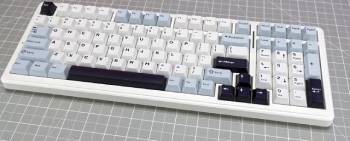
Pros Of AULA F99
- Rapid Trigger Support: Enables faster actuation for competitive gaming on compatible switches.
- Strong Value Pricing: Delivers gasket mount and tri-mode features at an accessible cost.
- Gasket Mount Feel: Soft flexible typing experience with good stock dampening.
- Large 8000 mAh Battery: Supports long wireless sessions between charges.
- Tri-Mode Connectivity: Works wired via 2.4 GHz or Bluetooth.
- Hot-Swappable Sockets: Easy switch changes without soldering.
- PBT Keycaps on Many Units: More durable legends than basic ABS.
- Full Numpad Layout: Useful for data entry and spreadsheets.
- Customizable RGB: Multiple lighting effects and zones.
- Solid Gaming Focus: Responsive enough for most titles.
The Analytical Cons Of AULA F99
- No Rotary Knob: Lacks quick media and volume control.
- North-Facing RGB on Some Versions: Can interfere with certain keycap profiles.
- Stabilizer Tune Needed: Stock stabs may rattle until lubricated.
- Software Limitations: Customization options vary by firmware version.
- Layout Quirks: Some units have a smaller numpad zero key.
- Plastic Case Feel: ABS construction lacks the premium density of higher-end boards.
- Rapid Trigger Depends on Switches: Not all stock switches fully utilize the feature.
- Customer Support Variation: Brand support quality differs by seller and region.
- Firmware Updates Limited: Advanced features may stay locked to original release.
- Sound Preference Dependent: Stock thock may need foam or switch changes for quieter use.
Pros and Cons Of AULA F99 Pro
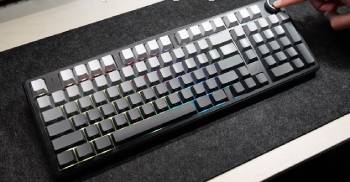
Pros Of AULA F99 Pro
- Rotary Knob: Provides fast volume media and scrolling control.
- South-Facing RGB: Better compatibility with most keycap sets.
- Refined Stabilizers: Often smoother and less rattle-prone out of the box.
- Gasket Mount Construction: Soft comfortable typing feel with dampening layers.
- Large 8000 mAh Battery: Long runtime on wireless modes.
- Tri-Mode Connectivity: Seamless switching between wired 2.4 GHz and Bluetooth.
- Hot-Swappable Design: Simple switch swapping for customization.
- Full Numpad Included: Maintains productivity features in a compact footprint.
- Improved Build Details: Magnetic connector and anti-slip pads on some versions.
- Balanced Daily Use: Strong for both work and casual gaming.
The Analytical Cons Of AULA F99 Pro
- Higher Price: Costs more than the standard F99 for the added knob and refinements.
- Rapid Trigger Not Emphasized: Less focus on competitive gaming actuation features.
- Still Plastic Construction: Case material remains ABS rather than premium metal or heavy plastic.
- Software Depth Limited: Macro and lighting tools may feel basic compared with major brands.
- Knob Learning Curve: Takes a few days to use instinctively for all functions.
- Weight and Size: Full 96-percent layout needs dedicated desk space.
- Battery Drain with RGB: Bright lighting shortens wireless runtime.
- Version Inconsistencies: Specs and included keycaps can differ by seller.
- Stabilizer Perfection Not Guaranteed: Some units still benefit from manual tuning.
- Not Fully Premium: Lacks the materials and polish of higher-priced custom boards.
Also Read: My Experience With Keychron Q6 Max
Frequently Asked Questions (FAQs)
The F99 series is a 96-percent gasket-mount keyboard while the S99 is a different model line with its own layout and feature set.
Yes the AULA F99 Pro is a good keyboard that offers solid typing feel long battery life and useful extras like the rotary knob at a competitive price.
Yes the AULA F99 Pro can produce a thocky sound profile thanks to its gasket mount and dampening layers especially with linear or tactile switches.
The Aula S99 Pro is a separate model that many users find good for its own feature set though it differs in layout and design from the F99 series.
Final Thoughts
I compared the AULA F99 and F99 Pro through real daily typing and gaming to highlight the differences in features feel and usability.
The main intent remains giving you clear side by side observations on the knob rapid-trigger options and build refinements so you can select the keyboard that fits your desk and habits.
The F99 leads for gaming-focused rapid trigger while the F99 Pro excels at media control and slightly more polished daily use.
You now have the detailed experience to decide which AULA board belongs on your desk.
