
I used both the Skylight Calendar and the Echo Show 15 on the wall in my kitchen for family scheduling and daily organization under the same conditions.
The main intent of this article is to show the practical differences in calendar focus smart features distraction level and ease of shared use so you can choose the display that best matches your household needs.
My focus stays on real family coordination daily visibility and long term usefulness rather than marketing claims alone.
You will see how the Skylight Calendar compares with the Echo Show 15.
| Feature | Skylight Calendar | Echo Show 15 |
| Primary Focus | Family calendar and organization | Smart display and entertainment |
| Calendar Interface | Clean dedicated | Widget based |
| Smart Assistant | None | Full Alexa |
| Distraction Level | Low | Higher |
| Best For | Pure scheduling | All-in-one smart home |
My Experience Testing Both Displays Side by Side
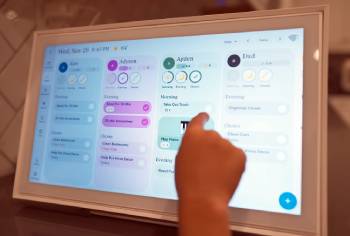
I started with the Skylight Calendar mounted in a central kitchen location.
The large screen showed the full family schedule at a glance with color coded events and shared lists.
Everyone could add or check items quickly without opening a phone.
The interface stayed focused on organization and avoided extra apps or video.
I then switched to the Echo Show 15 in the same spot.
Alexa responded to voice commands and the screen handled calendar widgets plus music video calls and smart home controls.
The extra features proved useful yet also created more visual noise and occasional distractions for the kids.
Both displays synced with Google and Apple calendars without major issues.
Key features such as touch interaction wall mounting options and shared access shaped the similar digital calendar experience while focus level and versatility differences stood out clearly.
My extended side by side use supplied the concrete organization distraction and daily workflow notes that follow.
I paid attention to how each handled morning routines after school updates and weekly planning.
Neither device required constant troubleshooting.
The choice came down to whether I wanted a pure family command center or a multi purpose smart display.
Calendar Interface and Family Organization
Calendar interface and organization tools decide how useful the display feels for shared family life.
The Skylight Calendar presents a clean dedicated view that prioritizes schedules chores and lists.
Color coding and simple taps made it easy for every family member to understand the day at a glance.
The Echo Show 15 offers calendar widgets that work yet sit alongside other content and Alexa results.
I found the Skylight faster for pure planning and less likely to pull attention away from the schedule.
Analytical review of family organization places the Skylight ahead for focused coordination.
The Echo Show remains capable when the household already lives inside the Alexa ecosystem.
Key features of the Skylight include multiple profiles chore tracking and meal related lists.
Key features of the Echo Show include voice addition of events and integration with other Amazon services.
Real daily testing confirmed both keep the family informed with the Skylight reducing friction for schedule focused use.
Smart Features Distraction and Daily Versatility
Smart features and distraction level affect how the display fits into everyday home life.
The Echo Show 15 brings full Alexa control streaming video calls and smart home management to the same screen.
I used it to dim lights play music and check the weather without reaching for another device.
The Skylight Calendar stays narrowly focused on organization and avoids those extra layers.
This lower distraction level helped keep mornings calmer and reduced arguments over screen content.
Analytical scoring of daily versatility places the Echo Show ahead for multi purpose households.
The Skylight wins when the goal is a calm shared calendar that stays on task.
Key features of the Echo Show include Fire TV capabilities and extensive voice skills.
Key features of the Skylight include optional photo displays and simple shared access.
Real multi week testing confirmed the Echo Show feels more like a hub while the Skylight feels more like a dedicated planner.
Setup Display Quality and Long Term Use
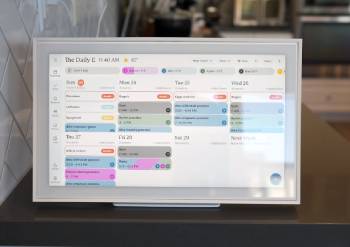
Setup display quality and long term use influence how satisfied the household stays over months.
Both devices mounted cleanly on the wall and connected to Wi-Fi without major problems.
The Skylight screen looked sharp for calendar text and color coded events.
The Echo Show 15 delivered a bright high resolution image that also handled video well.
Touch response felt similar on both with occasional lag during heavier use.
Analytical review of long term ownership shows the Skylight maintains its purpose with fewer feature updates that change the experience.
The Echo Show continues to gain new Alexa abilities yet also introduces more potential complexity.
Key features of both include automatic calendar sync and adjustable brightness.
Real extended use confirmed either device can become a reliable kitchen centerpiece when matched to the right household style.
Pros and Cons Of Skylight Calendar
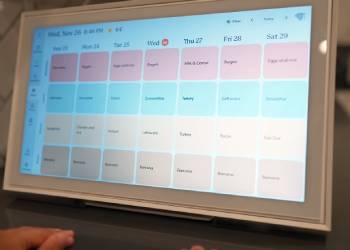
Pros Of Skylight Calendar
- Dedicated Calendar Focus: Keeps the screen centered on schedules chores and family organization.
- Clean Interface: Shows color coded events and lists without extra widgets or ads.
- Low Distraction: Avoids streaming games and open web content that pull attention away.
- Shared Family Access: Makes it easy for every member to view and update the plan.
- Chore and List Tools: Supports household task tracking alongside the calendar.
- Simple Daily Workflow: Reduces the need to open phones for basic schedule checks.
- Wall Mount Ready: Installs cleanly as a permanent kitchen or hallway display.
- Calendar Sync: Works with Google Apple and Outlook calendars.
- Optional Subscription Features: Adds extra tools without forcing them on every user.
- Calm Visual Presence: Feels more like a planner than a full entertainment device.
The Analytical Cons Of Skylight Calendar
- Limited Smart Features: Lacks voice assistant streaming and broad smart home control.
- Higher Starting Price: Costs more than a basic Echo Show 15 for the hardware.
- Optional Subscription Cost: Some advanced tools require an extra annual fee.
- Less Versatile: Cannot replace a smart display for music video or calls.
- Fewer Integration Options: Stays outside the larger Alexa or Google ecosystems.
- Touch Response Variation: Occasional lag appears during heavier interactions.
- Display Purpose Locked: Harder to repurpose for other household needs.
- Learning Curve for Setup: Initial calendar and profile configuration takes time.
- Mounting Hardware Considerations: May need extra attention for perfect wall placement.
- Competition from Multi Purpose Devices: Households wanting one screen for everything may look elsewhere.
Also Read: Comparison Of RV Armor Vs. FlexArmor
Pros and Cons Of Echo Show 15
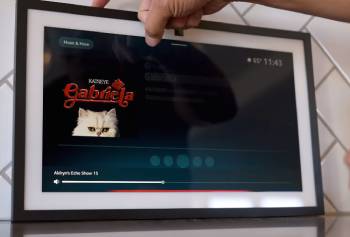
Pros Of Echo Show 15
- Full Alexa Integration: Handles voice commands smart home control and information requests.
- Multi Purpose Display: Combines calendar widgets with streaming video calls and entertainment.
- Strong Ecosystem Fit: Works seamlessly with other Amazon devices and services.
- No Required Subscription for Basics: Core features remain available without extra fees.
- Bright High Resolution Screen: Looks sharp for video and general content.
- Voice Event Addition: Lets users add calendar items hands free.
- Smart Home Hub Potential: Controls lights thermostats and more from one place.
- Regular Feature Updates: Gains new capabilities through Alexa improvements.
- Flexible Placement: Supports wall mounting or optional stand use.
- Competitive Hardware Price: Often costs less than dedicated calendar displays.
The Analytical Cons Of Echo Show 15
- Higher Distraction Level: Streaming and widgets can pull attention away from pure scheduling.
- Calendar Interface Secondary: Organization tools sit among many other functions.
- More Visual Noise: Home screen content changes and feels less focused.
- Privacy Considerations: Always listening microphone and camera require trust in the ecosystem.
- Stand Sold Separately: Extra cost appears if tabletop use is preferred.
- Feature Complexity: More settings and options can overwhelm simple calendar users.
- Ads and Recommendations: Occasional promotional content appears on screen.
- Less Ideal for Kids Focus: Extra entertainment options create more negotiation points.
- Battery Free Design: Requires constant power like most smart displays.
- Calendar Depth Limited: Dedicated tools on Skylight feel more complete for family planning.
Also Read: Comparison Of Dutchmen Kodiak RV Problems
Frequently Asked Questions (FAQs)
Yes an Echo Show can display calendars and lists yet it lacks the same dedicated focus and family organization tools.
The Skylight Calendar is better for pure family scheduling while the Echo Show 15 is better for multi purpose smart home use.
Echo Show is better when you want Alexa streaming and smart home control. Skylight is better when you want a calm focused family calendar.
Other dedicated displays exist yet Skylight remains one of the strongest options for households that prioritize shared scheduling.
Final Thoughts
I compared the Skylight Calendar and Echo Show 15 through real family use to highlight the differences in focus features and daily organization.
The main intent remains giving you clear side by side observations on calendar clarity distraction level and versatility so you can select the display that fits your household.
The Skylight Calendar leads for pure scheduling and low distraction while the Echo Show 15 excels at all-in-one smart home and entertainment functions.
You now have the detailed experience to decide which screen belongs on your wall.
