
I used both the Logitech Signature M550 and the Signature M650 for daily office work browsing and light productivity tasks on the same computers.
The main intent of this article is to show the practical differences in button layout shape comfort and everyday value so you can choose the mouse that best matches your hand and workflow.
My focus stays on real clicking feel scroll performance and daily usability rather than marketing claims alone.
You will see how the M550 compares with the M650.
| Feature | Logitech M550 | Logitech M650 |
| Side Buttons | No | Yes (forward/back) |
| Shape | More neutral / ambidextrous | Right-handed (left version available) |
| Connectivity | Logi Bolt + Bluetooth | Logi Bolt + Bluetooth |
| Battery | Multi-year AA | Multi-year AA |
| Best For | Simple quiet use | Productivity with side buttons |
My Experience Testing Both Mice Side by Side
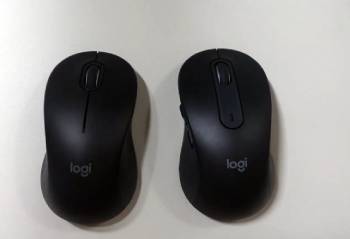
I started with the Logitech Signature M550 for several weeks of everyday work.
The quiet clicks felt pleasant in shared spaces and the SmartWheel handled both precise line scrolling and faster flicks.
The shape worked for either hand and battery life stretched across months without concern.
I then switched to the Signature M650 under the same tasks.
The added side buttons made browser navigation and document movement faster.
The right-handed contour fit my palm more naturally during longer sessions.
Both mice connected cleanly through Logi Bolt or Bluetooth and tracked accurately on common desk surfaces.
Key features such as silent buttons SmartWheel scrolling and dual wireless options shaped the similar quiet productivity experience while button count and ergonomic shaping differences stood out clearly.
My extended side by side testing supplied the concrete comfort navigation and value notes that follow.
I paid attention to how each handled long document work web browsing and multi-app switching.
Neither mouse caused fatigue or connection drops under normal office use.
The choice came down to whether you need side buttons and a contoured grip or prefer a simpler lower-cost neutral shape.
Shape Comfort and Hand Fit
Shape and comfort decide how natural the mouse feels during long workdays and whether your hand stays relaxed or needs frequent adjustment.
I used both the Logitech Signature M550 and the Signature M650 for extended office sessions browsing and document work to judge real hand fit.
The M550 follows a more neutral ambidextrous design.
The sides stay relatively symmetrical so either hand can use it without immediate discomfort.
It felt light and easy to lift or reposition yet offered less structured palm support.
Larger hands sometimes searched for a more filled-in grip during longer stretches.
The M650 adopts a clearer right-handed contour.
A gentle rise on the right side and a more sculpted shape filled my palm more completely.
The thumb found a natural resting place and the overall posture felt more secure during multi-hour use.
A left-handed large version exists for users who need the side buttons mirrored.
Analytical review of comfort places the M650 ahead for dedicated right-hand productivity and the M550 ahead for shared desks or either-hand flexibility.
Key features of the M550 include the neutral shape lighter feel and open usability.
Key features of the M650 focus on contoured palm support size options and a more locked-in right-hand grip.
Real multi-hour sessions confirmed both mice avoid hot spots and sharp edges.
The M650 simply required fewer micro-adjustments once my hand settled into the shape.
These ergonomic differences become obvious after a full workday and help match the right mouse to your hand size grip style and whether you share the device or keep it personal.
Also Read: Comparison Of Razer Naga V2 Pro Vs. Hyperspeed
Buttons Scrolling and Productivity Features
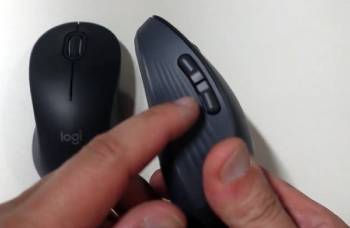
Buttons and scrolling affect daily speed.
The M650 includes forward and back side buttons that made web navigation and document jumping noticeably faster.
The M550 keeps a simpler three-button layout without side controls.
Both share the same SmartWheel that switches between precise ratchet scrolling and free-spin mode depending on speed.
Silent Touch buttons on both stayed quiet enough for open offices.
Analytical scoring of productivity places the M650 clearly ahead when side buttons matter.
Key features of the M650 include the extra side buttons and quiet clicks.
Key features of the M550 focus on simplified controls and the same quiet SmartWheel.
Real workflow testing confirmed the side buttons save time once muscle memory develops.
Connectivity Battery and Everyday Practicality
Connectivity and battery life influence how reliable the mouse feels day after day and how often you need to think about power or switching devices.
I used both the Logitech Signature M550 and the Signature M650 across multiple computers and work sessions to judge real wireless performance and long-term convenience.
Both mice support Logi Bolt USB receivers and Bluetooth with straightforward pairing.
I could move between a work laptop and a home desktop without noticeable lag or dropouts on either model.
The Logi Bolt connection stayed especially stable in busier wireless environments.
Battery life proved excellent on both.
A single AA cell lasted well over a year of typical office and home use so battery changes stayed rare.
The M550 often carries a lower purchase price which makes it attractive for simple quiet setups or multi-mouse households.
The M650 adds side buttons and a more contoured shape for only a modest step up in cost.
That extra outlay quickly feels justified once the forward and back buttons become part of daily navigation.
Analytical review of practicality places the M550 ahead for pure value and either-hand flexibility.
The M650 leads when productivity features and right-hand comfort matter more than the lowest price.
Key features of both include dual wireless options multi-year battery life and silent operation that works in shared spaces.
Key features of the M550 focus on simplicity and lower cost.
Key features of the M650 focus on the added side buttons and improved palm support.
Real ownership confirmed either mouse stays reliable for everyday work with minimal maintenance.
The better long-term choice depends on whether you want the most affordable quiet wireless mouse or the version that speeds up browser and document tasks with dedicated side controls.
These connectivity battery and practicality differences become clear after a few weeks of mixed use and help match the right mouse to your budget and daily workflow.
Pros and Cons Of Logitech M550
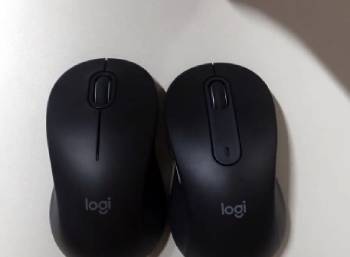
Pros Of Logitech M550
- Lower Price: Delivers quiet wireless performance at the more affordable cost.
- Neutral Shape: Works comfortably for either hand.
- Silent Clicks: Quiet enough for shared offices and late-night work.
- SmartWheel Scrolling: Switches between precise and fast scrolling automatically.
- Long Battery Life: Multi-year runtime on a single AA battery.
- Dual Connectivity: Logi Bolt receiver and Bluetooth both supported.
- Lightweight Feel: Easy to move and reposition.
- Simple Layout: No extra buttons to learn or mis-click.
- Multiple Colors: Matches different desk setups.
- Reliable Tracking: Accurate on common desk surfaces.
The Analytical Cons Of Logitech M550
- No Side Buttons: Lacks forward and back controls for faster navigation.
- Less Contoured Support: Neutral shape offers less palm fill for larger hands.
- Basic Feature Set: Fewer productivity extras than the M650.
- Ambidextrous Trade-Off: Shape compromises pure right-hand ergonomics.
- Limited Customization: Fewer programmable options without extra software depth.
- Plastic Build: Functional rather than premium materials.
- No DPI Button on Most Versions: Sensor adjustment stays software-based.
- Entry-Level Positioning: Feels simpler next to higher Signature models.
- Size Options Focused: Less specialized left-hand support.
- Upgrade Path Obvious: Users often move to side-button models later.
Pros and Cons Of Logitech M650
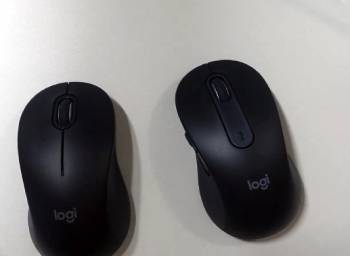
Pros Of Logitech M650
- Side Buttons: Forward and back controls speed up browser and document work.
- Contoured Right-Hand Shape: Fills the palm more naturally for longer sessions.
- Silent Clicks: Quiet operation suits open offices.
- SmartWheel Scrolling: Same precise-to-fast scroll behavior as the M550.
- Long Battery Life: Multi-year AA runtime with typical use.
- Dual Connectivity: Logi Bolt and Bluetooth switching stays simple.
- Size Options: Standard and large versions plus left-hand large model.
- Comfortable Grip: Reduced need to adjust hand position.
- Productivity Focus: Designed for everyday office and home workflows.
- Reliable Tracking: Accurate sensor performance on desks and mouse pads.
The Analytical Cons Of Logitech M650
- Higher Price: Costs more than the simpler M550.
- Right-Hand Bias: Standard versions favor right-handed users.
- Left-Hand Limited: Left-handed option exists only in large size.
- Still Basic Sensor: Not aimed at high-performance or gaming use.
- Plastic Construction: Durable yet not premium to the touch.
- Software Dependence for Full Setup: Logi Options+ unlocks extra customization.
- Side Buttons Take Learning: Muscle memory needs a few days.
- No Rechargeable Battery: Relies on replaceable AA cells.
- Modest Feature Jump: Gains are real yet incremental over the M550.
- Bulkier in Large Size: Bigger version may feel large for smaller hands.
Also Read: Comparison Of Logitech MX Master 3 Vs. 3S
Frequently Asked Questions (FAQs)
Yes the Logitech Signature M550 is good for quiet reliable wireless use especially when you want a simple neutral mouse at a lower price.
Yes the M650 is worth it when you value side buttons and a more contoured right-hand shape for daily productivity.
The M650 L offers modern silent clicks dual wireless and a large contoured shape that many office users prefer over the older M510.
Yes the Logitech Signature M550 is fully wireless with both Logi Bolt receiver and Bluetooth connections.
Final Thoughts
I compared the Logitech M550 and M650 through real daily work to highlight the differences in shape buttons and value.
The main intent remains giving you clear side by side observations on comfort navigation features and everyday usability so you can select the mouse that fits your hand and workflow.
The M550 leads for lowest cost and either-hand flexibility while the M650 excels at side-button productivity and contoured comfort.
You now have the detailed experience to decide which mouse belongs on your desk.
