
I used both the Logitech K380 and the Logitech K480 across laptops tablets and phones for daily typing and multi-device switching.
The main intent of this article is to show the practical differences in size typing feel portability and device cradle features so you can choose the wireless keyboard that best matches your setup.
My focus stays on real typing comfort battery life and everyday multi-device use rather than marketing claims alone.
You will see how the K380 compares with the K480.
| Feature | Logitech K380 | Logitech K480 |
| Size | Compact and light | Larger with cradle |
| Switches | Scissor | Rubber dome |
| Device Cradle | No | Yes |
| Weight | Lighter | Heavier |
| Best For | Portability and typing | Desk use with media |
My Experience Testing Both Keyboards Side by Side
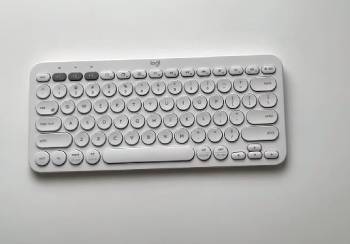
I started with the Logitech K380 for several weeks of laptop and tablet work.
The compact size fit easily in a bag and the scissor keys felt responsive for longer typing sessions.
Switching between three paired devices worked smoothly with the Easy-Switch buttons.
I then moved to the Logitech K480 on the same devices.
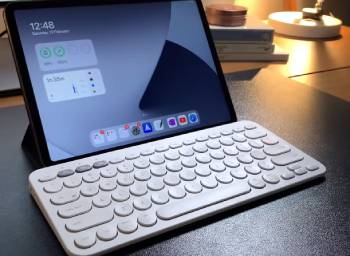
The built-in cradle held my phone or small tablet at a convenient angle which proved useful for reference while typing.
The larger footprint took more desk space and the rubber dome keys felt different under the fingers.
Both keyboards connected reliably over Bluetooth and delivered long battery life on AAA cells.
Key features such as multi-device pairing quiet operation and cross-platform support shaped the similar wireless experience while size typing feel and the cradle difference stood out clearly.
My extended side by side use supplied the concrete comfort portability and daily workflow notes that follow.
I paid attention to how each handled extended writing device switching and travel.
Neither keyboard required frequent re-pairing.
The choice came down to whether I valued the smaller portable form or preferred the integrated media stand.
Size Portability and Build
Size and portability decide how easily the keyboard moves with you.
The K380 is significantly smaller and lighter.
It slipped into a backpack or laptop sleeve without adding bulk and felt easy to carry for coffee shop or travel use.
The K480 is larger and heavier because of the integrated cradle design.
It stays more practical as a desk keyboard that occasionally moves between rooms.
Build quality on both feels solid for the price with stable frames and consistent keycaps.
Analytical review of portability places the K380 clearly ahead for mobile use.
The K480 wins when the keyboard mostly stays on a desk and the cradle adds value.
Key features of the K380 include the compact footprint and lighter weight.
Key features of the K480 focus on the integrated stand and broader base.
Real travel and desk testing confirmed the K380 travels better while the K480 anchors a workstation more effectively.
Typing Feel Keys and Comfort
Typing feel influences how comfortable the keyboard remains during longer sessions and how quickly you can work without fatigue.
I typed extensively on both the Logitech K380 and the Logitech K480 with the same laptops and tablets to judge the difference.
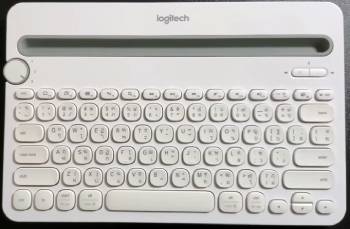
The K380 uses scissor switches that provide shorter travel and a more precise response.
Each keystroke felt cleaner and more immediate which helped during longer writing sessions and faster typing.
The low-profile design kept my hands in a natural position and reduced the effort needed to press each key.
I noticed less finger fatigue after multi-hour work blocks compared with softer domes.
The K480 relies on rubber dome switches that feel softer and a bit mushier by comparison.
The keys bottom out with a quieter cushioned sensation that some users prefer for light typing.
Key spacing on the K480 is slightly more generous which can benefit people with larger hands.
However the overall feedback felt less accurate when I needed to type quickly or for extended periods.
Analytical scoring of typing comfort places the K380 ahead for most users who type regularly.
The K480 remains acceptable for lighter or occasional use where a softer feel is welcome.
Key features of the K380 include low-profile scissor mechanisms and responsive actuation.
Key features of the K480 include quiet rubber dome keys and a slightly roomier layout.
Real multi-hour typing tests confirmed the K380 reduced fatigue and improved accuracy over long sessions.
I also paid attention to noise levels in shared spaces.
Both keyboards stayed quiet enough for offices or quiet homes yet the scissor switches on the K380 gave clearer tactile confirmation without added volume.
These comfort differences became obvious within the first day and remained consistent across weeks of daily use.
Multi-Device Switching Cradle and Daily Features
Multi-device features and the cradle affect daily workflow.
Both keyboards support Easy-Switch pairing with up to three devices.
The K380 uses dedicated function buttons for quick changes.
The K480 uses a dial on the side which some users prefer for tactile switching.
The standout feature on the K480 is the built-in cradle that holds a phone or tablet at a viewing angle.
I used it for video calls recipes and reference material while typing.
The K380 lacks this stand and requires a separate holder if you want the same setup.
Analytical review of daily features places the K480 ahead when the cradle is useful.
The K380 stays simpler and more portable without the extra structure.
Key features of both include long AAA battery life and broad OS compatibility.
Real multi-device testing confirmed either keyboard switches cleanly with the cradle giving the K480 a practical edge for media use.
Pros and Cons Of Logitech K380
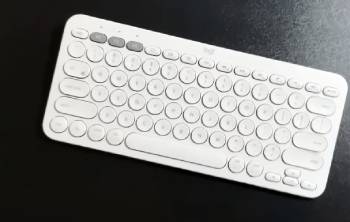
Pros Of Logitech K380
- Compact and Lightweight: Easy to carry in bags and use on the go.
- Scissor Key Switches: Deliver more precise and responsive typing feel.
- Strong Portability: Fits well for travel and multi-location work.
- Easy-Switch Buttons: Allow fast changes between three paired devices.
- Multiple Color Options: Available in a wider range of finishes.
- Quiet Operation: Suitable for shared spaces and quiet environments.
- Long Battery Life: Runs for extended periods on two AAA batteries.
- Cross-Platform Support: Works with Windows Mac iOS Android and more.
- Stable Wireless Connection: Maintains reliable Bluetooth links.
- Comfortable for Longer Typing: Reduces fatigue during writing sessions.
The Analytical Cons Of Logitech K380
- No Device Cradle: Requires a separate stand for phone or tablet viewing.
- Smaller Key Spacing: May feel cramped for users with larger hands.
- Limited Multimedia Layout: Fewer dedicated media controls than some models.
- Not Ideal for Heavy Gaming: Lacks the response and features of gaming keyboards.
- Plastic Build: Feels functional rather than premium.
- No Backlighting: Harder to use in very dark environments.
- Battery Compartment Access: Requires occasional replacement of AAA cells.
- Fixed Layout: No numeric keypad or advanced macro support.
- Competition from Newer Models: Later Logitech keyboards offer refinements.
- Travel Case Sold Separately: Benefits from extra protection during transport.
Also Read: Comparison Of Logitech Z623 vs Logitech Z625
Pros and Cons Of Logitech K480
Pros Of Logitech K480
- Integrated Device Cradle: Holds a phone or tablet at a convenient viewing angle.
- Stable Desk Presence: Larger base feels secure during regular use.
- Easy-Switch Dial: Provides tactile control for changing devices.
- Quiet Rubber Dome Keys: Soft and suitable for shared or quiet spaces.
- Long Battery Life: Delivers extended use on two AAA batteries.
- Cross-Platform Compatibility: Supports major operating systems.
- Reliable Bluetooth Connection: Pairs and stays connected consistently.
- Practical Media Setup: Combines keyboard and device stand in one unit.
- Simple Design: Easy to understand and operate.
- Good Value for Cradle Feature: Adds functionality without needing accessories.
The Analytical Cons Of Logitech K480
- Larger and Heavier: Less convenient for frequent travel or bag carry.
- Rubber Dome Feel: Less precise and more mushy than scissor switches.
- Fewer Color Options: Available in a more limited range of finishes.
- Takes More Desk Space: Requires a larger clear area.
- Not Highly Portable: Best suited to semi-permanent desk use.
- No Backlighting: Difficult in low-light conditions.
- Basic Typing Experience: Falls short for users who type extensively.
- Plastic Construction: Functional but not premium to the touch.
- Cradle Size Limits: Fits phones and small tablets better than larger devices.
- Older Design: Faces competition from newer multi-device keyboards.
Also Read: Comparison Of Logitech MX Master 3 Vs. 3S
Frequently Asked Questions (FAQs)
Yes the Logitech K480 is good for users who want a wireless keyboard with a built-in phone or tablet cradle.
The K380s is a newer updated version of the K380 with refinements in design and features while retaining the compact multi-device approach.
Yes the Logitech K380 is a good compact wireless keyboard especially for portable typing and multi-device use.
No the Logitech K380 is not ideal for gaming because it lacks the speed features and durability of dedicated gaming keyboards.
Final Thoughts
I compared the Logitech K380 and K480 through real daily typing and multi-device use to highlight the differences in size feel and features.
The main intent remains giving you clear side by side observations on portability typing comfort and the device cradle so you can select the keyboard that fits your workflow.
The K380 leads for compact size and better typing feel while the K480 excels when you want an integrated stand for phone or tablet use.
You now have the detailed experience to decide which Logitech keyboard belongs on your desk or in your bag.
