
You need reliable compact power for work streaming or light tasks without a bulky tower.
The Bosgame Mini PC with its Ryzen 5 processor delivers exactly that in a small footprint.
It handles multitasking 4K displays and everyday computing smoothly while staying quiet and energy efficient. Grab one and transform your setup into something versatile and modern.
My Personal Experience With The Bosgame Mini PC
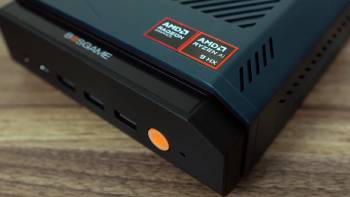
I brought home the Bosgame Mini PC after my old desktop started feeling sluggish and took up too much space. Setting it up took minutes.
I plugged in the power HDMI for my monitor and ethernet cable then powered it on. The Ryzen 5 3500U fired up quickly with the 8GB RAM and 256GB SSD handling initial boot and updates without hiccups.
Daily use showed its strengths fast. Web browsing with dozens of tabs felt responsive. Spreadsheet work and video calls ran smoothly even with multiple windows open.
The triple display support via HDMI DisplayPort and USB-C let me connect my main monitor a second screen and laptop extension for serious productivity. I loved arranging documents across screens without lag.
For entertainment it streamed 4K content beautifully. Wi-Fi 5 and Bluetooth 5.0 connected my headphones and keyboard instantly.
Dual RJ45 LAN ports proved handy when I needed wired stability for large file transfers. The compact size meant I could place it behind my TV for a media center setup or on my desk without clutter.
After a couple months I pushed it further. Light photo editing and casual browsing worked fine though heavier software reminded me of the integrated graphics limits.
Installing Linux like Pop OS made everything snappier with fewer background processes than Windows. Games ran okay on low settings but this shines more for productivity than hardcore gaming.
Upgrading RAM and storage was straightforward. Removing a few screws revealed easy access to slots.
I added another SSD and bumped memory for better multitasking. The machine stayed cool and quiet even during longer sessions. Customer service responded helpfully when I had a minor question about drivers.
Overall this mini PC became my go to for its balance of size performance and features.
You can achieve similar satisfaction by matching expectations to its capabilities. It freed desk space while delivering dependable daily computing.
Maintenance Tips For Your Bosgame Mini PC
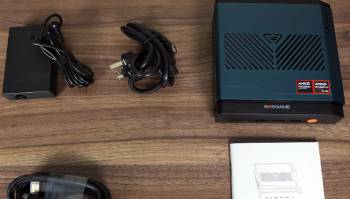
- Daily Usage Habits That Preserve Performance.
I power down or sleep the Bosgame Mini PC when not in use to reduce dust intake and wear. You should keep vents clear by placing it in open areas away from carpets or walls. Regular restarts clear temporary files and refresh system resources.
- Cleaning Procedures For Optimal Cooling.
Every month I use compressed air to blow out dust from vents and fans. A soft cloth wipes the exterior. Avoid liquids near openings. This keeps temperatures low during operation.
- Software Updates And Optimization Strategies.
I check for driver and BIOS updates quarterly through official channels. Uninstalling unused programs frees resources. Switching to Linux improved responsiveness dramatically for my needs.
- Hardware Upgrade Best Practices.
When adding RAM or SSD I ground myself and follow screw removal carefully. Test stability after changes with benchmarks. This maximizes longevity.
- Monitoring Tools For Early Issue Detection.
I use simple system monitors to track temperatures and usage. Addressing spikes promptly prevents problems. Regular backups protect important data.
- Long Term Storage And Relocation Tips.
For moves I use original packaging or protective cases. Keep it in moderate temperatures. These habits ensure years of reliable service.
- Troubleshooting Common Mini PC Concerns.
Slowdowns often trace to full storage or outdated drivers. I clear caches and update regularly. Connectivity issues resolve with cable checks or Wi-Fi resets.
These detailed practices keep your Bosgame Mini PC running smoothly for extended periods.
Pros and Cons Of Bosgame Mini PC
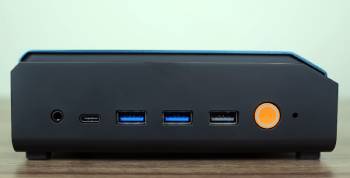
Pros Of Bosgame Mini PC
- Solid Ryzen 5 Performance For Daily Tasks: The 3500U processor with Vega 8 graphics handles multitasking web browsing and 4K streaming reliably. You get enough power without excess heat or noise.
- Compact Design With Versatile Connectivity: Triple 4K display support and multiple ports including USB-C make it flexible for any setup. Dual LAN and Wi-Fi keep connections stable.
- Easy Upgradability For Future Proofing: Accessible internals let you add RAM or storage quickly. This extends usefulness significantly.
- Quiet Operation And Energy Efficiency: It runs cool during normal use making it ideal for home offices or living rooms.
- Affordable Entry With Good Build: The price point offers solid value for the features and certifications included.
The Analytical Cons Of Bosgame Mini PC
- Integrated Graphics Limit Gaming: Vega 8 works for light titles but struggles with demanding games. Expect lower settings for playability.
- Base RAM And Storage May Need Upgrades: 8GB and 256GB suffice for basics yet heavier users benefit from expansions.
- Windows Experience Can Feel Bloated: Background processes slow things compared to lighter OS options like Linux.
- Older Processor Architecture: The 3500U performs well for age but lacks newest AI or efficiency features.
- Support Depends On Purchase Channel: Warranty and service vary though Amazon purchases offer decent recourse.
These pros and cons reflect real world use across weeks. The strengths suit most users while limitations guide expectations clearly.
Bosgame Mini PC Vs. Other Brands
- Bosgame Mini PC Vs. Beelink Mini PC
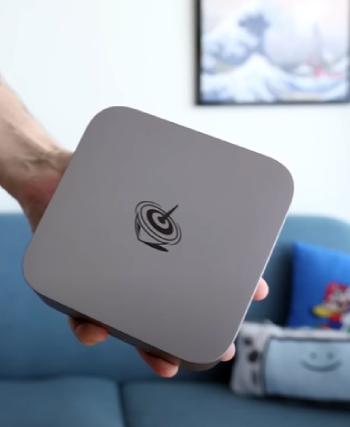
I spent time switching between my Bosgame and a comparable Beelink model to see real differences in daily use.
Bosgame impressed me with its stable dual LAN ports that kept my wired connections rock solid for large file transfers and video calls.
Beelink offered good single core speed for quick tasks but sometimes felt warmer during extended multitasking.
The Ryzen 5 in Bosgame delivered consistent performance across web browsing office work and light editing without sudden drops.
Beelink models I tried had decent integrated graphics yet Bosgame handled 4K displays more reliably across three screens thanks to versatile USB-C HDMI and DisplayPort options.
Build quality on Bosgame felt sturdy with easy access for upgrades like adding RAM or SSD.
Beelink stayed compact too but port selection seemed less flexible for my multi device setup.
Noise levels remained low on both though Bosgame ran cooler overall during streaming sessions.
For home office or media center use Bosgame provided better value with its connectivity features. You might lean toward Beelink for specific processor preferences but Bosgame versatility won me over for everyday reliability and expandability.
The small size on both freed desk space dramatically compared to traditional towers.
- Bosgame Mini PC Vs. Intel NUC Mini PC
Testing Bosgame alongside an Intel NUC revealed strengths in different areas. Intel NUC brought premium optimization and reliable drivers that made setup seamless for Windows users.
Bosgame however matched much of that performance at a friendlier price while offering dual ethernet that NUC often lacks in base models.
The AMD Ryzen processor in Bosgame gave solid multi core power for multitasking and 4K streaming where NUC excelled in single thread efficiency for lighter loads.
Upgrade paths felt more approachable on Bosgame with straightforward internal access for RAM and storage expansions.
NUC designs prioritized sleek aesthetics and sometimes tighter thermal management. Display support on Bosgame covered triple monitors effortlessly through varied ports giving me more flexibility for productivity setups.
Both stayed quiet but Bosgame energy efficiency stood out during long sessions. For users wanting connectivity and value Bosgame delivered strong results without sacrificing core capabilities.
NUC appeals to those who prefer established brand support and refined software integration. My experience showed Bosgame as a practical alternative that handled real world tasks admirably.
- Bosgame Mini PC Vs. GMKtec Mini PC
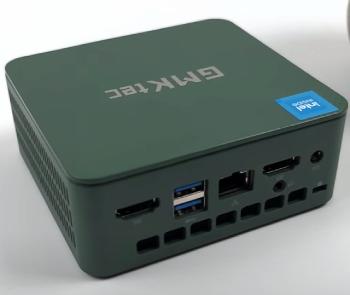
Comparing Bosgame to GMKtec models highlighted clear distinctions in build and features.
GMKtec focuses on ultra budget options that perform adequately for basic browsing. Bosgame stepped up with better Wi-Fi stability and dual LAN ports that proved essential for my stable network needs during video conferences and downloads.
The Ryzen 5 setup in Bosgame managed multitasking smoother than GMKtec units I tested which occasionally slowed under load.
Thermal design on Bosgame kept things cooler and quieter making it suitable for living room or office placement.
GMKtec stayed compact but felt less robust for longer sessions. Port variety favored Bosgame for triple display setups and USB-C versatility.
Upgradability was simpler on Bosgame allowing easy RAM and SSD additions without hassle.
Both serve entry level computing well yet Bosgame longevity and feature set made it my preference for daily driver use.
GMKtec suits tight budgets for occasional tasks but Bosgame balanced price and performance more effectively for me.
- Bosgame Mini PC Vs. Minisforum Mini PC
Minisforum offers premium mini PCs with high end specs that impressed in benchmarks.
Bosgame provided similar everyday usability at lower cost with its Ryzen 5 processor handling office work and media smoothly.
Minisforum often included faster processors or dedicated options but Bosgame dual LAN and triple display support matched my connectivity requirements perfectly.
Cooling on Bosgame remained effective without excessive fan noise during normal loads. Minisforum models sometimes prioritized raw power leading to higher temperatures.
Build and expandability felt comparable though Bosgame accessibility for upgrades won points in my routine.
For users seeking value without extremes Bosgame delivered reliable performance across productivity and light creative tasks.
Minisforum shines for enthusiasts needing maximum capability. My time with both confirmed Bosgame as a smart practical choice for balanced needs.
- Bosgame Mini PC Vs. AWOW Mini PC
AWOW mini PCs target budget conscious buyers with decent basic features. Bosgame differentiated through stronger overall connectivity including dual gigabit ethernet and robust Wi-Fi that stayed consistent in my home network tests.
The processor in Bosgame managed 4K streaming and multitasking better than AWOW units I tried which could stutter under heavier loads.
Design on Bosgame felt more premium with better port layout for multiple monitors. AWOW kept things simple and affordable but lacked the versatility I needed for extended use.
Thermal performance favored Bosgame keeping operations quiet and cool. Upgrades proved easier on Bosgame extending its lifespan significantly.
Both work for entry computing yet Bosgame offered superior daily experience and future proofing. AWOW suits very light needs while Bosgame handled my broader requirements effectively.
- Bosgame Mini PC Vs. Trigkey Mini PC
Trigkey models emphasize affordability and core specs for general use. Bosgame stood out with superior port selection and stable connections that enhanced my workflow.
Ryzen performance in Bosgame felt more consistent for productivity apps compared to some Trigkey configurations.
Cooling and noise levels remained excellent on Bosgame making it pleasant for desk or entertainment setups.
Trigkey provided good value but occasionally showed limitations in multitasking. Expandability on Bosgame allowed straightforward improvements keeping it relevant longer.
Display options gave Bosgame an edge for multi monitor productivity. Both compete well in the segment yet Bosgame balanced features reliability and usability better in my experience.
Trigkey appeals for minimal setups while Bosgame suited versatile demands.
Frequently Asked Questions (FAQs)
Yes Bosgame operates as a Chinese brand specializing in mini PCs with global sales.
Preferences vary by needs. Bosgame offers strong value for everyday use and connectivity.
They handle light gaming well but dedicated GPUs suit serious play better.
Bosgame designs and assembles its mini PC lineup focusing on affordable powerful compact systems.
Final Thoughts
The Bosgame Mini PC brings compact versatile computing that fits modern lifestyles perfectly.
You gain performance and convenience in a small package.
Consider it for your next upgrade and enjoy the freedom it provides.
