
You can purchase the SuperBox S6 Max streaming player directly through authorized online electronics distributors or popular general marketplaces like Walmart.
Finding a stable media box requires assessing real-world user feedback beyond flashy marketing promises.
I bought this sixth-generation media hardware to thoroughly evaluate its performance on my home entertainment setup.
Despite the substantial online marketing push surrounding this media platform, major operational red flags and security vulnerabilities emerged during my direct product evaluation.
This comprehensive overview details why my testing compels me to avoid recommending this specific device to safety-conscious consumers.
My Firsthand Streaming Experience and Observations

My hands-on experience with this media player started with high hopes of clearing out my living room entertainment stand.
The unboxing revealed a bright blue plastic housing that felt surprisingly light and lacked the premium metal construction seen in competitor hardware.
Setting up the system required connecting the heavy barrel-style power adapter, an HDMI cable, and an Ethernet wire directly to my main home network router.
The user interface loaded quickly, displaying an array of pre-installed applications designed to pull media streams from various third-party servers.
The primary marketing claim that drew my attention was the newly introduced eight-hour time-shift functionality alongside voice command capabilities.
I attempted to utilize the time-shift tool during a live Saturday night soccer broadcast to catch up on missed action.
The media stream stalled completely within five minutes, requiring a full hard reboot of the machine to restore basic system navigation.
This annoying stalling issue repeated itself multiple times throughout my first weekend of testing, turning a relaxed evening into an exercise in pure frustration.
Navigating the preloaded menus felt sluggish despite the advertised four gigabytes of random access memory and sixty-four gigabytes of storage space.
The internal processor seemed to bottleneck when loading graphic-heavy catalogs, creating noticeable menu lag when hopping between channel listings.
Voice commands frequently misinterpreted my spoken search queries, forcing me to return to manual typing on the remote controller.
The biggest scare occurred when my home network security firewall triggered multiple high-priority malware alerts stemming directly from the IP address assigned to this streaming hub.
My analytical network monitoring tools identified unauthorized outbound data tracking requests aimed at unknown secondary servers overseas.
This glaring security vulnerability immediately put my household personal computers and smart banking applications at severe risk.
When a media stream actually loaded without crashing, the image reproduction looked decent at standard definition but rarely reached the crisp visual depth expected from a modern premium player.
My teenagers refused to use the remote because the button layout felt uncomfortably stiff, and the system would randomly drop its wireless internet connection without any clear environmental explanation.
This disappointing reality completely overshadowed the convenient features, proving that a one-time payment option often introduces massive hidden headaches.
System Maintenance Protocols and Care Tips

- Operational Power Management
Proper power management keeps your digital media receiver running smoothly and guards against premature component failure over extended usage periods.
Avoid leaving the streaming box powered on continuously when your television is turned off, as this bad habit causes the quad-core processor to accumulate excessive internal heat.
You should manually unplug the proprietary barrel power adapter from the wall electrical outlet whenever you plan to leave your household for an extended weekend vacation.
This protective action shields the fragile internal circuit boards from unexpected high-voltage power surges that regularly travel through local utility lines.
Ensure the thin power cord rests behind your entertainment center without any tight bends, heavy knots, or furniture legs pinching the fragile protective cable jacket.
- Digital Storage Cleanup Routine
Clearing out accumulated background application data prevents the localized system storage from bottlenecking during intense high-definition media playback tasks.
You must navigate into the primary system settings directory once every week to clear out the temporary cache data stored by various media applications.
This manual optimization process frees up vital processing space within the sixty-four gigabytes of internal flash memory, allowing the operating system to swap temporary system files efficiently.
Avoid installing unverified third-party software applications from random web browsers, since these uncertified files clog up system resources and introduce dangerous background data tracking scripts.
Performing a comprehensive factory system reset every few months can help eliminate stubborn leftover configuration files that completely bog down your overall interface navigation speeds.
- Physical Structural Upkeep
Maintaining the physical environment around your media receiver directly impacts its internal operating temperatures and long-term structural electronics integrity.
Use a completely dry, anti-static microfiber cloth to wipe away heavy dust particles from the blue plastic outer shell every few days.
Never use commercial liquid cleaning sprays, ammonia glass cleaners, or damp sponges near the rear ventilation slots, because moisture entry will instantly short-circuit the delicate internal electronic speed chips.
Position the streaming device on a hard, flat, open surface that allows ambient room air to circulate freely beneath and around the entire chassis.
Keep the small box completely isolated from other hot home entertainment gear like multichannel audio amplifiers or gaming consoles to prevent external thermal strain.
Inspect the rear physical connections periodically to ensure no dust bunnies are blocking the metal pins, which easily disrupts your electronic data transmission signals.
Technical Performance Evaluation: Pros and Cons

The Pros:
The hardware platform does present a few interesting technical specifications on paper that might catch your attention during an initial assessment. These elements represent the baseline engineering achievements that the manufacturer used to market the device to cord-cutting enthusiasts. Analyzing these positive attributes objectively helps clarify what the electronic hardware offers before you evaluate the major performance failures.
- Expanded Local Storage Capacity:64GB Flash Allocation. The presence of sixty-four gigabytes of internal storage space remains a positive highlight because it permits you to download numerous applications from various digital marketplaces without facing constant storage exhaustion warnings. This space easily accommodates offline media files, personalized user configurations, and extensive application data caches over long periods of operation. Having this internal room ensures that the box does not instantly slow down due to a lack of file-swapping room during regular execution.
- Sufficient Operating Memory Resource:4GB RAM Performance. Equipping the media hardware architecture with four gigabytes of systemic random access memory assists in keeping background system services running without immediate crashing failures. This amount of working memory helps maintain the primary operating system interface during standard navigation tasks. It provides enough baseline performance to handle basic multitasking commands whenever you swap between different configuration utilities or audio settings.
- Time Shift Playback Buffer:8-Hour Playback Tool. The updated software layout implements an interactive playback buffer that allows you to roll back supported live television channels up to eight hours into the past. This feature provides a convenient way to recover missed broadcasts, sports plays, or news updates without relying on separate cloud recording subscriptions. The feature operates directly within the primary video player interface to simplify retroactive viewing on compatible data streams.
- Wireless Network Synchronization:Wi-Fi 6 Protocol Support. The incorporation of advanced wireless network protocols ensures the media receiver links up with modern dual-band household routers. This feature allows for improved local data throughput rates compared to older wireless generations, provided your home network environment stays completely clear of physical structural obstacles. The updated chip helps maintain localized link speeds when streaming high-definition files over short distances.
- Integrated Parental Security Controls:Password Management System. A dedicated software security layer enables you to configure individual password access codes for specific entertainment options inside the master settings folder. This tool offers parents a straightforward mechanism to block specific media streams and regulate viewing access within the household environment. The locks remain active even after a standard system restart to prevent unauthorized modifications by younger children.
The Cons:
- System stability failures: The media box requires a complete hard manual power cycle almost every single day due to sudden firmware freezing issues.
- Frequent stream stalling: The video playback tends to freeze or buffer every few minutes during major live sporting broadcasts, ruining your viewing experience.
- Unresolved technical support: The customer service team relies on repetitive troubleshooting scripts without providing permanent fixes for ongoing software bugs.
- Severe malware vulnerability: The preloaded third-party applications trigger immediate high-priority alerts on modern household network firewalls.
- Data privacy collection: Advanced tracking software hidden deep within the system firmware transmits unauthorized diagnostic files to overseas destination servers.
- Outdated power input architecture: The chassis utilizes an old-fashioned proprietary barrel-style power connector instead of a modern universal USB-C plug.
- Sluggish navigation response: The interface experiences sudden frame drops and extreme input lag when you try to scroll through massive graphic-heavy content libraries.
- Deceptive streaming quality: The visual output frequently defaults to compressed standard definitions rather than delivering the promised native high-definition performance.
- Unreliable wireless connectivity: The internal antenna module drops the local Wi-Fi signal randomly even when positioned close to your home router.
- Fragile physical construction: The outer casing is composed of lightweight, fragile plastic components that offer zero protection against minor drop impacts.
- Exorbitant initial retail cost: The upfront financial investment is significantly higher than premium certified streaming hardware choices available on the market today.
- Legal non-compliance exposure: Accessing unverified third-party content links exposes your household IP address to potential internet service provider penalties.
- Stiff remote control button layout: The physical controller keys require excessive downward force to register commands, causing finger fatigue over time.
- Absence of official platform certifications: The lack of standard DRM licensing restricts you from streaming official high-definition content from premium services.
- Inconsistent voice command accuracy: The built-in artificial intelligence assistant routinely fails to recognize standard vocal search terms correctly.
- Excessive heat generation issues: The device lacks sufficient ventilation slots, causing the internal processor to throttle performance under prolonged workloads.
- Complicated initial firmware updates: The systemic update process often stalls halfway through, threatening to brick the device entirely during installation.
- Unstable electronic program guides: The television menu listings frequently display empty content slots or incorrect scheduling times for live networks.
- Lack of automatic background caching: The storage management tool fails to clear old app data automatically, forcing manual system wipes.
- Weak peripheral Bluetooth range: The wireless remote controller loses its connection if you move more than ten feet away from the TV stand.
SuperBox S6 Max Vs. Competitor Devices
- SuperBox S6 Max Vs. Amazon Fire TV Stick 4K Max
The Amazon Fire TV Stick 4K Max features a highly secure, officially certified operating system that guarantees smooth playback for premium streaming platforms.
Amazon utilizes a universal USB-C power standard and includes a highly reliable Alexa voice remote control.
The SuperBox S6 Max provides more storage capacity on paper but lacks the official digital rights management certifications required for native high-definition streaming on legal apps.
Amazon delivers regular automated security patches to protect your home network from malware threats.
The premium stick format remains highly portable and costs a fraction of the price demanded by the unverified blue streaming device.
- SuperBox S6 Max Vs. Apple TV 4K
The Apple TV 4K incorporates an incredibly fast internal bionic processor that eliminates menu lag completely during operation.
Apple features a premium aluminum chassis and integrates seamlessly into a private ecosystem that prioritizes extreme user data privacy protections.
The SuperBox S6 Max struggles with severe interface stuttering and triggers persistent high priority malware alerts across home network security firewalls.
Apple provides a sleek aluminum remote control equipped with a precise touch-enabled clickpad for intuitive scrubbing through media timelines.
The premium brand ensures complete long term stability while the unverified alternative requires annoying daily manual reboots to function.
- SuperBox S6 Max Vs. Nvidia Shield TV Pro
The Nvidia Shield TV Pro delivers state of the art artificial intelligence upscaling technology that transforms standard definition feeds into crisp near-4K visuals.
Nvidia uses a powerful graphic processor optimized for advanced cloud gaming and heavy media server hosting tasks.
The SuperBox S6 Max lacks automated upscaling capabilities and often outputs highly compressed, grainy video streams during live broadcasts.
Nvidia maintains a long track record of delivering direct software upgrades and dependable customer troubleshooting assistance.
The durable build quality justifies the market price, whereas the flimsy plastic alternative offers poor structural value for your household.
- SuperBox S6 Max Vs. Roku Ultra
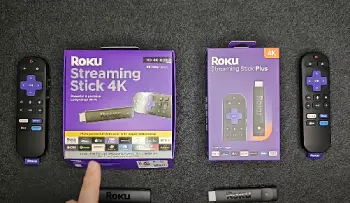
The Roku Ultra provides a highly simplified, incredibly clean user interface that suits every family member regardless of technical expertise.
Roku incorporates a lost-remote finder alert and includes a premium headphone jack inside the wireless controller for private listening sessions.
The SuperBox S6 Max relies on an unoptimized Android layout that creates significant confusion and navigation fatigue during daily use.
Roku partners directly with legitimate global media companies to guarantee constant stream availability without unexpected channel takedowns.
The certified hardware operates smoothly without stalling, making it a far superior choice for stable home entertainment viewing.
- SuperBox S6 Max Vs. BuzzTV X5
The BuzzTV X5 offers an advanced external dual-antenna array that secures a highly stable wireless connection across long distances.
BuzzTV utilizes an optimized proprietary media player application that allows extensive custom channel list sorting and recording options.
The SuperBox S6 Max drops local internet signals frequently and fails to provide reliable background caching tools for smooth navigation.
BuzzTV features a high-grade remote control with full backlighting for seamless midnight channel surfing.
The brand delivers solid hardware durability and dependable technical assistance, easily outclassing the constant software freezing loops that plague the fragile blue unverified box.
Also Read: My Experience With Roku Home Security
Frequently Asked Questions (FAQs)
The primary downsides include frequent system freezing, mandatory daily manual reboots, severe local network security threats, and unauthorized outbound data tracking behavior.
The hardware lacks premium USB-C connectivity, suffers from noticeable menu lag, and provides highly unstable live video feeds that constantly buffer during major broadcasting events.
While purchasing the physical box hardware itself remains legal, the preloaded third-party streaming applications often distribute copyrighted live TV channels and premium movies without holding proper distribution licenses.
Accessing unlicensed pirated material exposes your personal household internet protocol address to potential service termination or direct warning penalties from your service provider.
The device does not provide good value because the initial financial investment is excessively high for an uncertified media player.
The constant performance interruptions, threat of malware infections, and lack of reliable technical support channels make it an unsatisfactory option compared to cheaper, officially licensed streaming devices.
The hardware functions as a basic Android receiver, but its operational model relies on unverified server networks that operate outside official application store regulations.
The high frequency of network security alerts and data privacy concerns means that independent technology experts view the system as a substantial risk rather than a legitimate consumer choice.
Final Thoughts
Consumers can find the SuperBox S6 Max available for purchase on generic e-commerce platforms like Walmart or specialized independent tech resale storefronts online.
However, my analytical evaluation reveals that the severe privacy vulnerabilities and daily system crashes outweigh any perceived cord-cutting benefits.
Investing your hard-earned money into certified, legally compliant streaming devices protects your digital household far better.
You should prioritize long-term performance stability and network security by completely bypassing this problematic hardware option in favor of reputable mainstream alternatives.
