I used Sling TV together with an AirTV device and a solid outdoor antenna for several weeks while recording local channels watching live sports and managing the combined guide on multiple screens.
The main intent of this article is to show the practical differences in local-channel access recording flexibility cost and everyday convenience so you can decide whether the Sling plus AirTV combination fits your household.
My focus stays on real setup performance interface behavior and long-term ownership rather than marketing claims alone.
You will see how the hardware and service work together and where the limits appear.
| Feature | Sling TV Alone | Sling TV + AirTV |
| Local Channels | Limited or none in many markets | Full OTA locals via antenna |
| Monthly Fee for Locals | Included only in select plans/markets | None extra for OTA |
| Recording | Cloud DVR for Sling channels | Local + cloud for OTA shows |
| Interface | Single Sling app | Locals appear inside Sling guide |
| Best For | Budget cable-style packages | Cord-cutters wanting locals + Sling channels |
My Experience Testing Sling TV with AirTV
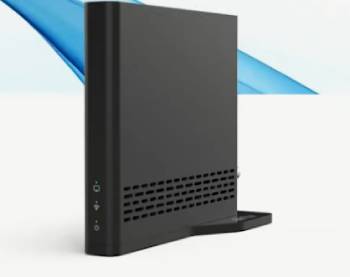
I started with a standard Sling Blue plan and added an AirTV 2 unit connected to a rooftop antenna.
The goal was to pull in the major network affiliates that Sling often lacks and to test recording and multi-device playback.
Setup began in the Sling mobile app under the Over-the-Air Channels section.
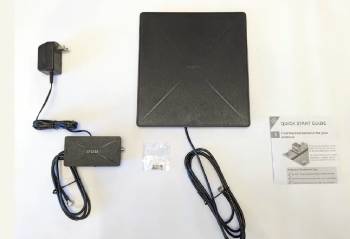
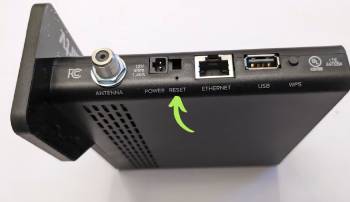
I connected the antenna coax to the AirTV, powered the device, and followed the on-screen steps to join my home Wi-Fi.
Once the scan finished the local channels appeared in a dedicated tab inside the Sling guide.
Live viewing of ABC CBS FOX and NBC looked clean when the antenna signal was strong.
Recording an evening news show and a primetime episode worked through the same interface I already used for Sling channels.
Playback on a Roku and a Fire TV stick felt consistent.
The phone app also let me start a recording while away from home.
After several weeks the combination delivered the locals I wanted without a second monthly bill.
Signal quality still depended entirely on the antenna and weather.
The Sling interface remained the same familiar layout with the added locals tab.
Key features such as the antenna input dual tuners optional external drive and deep Sling app integration shaped a system aimed at Sling subscribers who refuse to give up free broadcast channels.
My side-by-side use of pure Sling versus Sling plus AirTV supplied the concrete observations that follow.
Setup Process and Antenna Requirements
Setup process and antenna requirements determine how quickly the system becomes useful.
The AirTV needs a coaxial connection from any standard OTA antenna.
I placed the antenna for maximum signal then ran the coax to the AirTV.
Power and network came next.
Ethernet proved more stable than Wi-Fi in my tests yet both worked.
The Sling app guided the rest of the process from a phone.
Channel scan results matched what a dedicated OTA tuner would find.
Weak signals produced the expected pixelation or missing channels.
A good antenna remains the most important part of the entire combination.
Also Read: Comparison Of Insignia Vs. Vizio TV
Interface Guide and Daily Navigation
Interface guide and daily navigation decide how natural the combined experience feels.
Locals appear in their own section of the Sling guide once AirTV is online.
Switching between a Sling cable-style channel and a local affiliate takes only a couple of clicks.
The layout stays consistent with the rest of the Sling app.
I found the guide data for locals adequate for major networks.
Scheduling a recording from the same screen used for Sling channels kept everything in one place.
Navigation felt familiar to existing Sling users and only slightly less polished than a dedicated OTA DVR interface.
Recording Quality Storage and Library Management
Recording quality storage and library management form the core of the DVR side.
AirTV 2 requires an external hard drive for local recordings.
I attached a compatible drive and the system began saving shows without extra monthly cost.
Picture quality tracked the incoming antenna signal.
Strong channels recorded cleanly.
Weaker ones showed the same artifacts visible in live viewing.
The AirTV Anywhere model includes internal storage and more tuners for households that record several shows at once.
Library management lives inside the Sling app alongside cloud DVR recordings from the subscription.
Deleting watched episodes and protecting favorites worked as expected.
Multi-Device Access and Remote Viewing
Multi-device access and remote viewing shape how the household actually uses the system.
Once AirTV is on the network any supported device running the Sling app can tune the locals.
I watched a local newscast on a phone while another person used the living-room Roku.
Remote access from outside the home worked after the usual network permissions.
Device support covers Roku Fire TV Android and iOS well.
Some platforms such as certain smart TVs or Apple TV have more limited or separate app behavior.
The combination favors households already invested in the Sling app ecosystem.
Cost of Ownership and Ongoing Fees
Cost of ownership and ongoing fees often decide the long-term value.
Sling plans start at lower price points than most full live-TV services.
AirTV hardware is a one-time purchase and frequently appears in promotional bundles.
OTA recording itself carries no monthly fee.
The only recurring cost remains the Sling subscription if you want the cable-style channels.
Over two or three years the combination stays cheaper than services that include locals in every market.
Pure antenna users can run AirTV with a free Sling account and avoid the monthly bill entirely.
Reliability Network Dependence and Everyday Practicality
Reliability network dependence and everyday practicality determine whether the system stays out of the way.
AirTV needs a stable home network to stream locals to other devices.
A strong antenna signal is equally critical.
When both are solid the combination runs quietly.
Outages on the Sling service side do not affect the pure OTA path as severely.
Everyday practicality is highest for current Sling subscribers who simply want to add free locals.
Households seeking a fully independent OTA DVR may prefer a dedicated device with its own interface.
Pros and Cons of Sling TV with AirTV
Pros of Sling TV with AirTV
- Locals Inside One Guide: OTA channels appear directly in the Sling interface.
- No Extra Monthly Fee for OTA: Antenna channels remain free after hardware purchase.
- Familiar App Experience: Existing Sling users need almost no new learning.
- Flexible Hardware Options: AirTV 2 AirTV Anywhere and Mini cover different needs.
- Local Recording Capability: Save OTA shows to a drive without cloud fees.
- Multi-Device Streaming: Watch locals on phones tablets and supported streaming boxes.
- Promotional Hardware Deals: Devices often come discounted or free with prepaid Sling.
- Remote Access: View live and recorded locals away from home.
- Lower Long-Term Cost: Cheaper than full live-TV services that bundle locals everywhere.
- Works with Free Account: Basic OTA functions do not require a paid Sling plan.
The Analytical Cons of Sling TV with AirTV
- Antenna Dependent: Poor signal produces poor picture and missing channels.
- External Drive Needed on Some Models: AirTV 2 does not include storage.
- Limited Live Pause on Basic Units: Some models lack full live-TV pause for OTA.
- Device Support Gaps: Not every Sling-compatible platform handles AirTV locals equally.
- Interface Tied to Sling: Less ideal for users who dislike the Sling app layout.
- Network Required for Multi-Device: Locals stream over the home network.
- Tuner Count Limits: Dual-tuner models restrict simultaneous recordings.
- Guide Depth for Locals Varies: Major networks work well finer details can be thinner.
- Hardware Availability Changes: Specific models and bundles shift over time.
- Best Value Inside Sling Ecosystem: Pure cord-cutters may prefer standalone DVRs.
Pros and Cons of Pure Sling TV Without AirTV
Pros of Pure Sling TV Without AirTV
- Simple One-Service Setup: No extra hardware or antenna required.
- Lower Upfront Cost: Avoid the price of an AirTV unit and antenna.
- Cloud DVR Included: Record Sling channels without local drives.
- Wide Device Support: Works on nearly every major streaming platform.
- Customizable Plans: Orange Blue and add-ons let you pay for only what you want.
- Frequent Promotions: Regular deals on first months and hardware.
- No Antenna Variables: Picture quality depends only on internet connection.
- Easy Cancellation: Month-to-month with no long contracts.
- Sports and Cable Staples: Strong for ESPN or news depending on plan.
- Freestream Option: Free tier available for basic viewing.
The Analytical Cons of Pure Sling TV Without AirTV
- Missing Locals in Many Markets: ABC CBS FOX NBC often absent or incomplete.
- Channel Lineup Gaps: Fewer total channels than fuller live-TV services.
- Ongoing Monthly Fee: Cost continues even when you only want a few networks.
- Subscriber Declines: Service has lost customers amid competition and channel disputes.
- Interface Criticisms: Some users find navigation less polished than rivals.
- Stream Limits on Lower Plans: Simultaneous streams vary by package.
- No True OTA Independence: Relies entirely on the internet feed.
- Add-On Costs Add Up: Extra channel packs raise the monthly total.
- Customer Satisfaction Mixed: Surveys often place Sling lower on features and experience.
- Future Channel Risk: Carriage disputes can remove key networks.
Who Should Choose Sling TV with AirTV
The combination fits current or prospective Sling subscribers who live in areas with usable over-the-air signals and want local news weather and network shows without switching services.
You gain a single app experience and keep monthly costs lower than most full live-TV packages.
Households already comfortable with the Sling interface will feel at home immediately.
Who Should Skip the Combination
Pure cord-cutters who never plan to pay for Sling may prefer a dedicated OTA DVR with its own apps and interface.
Users in weak-signal locations will see little benefit from the AirTV hardware.
Anyone who dislikes the Sling app layout should evaluate standalone alternatives first.
Long-Term Ownership and Future Outlook
Long-term ownership and future outlook influence the smarter decision.
Sling continues to compete on price and customization yet has faced ongoing subscriber losses.
AirTV hardware remains a practical bridge for locals.
The combination still delivers clear value for the right household.
Monitor antenna performance and Sling plan changes over time to keep the system working as expected.
Also Read: Comparison Of Insignia TV Vs. Hisense
Frequently Asked Questions (FAQs)
Yes. AirTV is designed to integrate over-the-air channels directly into the Sling TV app and guide.
Competition from other live-TV services channel gaps especially locals price sensitivity and broader industry shifts toward on-demand viewing have contributed to ongoing declines.
Connect an antenna to the AirTV power the device then use the Sling mobile app Settings Over-the-Air Channels section to complete network pairing and channel scan.
Yes. A free Sling account is enough for basic OTA viewing and recording although the experience is optimized for paid Sling subscribers.
Final Thoughts
I tested Sling TV together with AirTV and a real antenna to highlight the practical gains in local channels recording and single-app convenience.
The main intent remains giving you clear side-by-side observations on setup performance cost and everyday use so you can decide whether the combination belongs in your home.
Sling plus AirTV works best for subscribers who want free locals without leaving the Sling ecosystem.
Pure antenna users and those seeking a fully independent DVR may still prefer dedicated alternatives.
You now have the detailed experience to choose the approach that fits your channels budget and devices.