
You know that feeling when you want something fun and simple to capture everyday moments without spending a fortune.
That is exactly why so many people pick up the Camkory digital camera.
It promises compact size, decent specs for the price, and easy operation that makes it appealing for beginners, kids, or casual users.
In this review I share my honest thoughts after using it extensively so you can decide if it fits your needs.
My Hands-On Experience with the Camkory Digital Camera
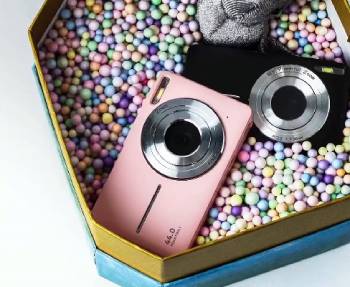
I remember unboxing the Camkory and thinking how cute and lightweight it felt in my hands. The pink version caught my eye immediately with its retro Y2K vibe that so many people love right now.
I charged one of the two included batteries and popped in the 32GB microSD card that came with it. Setup took almost no time at all. You turn it on, the screen lights up, and you are ready to shoot.
I took it with me on a weekend trip to the park and around town. During the day the camera performed okay in bright sunlight.
Colors popped somewhat and the 16x digital zoom let me capture distant subjects without much hassle.
I snapped photos of my kids playing, flowers in bloom, and some street scenes. The 44MP claims sound impressive on paper but in real life the images turned out softer than I expected with noticeable grain especially when viewed on a larger screen.
Videos in 1080P worked for short clips but audio quality left a lot to be desired. Background noise often overwhelmed voices and the stabilization did not fully compensate for handheld movement.
I tried the burst mode for action shots of the kids running around. It fired off several frames quickly yet many came out blurry or with inconsistent exposure.
Battery life became an issue faster than anticipated. The two batteries lasted roughly two hours of mixed photo and video use before I needed to swap or recharge.
That meant carrying the charger or planning shoots around power availability. The build quality also showed limitations quickly.
The plastic body felt thin and flexy. Buttons required firmer presses than expected and sometimes inputs did not register right away.
I worried about dropping it because it did not inspire much confidence in durability.
Indoors performance dropped noticeably. Low light introduced more noise and the flash often overexposed subjects or washed out backgrounds.
Smile detection rarely worked as advertised which frustrated attempts at candid family shots.
Transferring photos involved removing the card and using a reader on my computer. The process worked but felt dated compared to modern wireless options.
Despite these points I appreciated the simplicity. No complicated menus or manual settings to master.
You point and shoot which suits beginners perfectly. The filters added some creative fun for social media style shots.
Kids loved holding it and taking their own pictures without me worrying about an expensive device. For casual fun outings or as a starter camera it delivered basic satisfaction.
Yet after several weeks of regular use the shortcomings became more apparent in daily scenarios. I found myself reaching for my phone instead for better results in most situations.
The experience taught me that while the Camkory offers an accessible entry into dedicated cameras its real-world performance does not always match the marketing hype.
You get what you pay for in many ways. It shines in very specific daylight conditions but struggles elsewhere. I continued testing it in different environments to gather more data for this review.
Maintenance Tips for Camkory Digital Camera
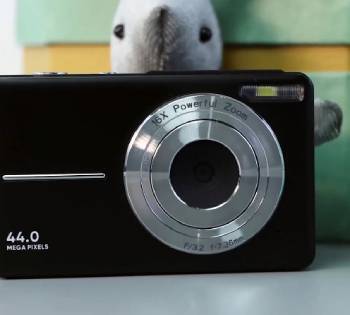
Taking good care of your Camkory digital camera helps extend its usability even with its budget construction.
I always start by storing it in the included pouch when not in use. This protects against dust and minor bumps.
Avoid exposing it to extreme temperatures or moisture since the seals are not robust. Clean the lens gently with a microfiber cloth after each session.
I use a blower first to remove loose particles then wipe in circular motions without pressing hard.
For the battery I recommend charging it fully before long trips but not leaving it plugged in constantly.
Store spare batteries in a cool dry place away from direct sunlight. Check the card regularly for errors by formatting it in the camera every few weeks.
This prevents corruption issues that could lose your photos. When transferring files I safely eject the card from my computer to avoid data problems.
Keep the body clean by wiping exterior surfaces with a slightly damp cloth. Never use harsh chemicals or submerge any part.
Inspect buttons and ports periodically for debris that could cause connection issues. If you notice sluggish performance a factory reset sometimes helps clear temporary glitches.
Update your shooting habits by favoring well-lit environments where the camera performs best.
Carry extra cards if you shoot lots of video to prevent running out of space mid-session. These habits maximize what you get from the device despite its limitations.
Regular maintenance like this adds to your overall satisfaction. You learn the camera’s quirks and work around them more effectively. I found that gentle handling prevents many common failures reported by other users.
Pros and Cons of Camkory Digital Camera
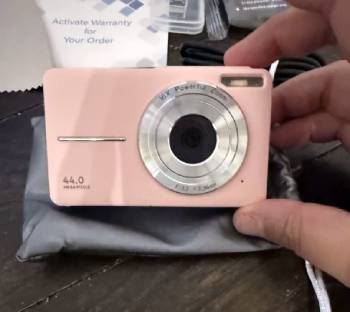
Pros:
- The Camkory digital camera stands out for its affordability which makes it accessible to many users.
- You can grab one without breaking the bank and still get basic photo and video capabilities.
- The compact size fits easily in a pocket or small bag so you carry it everywhere without hassle.
- Included accessories like two batteries, 32GB card, and a pouch add immediate value.
- Beginners appreciate the straightforward point-and-shoot operation that requires almost no technical knowledge.
- Filters and scene modes provide quick creative options that enhance casual shots.
- The retro aesthetic appeals strongly to those chasing Y2K or vintage looks popular on social platforms.
- Lightweight design reduces fatigue during extended use which is great for kids or seniors.
Cons:
- Image quality often disappoints especially beyond bright daylight conditions.
- You notice grain, softness, and limited dynamic range that make photos less shareable on high-resolution devices.
- Build quality feels cheap with thin plastic that flexes and raises durability concerns over time.
- Battery life runs short forcing frequent recharges or swaps during outings.
- Video audio quality is poor and stabilization does not fully handle movement leading to shaky footage.
- Button responsiveness lags which causes missed shots or navigation frustration.
- Low light performance suffers significantly with noise and flash issues that ruin many indoor or evening captures.
- Lack of wireless transfer options means you rely on manual card removal which slows your workflow.
- Overall reliability varies and some users report inconsistent performance across units.
Also Read: My Thoughts On Dji Osmo Action 5 Vs. Gopro 13
Camkory Vs. Other Brands
- Camkory Vs. Canon Digital Cameras
When I compare the Camkory digital camera to Canon models like the PowerShot series you see clear differences in performance and reliability.
Canon cameras deliver sharper images with better color accuracy and superior low light capabilities that the Camkory simply cannot match.
You get more consistent autofocus and longer battery life which makes Canon a stronger choice for serious beginners or hobbyists.
Build quality feels solid and durable unlike the lightweight plastic of the Camkory. Canon offers better software support and accessories too.
While the Camkory wins on price and cuteness Canon provides value through longevity and image quality that justifies the higher cost for many users.
I often recommend stepping up to Canon if your budget allows because the results speak for themselves in everyday shooting.
- Camkory Vs. Nikon Digital Cameras
Nikon digital cameras such as their Coolpix line outperform the Camkory in several key areas that matter to everyday photographers.
You benefit from superior optics, more accurate metering, and better zoom performance that keeps details intact even at distance.
Nikon models handle varying lighting conditions more gracefully reducing the grain and noise you encounter frequently with the Camkory.
Ergonomics feel more comfortable for extended use and menus are intuitive yet powerful. Battery endurance lasts significantly longer allowing full day adventures without worry.
While the Camkory appeals for its budget appeal and simple operation Nikon delivers professional-grade results in a compact form.
Many users who start with Camkory eventually upgrade to Nikon for the noticeable jump in quality and reliability that enhances their photography journey.
- Camkory Vs. Sony Digital Cameras
Sony offers compact cameras like the Cyber-shot series that highlight where the Camkory falls short in technology and output.
You experience faster processing, better image stabilization, and higher quality video recording with Sony that captures clearer audio and smoother motion.
Low light performance stands out dramatically compared to the Camkory’s struggles. Sony builds feel premium and include advanced features like wireless sharing that streamline your workflow.
The Camkory remains cheaper and simpler but Sony rewards users with sharper, more vibrant results that look great straight out of camera.
For those wanting creative control and future-proofing Sony represents a worthwhile investment over the entry-level Camkory.
I appreciate how Sony bridges beginner ease with growth potential in ways the Camkory does not.
- Camkory Vs. Kodak Digital Cameras
Kodak digital cameras provide a similar budget-friendly vibe yet often edge out the Camkory in consistency and user satisfaction.
You get more reliable flash performance and slightly better color reproduction that makes family photos more pleasing.
Kodak models tend to have sturdier construction that withstands casual handling better than the Camkory’s fragile feel.
Battery life and menu navigation also show improvements that reduce frustration during use. Both brands target beginners but Kodak frequently receives praise for delivering on basic expectations more dependably.
The Camkory’s retro charm is fun yet Kodak balances affordability with practical performance that many reviewers prefer.
If you seek something straightforward without major compromises Kodak serves as a solid alternative worth considering alongside or instead of the Camkory.
- Camkory Vs. Fujifilm Digital Cameras
Fujifilm cameras bring unique character and quality that set them apart from the Camkory in meaningful ways.
You enjoy film simulation modes, excellent color science, and superior build that make shooting enjoyable and results impressive.
Fujifilm compacts handle dynamic range and detail retention far better especially in mixed lighting where the Camkory shows limitations.
Creative options inspire more artistic photography compared to the basic filters on the Camkory.
While more expensive Fujifilm offers longevity and resale value that the Camkory lacks. Many enthusiasts start exploring with budget options but quickly appreciate Fujifilm’s craftsmanship.
The Camkory suits ultra-casual use but Fujifilm elevates your experience and encourages growth as a photographer.
Also Read: My Thoughts On Vivitar Digital Camera
Frequently Asked Questions (FAQs)
A good inexpensive digital camera balances basic features with decent performance for casual use. Look for models with reliable battery life, simple operation, and acceptable image quality in daylight. Brands like Canon or Nikon entry-level options often provide better long-term value than ultra-cheap alternatives. Consider your main needs such as kids photography or travel snapshots before buying.
Yes the Camkory digital camera typically includes a 32GB microSD card in the package along with batteries and a pouch. This allows you to start shooting right away without extra purchases.
The best brand depends on your budget and needs. Canon and Nikon generally excel in reliability and image quality across price ranges. Sony offers strong tech features while Fujifilm shines in creative styles. Research specific models for your use case.
To transfer photos from the Camkory camera remove the microSD card and insert it into a card reader connected to your computer. Copy the files directly from the card. Some users connect via USB but card removal remains the most straightforward method.
Final Thoughts
After spending considerable time with the Camkory digital camera I see why it attracts attention with its low price and cute design.
It delivers basic functionality for very light use in ideal conditions. Yet the limitations in image quality, build, battery, and reliability make it hard to recommend wholeheartedly for most people.
You might enjoy it briefly for fun experiments or as a gift for very young kids but expect compromises.
Consider your priorities carefully and explore alternatives if you want more dependable results.
Photography should bring joy not frustration and there are options that better match that goal at various price points.
