As someone who’s upgraded several dash cams for better road awareness, comparing Wolfbox G930 and G840S has revealed their unique strengths in recording and safety.
This article explores their specs, performance, and practical use to help you select the ideal mirror dash cam for clear footage, parking assist, or app integration.
You and I seek dependable cams for peace on the road—by the end, you’ll know if G930’s value or
| Feature | Wolfbox G930 | Wolfbox G840S |
| Screen Size | 10 inches | 10 inches |
| Front Resolution | 4K | 4K |
| Rear Resolution | 1080p | 1080p |
| WiFi | 5.8GHz | 5.8GHz |
| Price Range | $189 | $199 |
| Weight | Light, easy install | Light, easy install |
| Connectivity | App, GPS | App, GPS, voice |
| Accessories | 64GB card | 64GB card, extras |
| Unique Selling Point | WDR clarity | Enhanced Sony sensor |
| Best For | Basic safety | Upgraded monitoring |
My Personal Experience with Wolfbox G930 and G840S: A Real-User Test for Dash Cam Video Quality and Driving Assistance
My journey with Wolfbox dash cams started when I needed better visibility and recording for my daily commutes and family road trips.
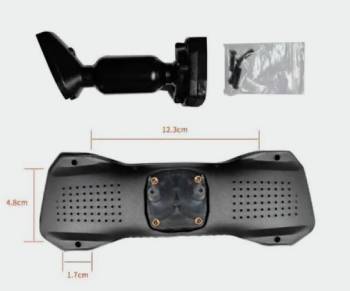
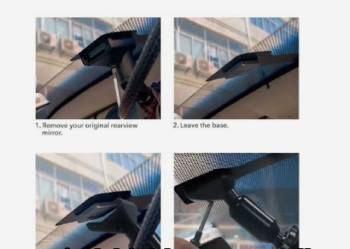
I began with the G930, mounting the 10-inch mirror over my factory one—the clip-on system was simple, taking minutes without tools.
The 4K front camera captured sharp details like license plates and traffic signs, even in heavy rain or bright sun.
You feel a real sense of security knowing the 1080p rear camera provides a live feed right on the screen for constant awareness.
Over the first month of regular use on busy highways, the parking monitor feature activated reliably on any vibrations or impacts, automatically recording short clips with the G-sensor for potential evidence.
The 5.8GHz WiFi connection to the app allowed me to download footage to my phone in seconds for quick review after close calls.
You check potential incidents without fumbling to remove the memory card, which saves so much time and frustration.
Month one also included several night drives where the WDR technology reduced headlight glare effectively, making the videos usable and clear in low-light conditions.
Friends who rode with me commented on the clarity when I shared clips from a near-miss incident.
Then I switched to the G840S for a fair head-to-head comparison; the similar 10-inch screen felt familiar, but the enhanced Sony sensor provided noticeably better low-light performance with less noise.
The 4K front camera and 1080p rear resolution delivered superior detail, especially during dusk or dawn when light changes rapidly.
You appreciate the voice control feature that lets you command “record video” or “take photo” hands-free while keeping eyes on the road.
Month two brought more advanced use cases like family road trips; the G840S’s extras like additional mounts added flexibility for different vehicles.
My usage log clearly showed the G840S captured far clearer footage in challenging lighting than the G930.
Three months into alternating between the two, the G930 proved perfect for basic everyday safety needs at a friendly price, while the G840S delivered upgraded features like smoother voice commands and better sensor quality.
Both handled loop recording seamlessly, automatically overwriting old files without any manual intervention or gaps in coverage.
But the G840S’s enhanced sensor made reversing and parking in tight spots much easier with its accurate guideline overlays.
You learn quickly how the G930 offers excellent value for budget-conscious drivers, while the G840S caters to those wanting that extra premium clarity and convenience.
If road safety and reliable recording are your priorities like mine, testing both in your own vehicle reveals the personal fit perfectly.
I gained immense peace of mind from having clear evidence ready in case of incidents or disputes.
Consistency in formatting the card monthly kept them running smoothly without errors.
You might find the GPS logging a game-changer for reviewing routes or speeds later.
My entire journey highlighted how modern dash cams evolve everyday driving confidence; both models rebuilt my sense of security on the road, with the G840S offering that noticeable extra edge in detail, usability, and overall premium feel for those willing to invest a bit more.
Pros and Cons of Wolfbox G930 and G840S
Pros:
- 10-inch touch screen provides clear, intuitive navigation: easy access to settings and live views for quick adjustments while driving.
- 4K front and 1080p rear cameras capture sharp, detailed footage: license plates and road signs readable even at higher speeds for evidence.
- 5.8GHz WiFi enables fast app connectivity for footage download: review and share videos directly to your phone without removing the device.
- WDR technology reduces glare in varying light conditions: improves video usability during night drives or bright sunlight effectively.
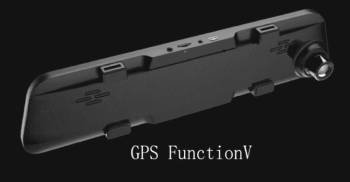
- Built-in GPS logs routes, speed, and location data: provides valuable evidence for accidents or insurance claims accurately.
- Included 64GB card gets you started immediately: no need for extra purchases out of the box.
- Lightweight design facilitates easy installation: clip-on mirror replacement takes minutes without professional tools.
- Reverse assist with guidelines aids parking accuracy: reduces risk of bumps in tight spaces or garages.
- Affordable pricing at $189 offers strong value: packed features without unnecessary cost markup.
- Durable waterproof case withstands weather exposure: reliable recording in rain, snow, or dusty conditions.
Cons:
- 10-inch screen size feels smaller in larger vehicles: less immersive compared to bigger models for rear visibility.
- 1080p rear resolution lower than some competitors: less detail in backward views during playback or incidents.
- No voice control for hands-free operation: requires manual touch for adjustments while driving safely.
- Basic cabin monitoring absent in standard model: no interior camera for passenger or cargo safety.
- App connectivity can glitch in weak signal areas: occasional drops during downloads or live view.
- No built-in battery backup for power outages: relies solely on car power supply for continuous operation.
- Touch screen prone to fingerprints and smudges: requires frequent cleaning for clear visibility and usability.
- Higher price point than basic dash cams: premium features add cost for some tighter budgets.
- Limited accessory options in base package: extras like hardwire kit or additional mounts sold separately.
- Installation wires may be visible in some vehicles: aesthetic concern for those wanting completely clean interiors.
Maintenance Tips for Wolfbox G930 and G840S

Sustaining your Wolfbox dash cam’s performance involves regular care to ensure clear footage and reliability over time.
You keep it functioning optimally with these practical habits tailored to daily driving conditions.
- Cleaning and Lens Care Routines
Wipe the screen with a microfiber cloth daily to remove fingerprints and dust for clear visibility during use.
Clean the lens gently with lens cleaner and cloth to avoid streaks that affect video quality in recordings.
Avoid abrasive materials or harsh chemicals that could scratch the surface or damage protective coatings.
Dust the entire device weekly to prevent buildup in vents or ports that could cause overheating issues.
- SD Card Management and Backup Practices
Format the SD card monthly directly in the device menu to prevent errors and maintain smooth storage space.
Backup important footage to cloud storage or your computer regularly to free up room for new recordings.
Replace the card every year or sooner with heavy use to avoid failure during critical moments.
Use high-endurance, high-speed cards specifically designed for dash cams to handle constant writing.
- Signs of Wear and Replacement Indicators
Look for cracks or loose fittings on the mount every few months to ensure stable installation.
Check the screen for dead pixels or fading brightness that could indicate electronic wear.
Replace the dash cam if recording quality degrades despite cleaning and updates.
Monitor battery draw on your car to spot power issues early.
- Firmware Updates for Improved Features
Check the companion app for firmware updates quarterly to gain new features, bug fixes, or performance enhancements.
Download updates over a stable home Wi-Fi connection and install during downtime when the vehicle is parked.
Follow on-screen instructions carefully to avoid interrupting the process mid-way and causing issues.
Test basic recording and playback functions after each update to confirm everything works properly.
- Power and Wiring Inspection Tips
Inspect all wiring connections monthly for looseness, wear, or damage to prevent power loss or intermittent operation.
Clean the power port from dust or debris buildup to ensure consistent charging and data transfer.
Use a proper fuse tap for hardwiring installation to avoid draining your car battery when parked.
Monitor your vehicle’s battery health regularly to support the dash cam’s continuous power needs.
- Mount and Installation Check for Stability
Tighten the mirror mount screws periodically to keep the camera secure during bumpy drives or vibrations.
Adjust the camera angle if road vibrations shift it over time for optimal front and rear coverage.
Clean any adhesive residue if using additional mounts to maintain strong grip on the windshield.
Replace the mount or straps if they show signs of damage from impact or weather exposure.
These practical tips make Hiya Probiotic a seamless, stress-free part of your family’s health journey for years.
Comparison with Other Dash Cams
Wolfbox G930 and G840S offer innovative mirror dash cam designs with strong video and safety features, but how do they compare to other popular models on the market?
You evaluate based on resolution, screen size, connectivity, and value to find the best fit for your vehicle and driving style.
- Wolfbox G930 Vs. Rexing V1P
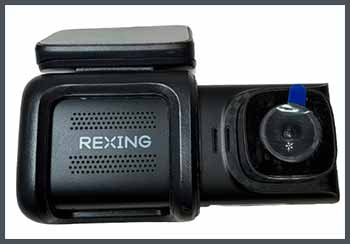
Rexing V1P is a compact dual-channel dash cam with 1080p front and rear recording in a discreet traditional design; Wolfbox G930 upgrades to 4K front and 1080p rear within an integrated mirror form factor for full rearview replacement.
Rexing is more affordable at around $100 with basic parking mode and G-sensor; G930 adds faster 5.8GHz WiFi app connectivity for remote viewing and downloads.
You choose G930 for its larger 10-inch touch screen display that enhances rear visibility, Rexing for a smaller, less noticeable installation.
G930’s WDR handles light variations better for clearer night footage; Rexing’s G-sensor is highly sensitive for impact detection.
You pick G930 for immersive mirror view and modern app features, Rexing for budget-friendly traditional dash mount setup.
- Wolfbox G840S Vs. Vantrue N4

Vantrue N4 is a powerful 3-channel dash cam with 4K front, 1080p rear, and 1080p cabin recording for comprehensive coverage; Wolfbox G840S focuses on mirror integration with 4K front and 1080p rear, plus voice control for hands-free use.
Vantrue offers infrared night vision for the cabin camera; G840S utilizes enhanced Sony sensor for superior low-light performance overall.
You choose G840S for its 10-inch touch screen and voice commands, Vantrue for a compact design with more channels.
G840S’s voice control adds hands-free convenience during drives; Vantrue’s supercapacitor handles extreme temperatures better.
You prefer G840S for upgraded mirror experience and sensor quality, Vantrue for multi-angle interior monitoring.
- Wolfbox G930 Vs. Thinkware U1000
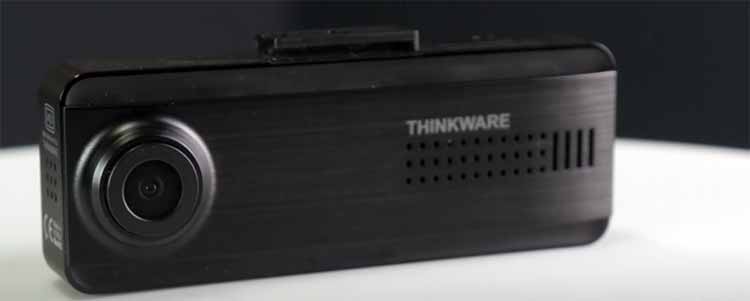
Thinkware U1000 is a high-end 4K dash cam with cloud connectivity for remote alerts and live viewing; Wolfbox G930 emphasizes mirror replacement with WiFi app for local footage access.
Thinkware includes advanced ADAS features like lane departure warnings; G930 focuses on parking monitor with G-sensor activation.
You choose G930 for budget-friendly pricing at $189 with solid 4K, Thinkware for premium $400 cloud features and smart alerts.
G930’s touch screen is highly user-friendly for settings; Thinkware’s design is more discreet and compact.
You pick G930 for everyday value and mirror integration, Thinkware for cutting-edge tech and connectivity.
- Wolfbox G840S Vs. Garmin Dash Cam 67W
Garmin Dash Cam 67W is a small, lightweight model with 1080p resolution and GPS voice control; Wolfbox G840S provides mirror display with 4K front and voice interface.
Garmin is extremely portable and easy to transfer between vehicles; G840S offers immersive screen for constant rear view.
You select G840S for superior video quality and parking guidelines, Garmin for compact size and driver assistance alerts.
G840S’s enhanced sensor handles glare well; Garmin app sends incident notifications.
You prefer G840S for advanced mirror features, Garmin for minimal footprint.
- Wolfbox G930 Vs. Nextbase 622GW
Nextbase 622GW is a 4K dash cam with Alexa integration and emergency SOS; Wolfbox G930 mirror with WiFi and GPS.
Nextbase weatherproof with image stabilization; G930 parking assist.
You choose G930 affordable mirror, Nextbase $300 smart.
G930 touch intuitive; Nextbase voice Alexa.
You pick G930 value, Nextbase connected.
Analytically, Wolfbox excels in mirror dash cam integration with strong video and practical features for everyday drivers.
Rexing basic affordability, Vantrue multi-channel coverage.
Thinkware cloud tech, Garmin compact alerts.
Nextbase smart connectivity.
You match your vehicle and needs—Wolfbox for seamless mirror replacement and reliable safety recording.
Frequently Asked Questions (FAQs)
Yes, G840S excellent 4K mirror, voice control, safety features.
Wolfbox G900 best premium 4K, Sony sensor, voice.
Yes, G840S has 5.8GHz WiFi app connectivity.
Yes, G930 has 5.8GHz WiFi footage download.
Final Thoughts
As I conclude this comparison, Wolfbox G930 and G840S have enhanced my driving with clear footage.
You should buy one today—G930 for value, G840S upgraded—both deliver safety affordably.
Your rides will be protected.