I have spent months testing the Nexar and Garmin ecosystems to see which one truly protects you when things go south on the road.
I am writing this article to help you decide between two very different philosophies: the cloud-centric, AI-heavy approach of Nexar and the ultra-compact, precision-engineered hardware of Garmin.
My intent is to compare these brands from a real-world perspective so you can spend your money wisely.
By the time you finish reading, you will know exactly which camera deserves a spot on your windshield and why one might be a better fit for your lifestyle.
Nexar Vs. Garmin Comparison Table
| Feature | Nexar Dash Cams | Garmin Dash Cams |
| Primary Focus | Cloud Integration & AI Events | Compact Design & Video Quality |
| User Interface | Primarily Smartphone App | On-device Screen & App |
| Storage | Cloud (Unlimited) + SD Card | SD Card + Vault (24-hour limit) |
| Resolution | Up to 4K (Nexar One) | Up to 4K (X310 / 67W) |
| Subscription | Required for cloud/LTE | Optional for extended storage |
| Installation | Easy (Adhesive/Suction) | Easiest (Magnetic Mount) |
| Driver Alerts | Emergency Contact/Incident | Lane Departure/Collision/Speed |
My personal experience with Nexar and Garmin
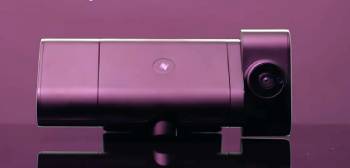
I remember the first time I set up a Nexar camera in my truck; it felt like I was installing a security system rather than just a camera.
I am someone who values having a digital paper trail, and I found that Nexar’s ability to instantly back up clips to my phone and the cloud gave me a massive sense of relief.
I started by using the Nexar Pro, and I noticed that the app is the brain of the operation.
I found that even if I left the SD card at home, the app would still save my “incidents” because it talks to the phone via Wi-Fi the entire time I am driving.
I noticed that the interior cabin view was incredibly sharp, making it a perfect choice when I was doing occasional rideshare shifts.
I found that switching over to a Garmin Dash Cam was a completely different vibe.
I am a fan of minimalist cockpits, and I noticed that the Garmin units are so small they practically hide behind the rearview mirror.
I started using the Garmin 67W, and I was blown away by the 180-degree field of view.
I found that the magnetic mount is a stroke of genius; I could pop the camera off and put it in my pocket in two seconds.
I noticed that Garmin’s driver assistance features, like the “Go” alert when the car in front moves, were actually useful rather than annoying.
I think it is vital for you to know that choosing between them is a choice between software and hardware.
I found that when I wanted to show a friend a cool sunset I drove through, the Nexar app made it easy to find and share in seconds.
I noticed that when I wanted to read a blurry license plate from a car three lanes over, the Garmin’s clarity and HDR processing were superior.
I began to feel that Nexar is for the person who wants a witness that sends data to the cloud automatically, while Garmin is for the person who wants a reliable, high-end optical tool.
I ended my testing realizing that both brands are at the top of their game, but they serve two different types of drivers.
Nexar Vs. Garmin: Maintenance and Tips

- Check Your SD Card Health Every Month: You should realize that dash cams are incredibly hard on microSD cards because they are constantly writing and overwriting data. Using the “Format” option in either the Nexar or Garmin app is the best maintenance tip for preventing file corruption, ensuring that the camera is actually recording when you need it most, which is an analytical necessity.
- Keep the Windshield Area Clean: You should not allow film or dust to build up on the glass directly in front of the lens. I found that even a thin layer of road grime can cause the autofocus to struggle at night, so a quick wipe with glass cleaner is the best maintenance tip for keeping your “evidence” looking sharp and professional, which is the smartest choice for clarity.
- Update Your Firmware Regularly: You should check the app for updates at least once a quarter. Both Garmin and Nexar release patches that fix connectivity bugs and improve image processing, and staying current is the best maintenance tip for avoiding those annoying app crashes that always seem to happen at the worst time.
- Verify Your App Permissions: You should ensure that your phone isn’t “offloading” the dash cam app to save space. I noticed that if the Nexar app is sleeping, it might not automatically start the drive recording, so checking your phone settings is the best maintenance tip for ensuring 100% coverage of your trips.
- Test the Emergency Alerts Periodically: You should occasionally “save” a non-incident video to make sure the cloud upload is working correctly. If you are using Nexar, verify that the “emergency contact” notification actually sends, as this maintenance tip ensures the safety features you are paying for are functional before a real emergency occurs.
- Protect the Lens from Direct, Stationary Sun: You should try to park in the shade whenever possible if the camera is mounted. While Garmin uses capacitors, the lens elements can still be affected by extreme heat over many years, so using a sunshade or parking under a tree is the best maintenance tip for preserving the optical integrity of your high-end dash cam.
Pros and Cons of Nexar Dash Cams
Pros of Nexar Dash Cams
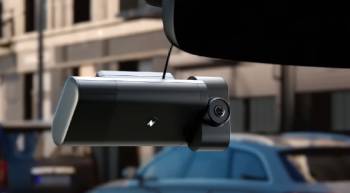
- Automatic Incident Backup: The system detects hard braking or crashes and sends a clip to your phone and the cloud immediately: this ensures that even if the camera is destroyed in a wreck: you still have the video evidence.
- Seamless Social and Legal Sharing: The app allows you to create a “Nexar Report” which summarizes the event, speed, and location: you can send this directly to insurance companies: this simplifies the claims process significantly.
- Infinite Cloud Storage: Most plans offer unlimited storage for saved clips: you don’t have to worry about old footage being overwritten if it was marked as an event: this provides long-term peace of mind for frequent drivers.
- Remote Vehicle Monitoring (Nexar One): With the LTE module, you can check a live feed of your car from anywhere: you receive alerts if the car is bumped while parked: this turns the dash cam into a true 24/7 security guard.
- Excellent Interior Coverage: Their dual-cam setups are designed with rideshare drivers in mind: the infrared cabin view is crisp in total darkness: this is the best choice for documenting passenger behavior.
Cons of Nexar Dash Cams
- Heavy Reliance on Your Smartphone: The camera essentially requires your phone to be active and connected to work at full capacity: this can drain your phone battery quickly: this forces you to keep your phone plugged in on every trip.
- Subscription Model for Advanced Features: After the initial period: you must pay a monthly fee for the cloud and LTE services: this is a recurring cost that some users find frustrating: this adds a “membership” feel to a piece of hardware.
- Lower Native Video Quality (on entry models): Compared to high-end optics: some Nexar models can struggle with license plate clarity at high speeds: the focus is more on the “story” of the event than pixel-perfect detail.
Pros and Cons of Garmin Dash Cams
Pros of Garmin Dash Cams
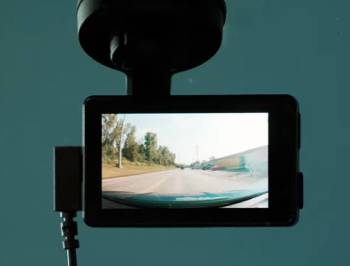
- Ultra-Compact and Discrete Design: Most Garmin units are the size of a key fob: they don’t block your view of the road: this makes for a much cleaner and safer windshield setup.
- Industry-Leading Magnetic Mount: The mounting system is the best in the business: it allows for perfect positioning and instant removal: this is an analytical win for those who live in high-theft areas and take their cams inside.
- Superior Optical Clarity and HDR: Garmin’s Clarity HDR is phenomenal at handling the transition from bright sun to dark tunnels: you get much better detail on license plates and road signs: this is crucial for forensic evidence.
- Reliable Driver Assistance Alerts: The camera warns you about red light cameras and upcoming forward collisions: I found these alerts to be surprisingly accurate: this adds an extra layer of safety to your daily commute.
- Voice Control Integration: You can say “OK Garmin, save video” without taking your hands off the wheel: the system responds instantly: this ensures you can capture interesting moments safely.
Cons of Garmin Dash Cams
- Limited Cloud Storage for Free: The Garmin Vault only stores clips for 24 hours unless you pay for a subscription: if you forget to save a clip: it might be gone by the next day: this requires more manual management than Nexar.
- Connectivity Can Be Finicky: I noticed that connecting the Garmin app to the camera via Wi-Fi can sometimes take several tries: this can be frustrating when you are in a rush to view a clip.
- Smaller Screens Can Be Hard to Use: On the units that do have screens: the menus are tiny: you might find yourself squinting or using your fingernails to navigate settings: this makes the smartphone app almost mandatory anyway.
Also Read: My Experience With Vantrue Dash Cam
Nexar vs Garmin: The Key Feature Breakdown
You should consider that Nexar is essentially a software company that makes cameras.
I have noticed that their feature set is built around the “Nexar App,” which acts as a digital co-pilot.
I found that the “Parking Mode” on the Nexar One is particularly impressive because it uses a low-power Bluetooth heartbeat to stay connected to your phone.
I noticed that if someone hits your parked car, you get a notification on your phone within seconds, provided you have the LTE kit.
Garmin, on the other hand, is a hardware company that makes apps.
I have found that their feature set is built around “The Vault” and high-quality lenses.
I noticed that Garmin cameras like the 67W use a supercapacitor instead of a lithium battery.
I think it is vital for you to know that this makes Garmin much more durable in extreme heat; if you live in Arizona or Texas, this is a major factor.
I found that Nexar units can sometimes overheat if left in a baking car, whereas Garmin units are built like little tanks.
You should also look at the “Incident Report” feature.
I noticed that Nexar creates a very detailed PDF that includes GPS data and a map of the incident.
I found that this is incredibly helpful when dealing with police officers at the scene of an accident.
I noticed that Garmin provides the video and the GPS coordinates, but you have to do the work of compiling the report yourself.
I found that for the average person who isn’t tech-savvy, Nexar’s “one-tap” reporting is a massive advantage.
Also Read: My Thoughts On Nexar Dash Cam
Frequently Asked Questions (FAQs)
It depends on your needs; Nexar is best for cloud backup and rideshare drivers, while Garmin is best for compact design and superior image quality.
No, Nexar is an Israeli company with headquarters in Tel Aviv and New York; they focus heavily on AI and vision-based technologies.
Yes, most Nexar models require a monthly or annual subscription to access the unlimited cloud storage and LTE features after the first year.
Yes, you can still use the camera for local recording to an SD card, but you will lose the automated cloud backup and advanced remote monitoring features.
Final Thoughts
You should choose the dash cam that matches how you interact with technology every day.
I have found that if you want a camera that disappears and just does its job with high-end video, Garmin is the winner.
You deserve a witness that is as reliable as you are, and if you prefer having your data automatically saved to the cloud for instant sharing, Nexar is the way to go.
I believe that for most modern drivers, the “insurance” of the Nexar cloud is worth the subscription, but for the purists, the Garmin hardware is hard to beat.
You are making a smart choice for your safety regardless of which brand you pick, as both represent the best of 2026’s road technology.