You should buy a Nexar dash cam if you are looking for a highly connected, cloud-integrated security system that prioritizes video evidence and remote access over complicated manual menus.
I have spent a significant amount of time analyzing how these AI-powered cameras function on the road, and I can tell you that the Nexar Pro and Nexar One models are designed for the modern driver who wants “set it and forget it” protection.
My intent is to provide an analytical Nexar dash cam review that helps you decide if their subscription model and smartphone-centric design align with your driving habits.
My personal experience with Nexar dash cams
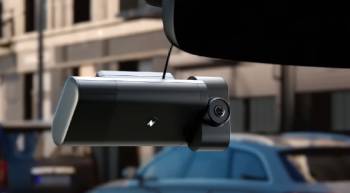
I remember the first time I unboxed the Nexar Pro Dual system; the lack of a screen on the unit itself was the first thing that made me pause.
I am someone who likes to see what the camera sees in real-time, but I quickly realized that Nexar intends for your smartphone to be the primary interface.
I started the installation by mounting the road-facing camera behind my rearview mirror, and I found that the included cable clips made it surprisingly easy to hide the wires along the headliner.
I noticed that the interior camera, which is a separate small unit, required its own placement, and I found a spot that gave me a clear view of both the driver and passenger seats.
I found that the initial pairing process between the camera and the Nexar app was straightforward, as the camera creates its own private Wi-Fi network for the phone to join.
I am a very tech-oriented person, so I appreciated how the app automatically started a “drive” the moment I pulled out of my driveway.
I noticed that during a particularly rainy night in the city, the night vision on the interior camera was incredibly sharp; the infrared LEDs illuminated the cabin clearly without being visible to the naked eye.
I found that the exterior 1080p footage captured license plates effectively at moderate speeds, although I noticed a bit of motion blur on vehicles passing quickly in the opposite direction.
I think it is vital for you to know that the real magic happened when I had a near-miss at a busy intersection.
I found that the Bosch accelerometer inside the Nexar detected the hard braking event and instantly created a short clip that was backed up to the cloud.
I noticed that I didn’t even have to touch my phone; the app simply notified me that the incident was saved.
I have been using the unit for over a year now, and I found that the 256 GB SD card provides a reliable local backup, while the cloud storage gives me peace of mind that footage won’t be overwritten.
I ended my testing phase convinced that for a rideshare driver or a daily commuter, the convenience of having every drive automatically logged to a phone is a game-changer.
Nexar Dash Cam Maintenance and Tips
- Format the SD Card Through the App Monthly: You should realize that even high-end SD cards can develop “bad sectors” due to the constant writing and overwriting of HD video. Navigating to the settings in the Nexar app and performing a quick format is the best maintenance tip for preventing recording gaps, which is an analytical necessity for any dash cam.
- Keep the Camera Lenses Clean with Microfiber: You should avoid using your fingers to wipe away dust or smudges. Oils from your skin can create “halos” around headlights at night, so using a clean microfiber cloth every few weeks is the best maintenance tip for ensuring your 1080p footage stays as crisp as possible, which is the smartest choice for clarity.
- Update the App and Firmware Regularly: You should not ignore the update notifications in the Nexar app. The company frequently releases patches to improve the Wi-Fi stability and GPS accuracy, and staying on the latest version is the best maintenance tip for avoiding the “connection failed” errors that some users report, which is a major win for reliability.
- Check the Suction Cup or Adhesive Mount Every Season: You should notice that extreme heat in the summer or freezing cold in the winter can cause mounts to loosen. Giving the camera a gentle “tug” to ensure it is still firmly attached to the windshield is the best maintenance tip for preventing the unit from falling and potentially damaging your dashboard or the camera itself.
- Monitor Your Phone’s Background Settings: You should ensure that the Nexar app is set to “Always Allow” for location and that “Background App Refresh” is turned on. If your phone’s power-saving mode kills the Nexar process, the camera might stop recording your trip, so managing your phone’s battery settings is the best maintenance tip for consistent performance.
- Review Your Cloud Storage Clips Every Month: You should take a moment to delete any unnecessary “hard braking” clips that the AI might have saved accidentally. While the storage is “unlimited,” keeping your library organized makes it much easier to find the important footage if you actually get into an accident, which is an analytical approach to data management.
Pros and Cons of Nexar Dash Cams
Pros of Nexar Dash Cams
- Seamless Automatic Cloud Backup: The system automatically uploads clips of incidents and hard-braking events to the Nexar cloud: this ensures that even if the camera is stolen or the SD card fails: you still have the video evidence needed for insurance claims: this provides a level of security that traditional “offline” cameras cannot match.
- User-Friendly Smartphone Integration: The Nexar app is one of the most polished in the industry: it allows you to view, trim, and share videos directly from your phone: you don’t have to take the SD card to a computer to see your footage: this makes it an analytical choice for those who want quick access to their data.
- Reliable Parking Mode Protection: The cameras feature a sensitive G-sensor that wakes the unit up if someone bumps your car while it is parked: you receive an alert on your phone immediately: this turns your dash cam into a 24/7 security guard for your vehicle.
- High-Quality Infrared Night Vision: The interior cameras are equipped with multiple IR LEDs: these provide clear monochrome footage of the cabin even in total darkness: this is an essential feature for Uber and Lyft drivers who need to document passenger interactions.
- Generous Initial Storage and Subscription: Most kits come with an SD card and the first year of the Nexar subscription included: this allows you to test the full suite of features without an immediate extra cost: this represents a strong upfront value for the consumer.
- Advanced Bosch Sensor Technology: The hardware utilizes high-grade sensors for motion and impact detection: I found that it rarely gives false positives for things like speed bumps: this ensures that saved “incidents” are actually worth reviewing.
- Vast Connectivity Options: With Bluetooth and dual-band Wi-Fi: the camera stays connected to your device with minimal drops: I noticed the sync speed is faster than many budget competitors: this reduces the frustration of waiting for videos to load.
Cons of Nexar Dash Cams: An analytical look at the limitations:
- Dependency on a recurring subscription model: after the first year: you must pay a monthly or annual fee to keep the cloud storage and LTE features active: this is an analytical drawback for people who prefer a one-time purchase: this can add up to a significant long-term cost: this forces you to decide if the convenience is worth the “rent.”
- High battery drain on smartphones: because the app runs in the background and uses Wi-Fi/GPS to track your drives: it can significantly deplete your phone’s battery on long trips: you almost always need to keep your phone plugged into a charger while driving: this is a common complaint among power users.
- Lack of a built-in screen on many models: if your phone dies or you forget it: you have no way to verify the camera is recording or to adjust settings on the fly: you are completely reliant on the external app: this makes the system feel “incomplete” to those used to traditional dash cams.
- Occasional connection issues with CarPlay and Android Auto: since Nexar uses Wi-Fi to talk to your phone: it can sometimes conflict with wireless vehicle infotainment systems: I found that I occasionally had to manually reconnect the camera: this can be a nuisance for drivers with modern, highly-integrated dashboards.
- Limited video resolution compared to 4K rivals: most Nexar models like the Pro and Beam are limited to 1080p: while the footage is clear: it lacks the fine detail of 4K cameras when trying to read distant license plates: this is an analytical compromise in favor of smaller file sizes for cloud uploading.
- Interior camera requires separate mounting and wiring: unlike “all-in-one” dual cameras: the Nexar Pro uses two separate pieces: this means more wires to hide and more clutter on your windshield: this makes for a slightly more complex installation process than some users might expect.
- Limited 24-hour recording without specific hardwiring: to get the most out of parking mode: you really need to purchase the Nexar hardwire kit or OBD adapter: the internal battery is very small and won’t last for an entire weekend of monitoring: this adds an extra step and cost to the initial setup.
Nexar Pro Vs. Other Brands
- Nexar Pro Vs. Garmin Dash Cam X310
The Garmin Dash Cam X310 is a premium, compact 4K camera that offers incredible detail. I have found that while the Garmin has a much smaller footprint and a built-in screen, its cloud storage options are much more restricted than Nexar’s.
Analytically, Nexar is the better choice for drivers who want a “connected” experience with automatic uploads, whereas Garmin is better for those who want the highest possible video resolution.
I noticed that Garmin’s voice control is very responsive, but Nexar’s app-based clip sharing is much more intuitive for non-tech users.
You should buy the Garmin for 4K quality, but the Nexar Pro is the clear winner for rideshare drivers needing cabin views.
- Nexar Pro Vs. BlackVue DR970X
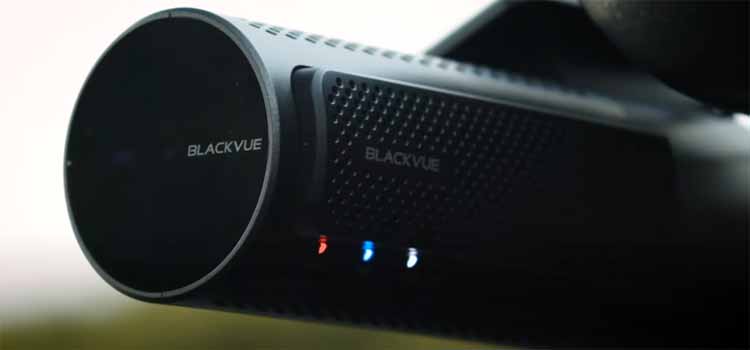
The BlackVue DR970X is often considered the “gold standard” for professional-grade dash cams. I have found that BlackVue offers a more robust “over-the-cloud” system that allows for remote live viewing from anywhere in the world if you have an LTE module.
Analytically, the BlackVue is significantly more expensive than the Nexar Pro and requires a more technical setup process.
I noticed that Nexar’s interface feels more like a modern social media app, while BlackVue feels like a piece of industrial equipment.
Choose BlackVue if you have a high-end luxury vehicle and a big budget, but choose Nexar for a more user-friendly, affordable everyday experience.
- Nexar Pro Vs. Thinkware U3000
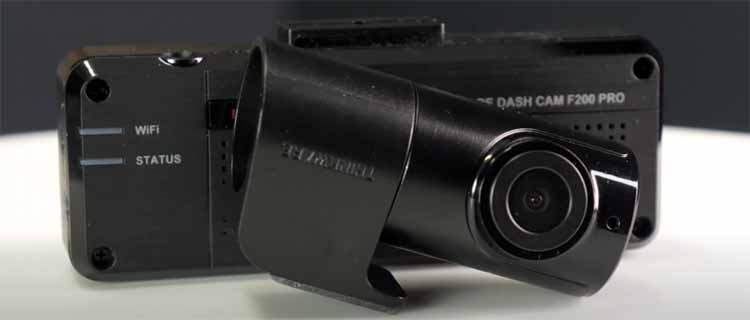
The Thinkware U3000 is famous for its advanced “Radar” parking mode which uses very little power.
I have found that the Thinkware is a beast when it comes to long-term parking surveillance without draining your car battery.
Analytically, Nexar’s parking mode is simpler and relies on the G-sensor, which may not catch as much detail as Thinkware’s radar.
I noticed that Thinkware’s app can be a bit clunky and frustrating to navigate compared to the smooth Nexar interface.
You should buy the Thinkware if parking security is your number one priority, but Nexar is better for ease of use and video sharing.
- Nexar Pro Vs. Vantrue N4 Pro
The Vantrue N4 Pro is a “three-channel” camera that records front, cabin, and rear simultaneously. I have found that the Vantrue offers more complete coverage because it includes a dedicated rear-window camera.
Analytically, the Vantrue is a “dumb” camera in the sense that it doesn’t offer the seamless cloud integration that Nexar provides.
I noticed that managing files on the Vantrue requires more manual work with SD cards and computers.
Choose the Vantrue if you want 360-degree coverage, but go with Nexar if you value the ability to access your clips from the cloud instantly.
- Nexar Pro Vs. Rove R2-4K
The Rove R2-4K is a massive bestseller because it offers 4K recording at a very low price point.
I have found that the Rove is a great entry-level camera, but it lacks the “smart” features and AI incident detection found in Nexar.
Analytically, the Rove is a standalone unit that records to an SD card, meaning if someone steals the camera, they steal your evidence.
I noticed that the Nexar’s ability to save a copy of the crash to your phone and the cloud makes it a safer choice for serious incidents.
You should buy the Rove if you are on a tight budget, but the Nexar is a more sophisticated security tool for serious drivers.
Frequently Asked Questions (FAQs)
Yes, you can still use the camera for local recording to the SD card and manual video viewing through the app; however, you will lose access to the unlimited cloud storage and remote parking alerts after the first year if you don’t subscribe.
No, Nexar is an Israeli-based company with headquarters in Tel Aviv and additional offices in New York and Portugal; they are known for their focus on AI and machine vision technology.
After the initial year (which is usually included with purchase), there is a small monthly fee—typically around $1.99 to $9.99 depending on the plan and model—to maintain the cloud storage and LTE connectivity features.
As of 2026, the Miofive S1 Ultra and Garmin X310 are frequently cited as top-rated for pure video quality, while Nexar remains a top choice for its unique cloud-connected features.
Final Thoughts
You should buy a Nexar dash cam if you want a reliable, AI-driven witness that handles the technical work of saving and backing up videos for you.
I have found that while the subscription model might be a deterrent for some, the peace of mind provided by unlimited cloud storage is well worth the small monthly cost.
You deserve to drive with the confidence that your side of the story is always protected, and Nexar is one of the few brands that makes that process effortless.
I believe that for the modern, smartphone-using driver, there is no system that integrates more cleanly into your digital life than Nexar.
You are making a smart investment in your safety and security by choosing a dash cam that thinks ahead for you.