When you are managing a large piece of timber or just trying to keep tabs on the backyard visitor that keeps knocking over your trash, you need technology that actually works when you aren’t there.
I have spent years testing cellular trail cameras in some of the most unforgiving environments to provide an analytical look at what really matters in the field.
My intent is to show you how the Moultrie Edge 2 Pro leverages AI and multi-network connectivity to solve the most common headaches associated with remote scouting.
You should buy the Moultrie Edge 2 Pro if you want a high-resolution, no-glow cellular camera that eliminates the frustration of choosing specific carrier SIM cards and reduces annoying false triggers.
My personal experience with the Moultrie Edge 2 Pro
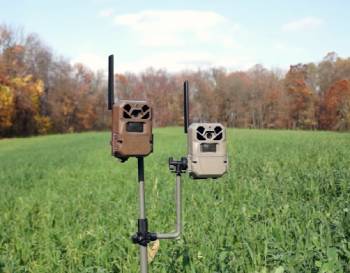
I remember the first time I hauled a box of eight cameras into a dense timber canopy; the humidity was rising, and my cell phone was barely showing a single bar of LTE service.
I was genuinely concerned that I was wasting my afternoon, as most cellular devices struggle to find a handshake in the deep woods where I place my corn feeders.
However, the setup process for the Moultrie Edge 2 Pro was surprisingly painless compared to the older generations I used to run.
I didn’t have to fiddle with multiple SIM cards to see if AT&T or Verizon had the better signal in that specific hollow; the camera’s Auto Connect feature simply found the strongest available network and locked in.
Even with my iPhone 16 Pro struggling to load a basic webpage in that same spot, the cameras were able to activate and start sending thumbnails to the app almost immediately.
I noticed that the AI identification system started categorizing images right away, separating bucks from does and even flagging “mature bucks” with impressive accuracy.
It saved me from scrolling through hundreds of photos of wind-blown branches or squirrels. I did notice that in areas where the cell service remained marginal, the power draw was significant as the camera worked harder to transmit data.
To solve this, I equipped my fleet with the 10W Gen II solar panels, and that changed the game entirely.
Even under a thick summer canopy where sunlight is at a premium, those panels kept the internal batteries topped off.
The night photos were particularly impressive; using the no-glow infrared, I could see crisp details on a big ten-pointer at 80 feet without spooking him.
I even experimented with the colorized night photo feature, which provided a unique perspective on the terrain even at lower thumbnail resolutions.
While I found myself wishing the high-res request feature was instantaneous, the overall reliability of the data transmission made me feel much more connected to the property.
I’ve had these units out through heavy rain and freezing temperatures, and they haven’t skipped a beat, proving themselves as a powerhouse for anyone serious about game management.
Maintenance and tips for your cellular trail camera
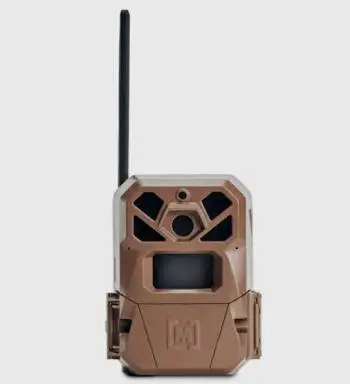
Maintaining a fleet of cellular cameras like the Edge 2 Pro requires a proactive approach to ensure they survive the elements and the local wildlife.
- Wipe the PIR sensor and lens every month: Dust, pollen, and spider webs can accumulate over the front of the camera, which can cause the AI to work harder or trigger incorrectly. A simple microfiber cloth is all you need to keep the “eyes” of your camera clear and functional.
- Check the seal on the battery compartment: Before you latch the camera onto a tree, inspect the rubber gasket for any dirt or debris. If moisture gets into the electronics, it can cause a permanent short that no warranty will cover, especially during heavy spring rains.
- Update firmware via the app regularly: Moultrie often pushes updates that improve AI detection and battery efficiency. Since the Edge 2 Pro can receive these over the air, make sure you approve any pending updates to keep the camera’s software running at peak performance.
- Use a security box in bear country: If you are hunting in areas with curious bears, a steel bear box is non-negotiable. Bears love the smell of plastic and the faint hum of electronics, and they will chew a camera off a tree in minutes if it isn’t protected by a locked metal housing.
- Position the camera north or south: To avoid the “whiteout” effect caused by the sun rising or setting directly into the lens, try to face your cameras toward the north. This also prevents the sensor from getting “heat-triggered” by the sun’s rays, which reduces the number of empty photos you receive.
- Manage your upload frequency: If you are trying to save battery, set the camera to upload twice a day rather than instantly. This allows the cellular radio to batch the images together, which uses significantly less power than firing up the transmitter for every single squirrel that passes by.
Pros and Cons of the Moultrie Edge 2 Pro
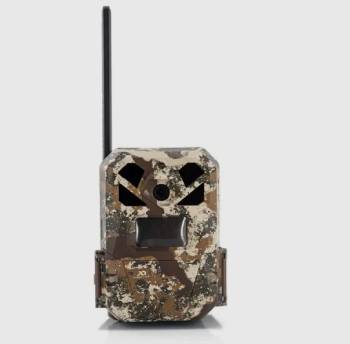
Pros of the Moultrie Edge 2 Pro
- Professional Grade 40MP Imagery: The sensor produces incredibly detailed stills that allow you to zoom in on antler points or ear notches without the image turning into a pixelated mess.
- AI-Powered Smart Capture: This is perhaps the best feature for your sanity; the onboard AI filters out false triggers from moving vegetation or shadows, ensuring your phone only pings when there is actual wildlife in front of the lens.
- Seamless Multi-Network Connectivity: You don’t have to worry about local coverage maps because the camera automatically connects to the strongest nationwide 4G LTE signal from multiple carriers.
- Impressive 100-Foot No-Glow Range: The infrared flash is completely invisible to both humans and animals, allowing you to monitor high-pressure areas without alerting your target or potential trespassers.
- Flexible Power Options: Whether you want to use standard AA batteries, rechargeable packs, or the high-efficiency 10W solar panels, the camera is designed to stay powered for an entire season.
- User-Friendly Moultrie Mobile App: The interface is clean and intuitive, making it easy to request high-res videos, check signal strength, and manage cloud storage for thousands of images from your desk.
Cons of the Moultrie Edge 2 Pro
- High Battery Consumption in Low Signal Areas: When the camera is placed in deep ravines or heavy timber where the signal is weak, the radio has to stay active longer to push files through: this results in a much faster drain on your AA batteries, making external power sources almost a requirement for remote setups.
- Delay in High-Resolution Downloads: While the camera sends thumbnails instantly, there is often a lag time between requesting a full 40MP image or 1440p video and actually seeing it in the app: this can be a minor annoyance when you are trying to confirm a specific detail on a trophy animal in real-time.
- Lack of 5G Support: Even though the Auto Connect is reliable, the hardware is limited to 4G LTE: while this is currently the standard for trail cams, users in areas where 4G is being phased out or repurposed might see a decline in upload speeds over the next several years.
- Sensitivity to Extreme Cold Without Solar Support: If you rely solely on alkaline batteries during late-season hunts in the North, the cold can significantly sap the voltage: this might lead to missed triggers or failed uploads unless you invest in the lithium battery packs or solar accessories.
- Initial Cost of Accessories: To get the most out of this camera, you really need the bear boxes for security and the solar panels for longevity: when you add these to the base price of the camera, the total investment per “scouting station” can become quite high for those on a tight budget.
- AI Filtering Can Occasionally Miss Fast-Moving Targets: While the Smart Capture is excellent for reducing trash photos, if a deer is sprinting through the frame, the AI might categorize it as “empty” if the sensor doesn’t catch enough clear body detail: you have to balance your sensitivity settings to ensure you aren’t filtering out the action you actually want to see.
Moultrie Edge 2 Pro Vs. Other Brands
- Moultrie Edge 2 Pro Vs. Tactacam Revel X Gen 2
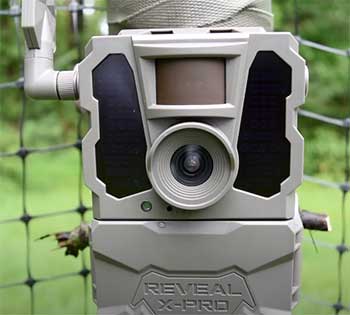
Tactacam has a massive following because of its simplicity and reliable image quality. In the comparison of Moultrie Edge 2 Pro vs. Tactacam Revel X Gen 2, the primary difference lies in the AI and network flexibility.
While the Tactacam produces great images, the Moultrie Edge 2 Pro’s Auto Connect feature is more seamless for users who don’t want to choose between a Verizon or AT&T specific model.
The Moultrie also pushes the envelope with 40MP resolution, whereas the Revel typically sits at a lower native megapixel count.
If you want the most advanced filtering to save your data plan, Moultrie’s AI is the analytical winner.
- Moultrie Edge 2 Pro Vs. Spypoint Flex-S
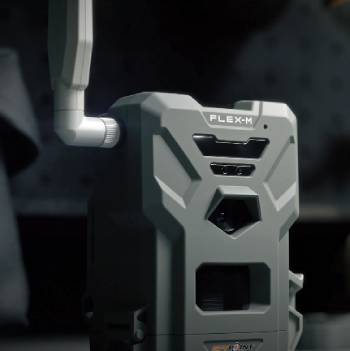
Spypoint’s Flex-S is a direct competitor because it also features multi-carrier auto-connectivity and an integrated solar panel.
Looking at Moultrie Edge 2 Pro vs. Spypoint Flex-S, the Moultrie tends to win on the software and app interface side.
Many users find the Moultrie Mobile app to be more stable and the AI tagging to be more accurate than Spypoint’s BUCK EYE technology.
Additionally, the Edge 2 Pro’s no-glow flash is superior for security applications or spook-prone mature bucks compared to the low-glow LEDs found on many Spypoint models. Moultrie’s build quality also feels a bit more rugged in the hand.
- Moultrie Edge 2 Pro Vs. Browning Defender Pro Scout
Browning is known for having some of the fastest trigger speeds in the industry. Comparing Moultrie Edge 2 Pro vs. Browning Defender Pro Scout highlights a trade-off between speed and smarts.
The Browning might catch a bird in flight a fraction of a second faster, but the Moultrie Edge 2 Pro offers a more comprehensive “smart” ecosystem.
The AI-driven Smart Capture on the Moultrie is better at preventing your phone from blowing up with 50 photos of a bush moving in the wind.
If you are managing 10 or more cameras, the organizational tools in the Moultrie app are much easier to navigate for long-term data analysis.
- Moultrie Edge 2 Pro Vs. Bushnell CelluCORE A30
Bushnell has been a staple in the trail cam world for decades, and the CelluCORE series is their answer to the cellular revolution.
In a matchup of Moultrie Edge 2 Pro vs. Bushnell CelluCORE A30, the Moultrie takes the lead in image resolution and night vision reach.
The 100-foot no-glow range on the Edge 2 Pro is noticeably more powerful than the standard LEDs on the Bushnell.
Furthermore, the Edge 2 Pro’s ability to work without an SD card (using internal memory) is a massive convenience that Bushnell hasn’t fully embraced across its lineup.
The Moultrie is simply a more modern piece of hardware for the 2026 season.
- Moultrie Edge 2 Pro Vs. Stealth Cam Deceptor
Stealth Cam’s Deceptor is another solid choice for those who want high-resolution images and cellular convenience.
In the debate of Moultrie Edge 2 Pro vs. Stealth Cam Deceptor, the Moultrie’s “Edge Detect” technology is the standout.
This technology allows the camera to trigger more reliably on the edges of the frame, capturing animals as they enter the zone rather than just as they leave it.
Stealth Cam has made great strides with their Command Pro app, but the Moultrie ecosystem still feels more polished for the “power user” who wants detailed AI classification of their deer herd.
Moultrie also offers a better range of external power accessories that are specifically tuned to the Edge 2 series.
Frequently Asked Questions (FAQs)
Yes, it is widely considered a top-tier cellular trail camera because of its 40MP resolution, AI filtering, and the ability to automatically connect to the strongest available cellular network without a manual SIM swap.
The Edge 2 features upgraded 40MP image quality, improved AI-driven Smart Capture to reduce false triggers, and enhanced internal memory options compared to the original Edge model.
Yes, it includes built-in GPS functionality that automatically pins the camera’s location on the map within the Moultrie Mobile app, which is a huge help for managing large properties.
The camera features a detection and night vision flash range of up to 100 feet, allowing you to cover wide food plots or deep timber trails with high clarity.
Final Thoughts
In the final analysis, your success in the field often depends on having the right information at the right time.
If you want a camera that does the heavy lifting of sorting images and finding signals for you, you should buy the Moultrie Edge 2 Pro for its unmatched AI capabilities and reliability.
I have found that the peace of mind knowing my cameras are active and only sending me relevant data is worth the investment every single time.
You should buy this camera today to stop guessing what is happening on your property and start seeing the results in high-definition.