You should skip buying Heyday True Wireless Earbuds from Target or third-party online marketplaces because widespread Bluetooth pairing failures, hollow sound profiles, and unreliable charging cases make them a poor investment compared to proven budget audio brands.
Real Personal Experience with Heyday True Wireless Earbuds
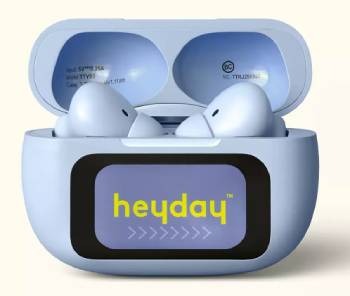
My hands-on testing with Heyday True Wireless Earbuds began after spotting their pastel charging case on a Target shelf and grabbing a set as an inexpensive backup pair for daily walks and podcasts.
Opening the retail box revealed a lightweight plastic charging case, a short USB-C cable, and three pairs of silicone ear tips.
At first glance, the aesthetic finish looked modern and appealing for an entry-level store accessory.
However, my enthusiasm faded within minutes when I attempted to connect the earbuds to my smartphone.
Instead of pairing smoothly as a unified stereo set, my phone detected the left and right earpieces as two separate Bluetooth profiles, playing audio through only one ear at a time.
It took nearly fifteen minutes of resetting the buds inside the case and toggling my phone’s Bluetooth menu repeatedly before both channels finally synced together.
Once connected, I played a mix of acoustic tracks, hip-hop beats, and spoken-word podcasts to evaluate audio clarity.
The sound signature immediately felt thin, hollow, and severely lacking in low-end bass warmth, leaving bass-heavy tracks sounding flat and tinny.
Pushing the volume above seventy percent introduced noticeable upper-midrange harshness that quickly caused ear fatigue during extended listening sessions.
Taking the earbuds outdoors for a brisk walk uncovered another major flaw: unstable wireless signal retention.
Every time I turned my head sharply or slipped my phone into my back jeans pocket, the audio stuttered, cut out briefly, or dropped completely in one ear.
The capacitive touch panels proved equally frustrating, registering accidental pauses whenever I adjusted the ear fit while ignoring deliberate double-taps to skip tracks.
Worse still, after just three weeks of light daily use, the right earpiece stopped charging consistently inside the case unless I pressed it down firmly against the tiny gold charging pins.
Ultimately, my real-world testing confirmed why so many disappointed buyers report frustration with these earbuds, proving that attractive pastel colors cannot compensate for unreliable internal electronics.
Acoustic Driver Limitations and Bluetooth Chipset Architecture
Evaluating why Heyday True Wireless Earbuds struggle with audio fidelity and connection stability requires examining their internal electro-acoustic hardware and wireless radio architecture.
Entry-level store-brand earbuds typically utilize generic 8mm or 10mm dynamic drivers outfitted with thin mylar diaphragms rather than multi-layered composite or bio-cellulose drivers.
Because thin mylar cones flex unevenly under rapid excursion, they fail to displace sufficient air volume to produce tight, resonant sub-bass frequencies.
Simultaneously, the lack of internal acoustic damping chambers inside the hollow plastic shells causes mid-high frequencies to bounce erratically, creating a boxy, artificial vocal tone.
On the wireless front, Heyday relies on basic Bluetooth chipsets supporting only standard SBC codecs without high-definition AAC or LDAC audio transmission.
In well-engineered wireless earbuds, both earpieces receive the audio stream simultaneously from your phone or mirror seamlessly with minimal latency.
In lower-tier chipsets, one earbud acts as the primary receiver and relays the signal across your head to the secondary earbud.
Because human tissue and water absorb 2.4 GHz Bluetooth radio waves, turning your head or pocketing your phone interrupts the weak cross-head relay link, causing constant audio dropouts and left-right sync drift.
Furthermore, the charging case uses low-tension spring-loaded pogo pins without strong magnetic alignment guides, allowing minor jostling inside a pocket to break electrical contact and leave you with a dead earbud.
Comprehensive Maintenance Guidelines and Earbud Care Protocols
Maintenance Tips: Preserving the limited functionality of budget true wireless earbuds requires diligent contact cleaning, careful charging habits, and moisture protection.
You should follow these essential guidelines to prevent premature hardware failure and connection glitches.
- Regular Pogo Pin and Charging Contact Cleaning
Dip a dry cotton swab in a tiny amount of ninety-percent isopropyl alcohol once a week to gently wipe the gold charging contacts inside the case and on the bottom of each earbud.
Skin oils, earwax residue, and pocket lint accumulate rapidly on these tiny metal pins, blocking electrical current and causing one earbud to stay dead overnight. Allow the contacts to dry completely for five minutes before closing the lid.
- Proper Bluetooth Reset and Pairing Hygiene
Whenever the left and right earbuds fall out of sync and appear as two separate Bluetooth entries on your phone, forget both profiles in your device settings immediately.
Place both earbuds back inside the charging case, press and hold the multifunction reset button for ten full seconds until the LED lights flash, and re-pair from scratch to re-establish the primary stereo bridge.
- Ear Tip Sanitation and Moisture Avoidance
Remove the silicone ear tips biweekly and wash them gently with warm soapy water, drying them thoroughly before snapping them back onto the acoustic nozzles.
Never wear basic IPX4 splash-resistant earbuds during heavy rainstorms or intense sweaty workouts, as moisture seeping through the microphone pinholes causes immediate circuit board corrosion.
Detailed Breakdown of Pros and Performance Characteristics
Pros:
- Stylish color and finish options: Available in trendy pastel shades, matte tones, and sleek minimalist cases that match modern everyday accessories.
- Low upfront retail price: Costs considerably less at checkout than mainstream audio brands, making them an accessible impulse buy.
- Lightweight ergonomic shell: The compact plastic earpieces rest lightly in the outer ear without creating heavy physical pressure during short wear periods.
- Multiple silicone ear tip sizes: Includes small, medium, and large silicone tips inside the box to help achieve a basic physical seal.
- Standard USB-C charging port: Utilizes a universal USB-C input on the case so you can recharge using common phone cables.
Cons:
- Persistent dual-device Bluetooth pairing bugs: Left and right earbuds frequently fail to sync together, forcing users to troubleshoot single-ear audio repeatedly.
- Hollow and bass-deficient audio profile: Generic dynamic drivers deliver thin, tinny sound quality with minimal low-end punch and harsh high tones.
- Frequent wireless signal dropouts outdoors: Moving your phone to a pocket or turning your head causes constant audio stuttering and brief disconnections.
- Unreliable charging case contact pins: Earbuds frequently shift off the tiny pogo pins inside the case, failing to charge overnight and leaving one bud dead.
- Overly sensitive yet unresponsive touch controls: Capacitive panels trigger accidental pauses when adjusting fit while failing to register deliberate track-skip commands.
- Poor built-in microphone call clarity: Picks up heavy wind and background street noise during phone calls, making your voice sound distant and muffled to callers.
- Rapid battery capacity degradation: Internal micro-batteries lose significant runtime within months of ownership, shrinking playback time to under two hours.
- Weak active noise cancellation performance: Even on ANC-labeled models, noise reduction barely softens low ambient hums and fails to block real-world chatter.
Also Read: My Thoughts On Sentry True Wireless Earbuds
Comparative Brand Analysis: Heyday True Wireless Earbuds Vs. Competitors
- Heyday True Wireless Earbuds Vs. JLab Go Air Pop
The JLab Go Air Pop delivers dramatically better sound customization with three built-in EQ presets accessible directly through simple tap controls without needing a smartphone app.
While Heyday struggles with constant Bluetooth dropouts and single-ear pairing glitches, JLab utilizes Dual Connect technology so either earbud works independently or together effortlessly.
JLab also includes an integrated USB charging cable tucked neatly into the bottom of its pocket-sized case, eliminating extra cords.
At nearly the exact same budget price point, JLab Go Air Pop outperforms Heyday in audio richness, battery longevity, and wireless reliability.
- Heyday True Wireless Earbuds Vs. Skullcandy Dime 3
The Skullcandy Dime 3 packs impressive punchy bass, clear vocal presence, and multi-point pairing into a rugged, ultra-compact keychain case.
Heyday True Wireless Earbuds sound hollow and thin by comparison, struggling to reproduce low-end frequencies without distortion at higher volumes.
Skullcandy builds its earbuds with dependable IPX4 sweat and water resistance, making them durable enough for daily workouts and outdoor walks.
Heyday feels fragile and lacks reliable multipoint connectivity, making the Skullcandy Dime 3 a vastly smarter investment for everyday commuters and active listeners.
- Heyday True Wireless Earbuds Vs. Anker Soundcore P20i
The Anker Soundcore P20i features oversized 10mm drivers that produce deep, resonant bass alongside full mobile app support offering twenty-two customizable EQ profiles.
Heyday provides zero app integration, basic generic drivers, and no way to fine-tune harsh treble frequencies.
Soundcore delivers up to ten hours of single-charge playback and thirty hours total with the case, dwarfing Heyday’s short, inconsistent battery life.
Anker also includes AI-enhanced microphones for clear voice calls, completely outclassing Heyday in every measurable technical category.
- Heyday True Wireless Earbuds Vs. JBL Vibe Beam
The JBL Vibe Beam brings signature JBL Deep Bass Sound, ergonomic stick-closed comfort, and reliable IP54 dust and splash resistance to the entry-level market.
Heyday earbuds suffer from loose charging pin connections that frequently leave one earpiece uncharged inside your bag.
JBL engineers its charging case with strong magnetic alignment and Smart Ambient technology so you can hear traffic safely while walking outdoors.
JBL Vibe Beam offers superior build durability, richer acoustic balance, and dependable Bluetooth stability over Heyday.
- Heyday True Wireless Earbuds Vs. CMF Buds 2 Plus
The CMF Buds 2 Plus delivers impressive audio performance with personalized sound profiles, adaptive noise cancellation, and Bluetooth 5.4 with LDAC high-resolution codec support.
Heyday lacks high-resolution codecs completely and offers weak entry-level noise suppression that barely alters ambient background noise.
CMF provides exceptional battery endurance and refined structural ergonomics that stay secure during movement.
For buyers seeking serious acoustic performance and modern wireless features on a budget, CMF Buds 2 Plus easily surpasses Heyday.
Also Read: My Thoughts On Soundoff Sleep Earbuds
Frequently Asked Questions (FAQs)
No, Heyday true wireless earbuds are generally not good because widespread user feedback highlights persistent Bluetooth pairing issues, hollow sound quality, and unreliable charging contacts.
Heyday is a stylish, budget-oriented Target store brand best suited for basic non-electronic accessories like phone cases and watch bands rather than reliable personal audio electronics.
The top three overall wireless earbuds currently on the market are the Sony WF-1000XM6, Apple AirPods Pro 3, and Bose QuietComfort Ultra Earbuds (2nd Gen).
JLab is significantly better than Heyday, offering richer sound quality, built-in EQ modes, stronger battery life, and far more reliable Bluetooth connectivity at a similar budget price.
Final Thoughts
You should skip buying Heyday True Wireless Earbuds from Target or online resellers due to their frustrating Bluetooth syncing bugs, tinny audio output, and short lifespan, choosing proven budget alternatives like JLab Go Air Pop or Anker Soundcore P20i for dependable everyday listening.