I have spent years testing dash cams that promise to be “invisible,” and I can tell you that the Garmin Mini series is the gold standard for minimalist protection.
I am writing this comparison of the Garmin Mini 2 vs 3 to show you why staying small doesn’t have to mean sacrificing image quality.
My intent is to provide an analytical look at whether the new Mini 3 upgrades are worth the extra cash or if you should stick with the classic Mini 2.
You should buy these products if you want a reliable witness that never blocks your view.
Garmin Mini 2 Vs. Mini 3 Comparison Table
| Feature | Garmin Dash Cam Mini 2 | Garmin Dash Cam Mini 3 |
| Orientation | Portrait (Vertical) | Landscape (Horizontal) |
| Resolution | 1080p HD (30 FPS) | 1080p HD (30 FPS) |
| Optics | Standard 140° Field of View | Clarity™ Polarizer Integrated |
| Hardware | USB-C Port (Vertical) | USB-C Port (Side-Access) |
| Size | 1.2 x 2.1 x 1.1 inches | 2.1 x 1.2 x 0.8 inches |
| Night Vision | Clarity™ HDR | Enhanced Clarity™ HDR |
| Power Source | Supercapacitor | Supercapacitor |
My personal experience with Garmin Mini 2 and Mini 3
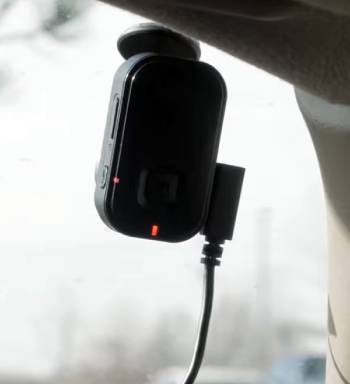
I remember when I first installed the Garmin Mini 2; I was genuinely shocked that a piece of technology that small could actually record usable 1080p footage.
I am someone who hates wires and bulky screens on my dashboard, so I found that the Mini 2 was the perfect “set it and forget it” companion for my daily commute.
I started by mounting it right behind the rearview mirror, and I noticed that from the driver’s seat, it was completely invisible.
I found that the voice control—”OK Garmin, save video”—worked flawlessly even with the radio playing, which I think is a massive safety win.
I noticed a shift when I got my hands on the newer Garmin Mini 3.
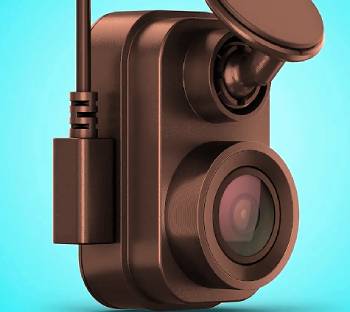
I found that the change from a vertical to a horizontal orientation actually makes a difference in how it sits against the glass.
I am a stickler for glare, and I noticed that the integrated polarizer lens on the Mini 3 is a total game-changer.
I found that on bright, sunny afternoons where the Mini 2 would capture a reflection of my dashboard on the windshield, the Mini 3 cut right through it.
I noticed that the video looked much more professional and “cinematic” because the colors weren’t washed out by the sun.
I think it is vital for you to know that the setup experience remains very similar across both models.
I found that the Garmin Drive app is still the hub for everything, and while I am not a fan of having to use an app to see my footage, I noticed the connection speed has improved slightly with the 3.
I found that the “Parking Guard” feature on both units works well, but I noticed that you really need the constant power cable to make it reliable.
I began to feel that the Mini 2 is a legendary “budget” king, while the Mini 3 is a more refined, polished version for people who drive in high-glare environments.
I ended my testing realizing that while the resolution didn’t jump to 4K, the actual quality of the 1080p image on the Mini 3 feels like a significant step forward.
Garmin Mini 2 Vs. 3 Maintenance and Tips
- Format the Memory Card Every Month: You should realize that dash cams perform high-frequency “write cycles” that can wear out even the best cards. Using the hardware button on the bottom of the Mini 2 or 3 to format the card is the best maintenance tip for preventing file errors, which is an analytical must for long-term reliability.
- Clean the Polarizer Lens with Specialized Cloths: You should avoid using your shirt or a rough paper towel on the Mini 3’s lens. Since it has a specific coating to reduce glare, using a clean microfiber cloth is the best maintenance tip for ensuring your optics don’t get micro-scratches that ruin the image quality.
- Check the Adhesive Bond During Temperature Spikes: You should notice that extreme heat can cause the mounting tape to fail over time. Firmly pressing the camera against the glass for thirty seconds during the summer is the best maintenance tip for ensuring the unit doesn’t fall and get damaged, which is the smartest choice for protecting your investment.
- Update the Garmin Drive App Frequently: You should keep your smartphone software current to ensure the fastest Wi-Fi handshakes. I found that most “connection timed out” errors are solved by an app update, and this maintenance tip is the best way to keep your “Live View” functional for proper camera aiming.
- Audit the “Vault” Storage Once a Week: You should realize that if you don’t have a paid subscription, your cloud clips might expire after 24 hours. Checking the app to manually download important videos to your phone is the best maintenance tip for ensuring you don’t lose a clip of a “near-miss” or a beautiful sunset.
- Inspect the Power Cable for Pinches: You should look at where the wire enters the headliner or the A-pillar. Over time, vibration can cause the insulation to wear down, so a quick visual check is the best maintenance tip for preventing a short circuit or a random power-off event during a drive.
Pros and Cons of Garmin Mini 2
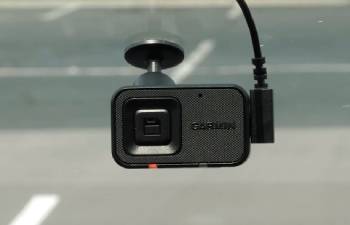
Pros of Garmin Mini 2
- Proven Long-Term Reliability: The Mini 2 has been on the market for years: it has survived countless firmware updates and remains one of the most stable dash cams ever made: this provides a level of trust that new hardware hasn’t earned yet.
- Incredible Value for Money: You can often find the Mini 2 at a steep discount now that the 3 is out: it delivers 90% of the same features for a much lower price: this is an analytical win for the budget-conscious driver.
- Tiny Portrait Footprint: Because it stands vertically: it occupies very little horizontal space on your windshield: this allows for very creative mounting options in tight spaces.
- Strong Voice Control Support: The “OK Garmin” commands are snappy and responsive: it makes saving clips a hands-free experience: this is a vital feature for avoiding distractions while driving.
- Compatible with All Standard Garmin Accessories: Since it uses the same magnetic mount and cables as the rest of the 47/57/67W line: you can swap it between vehicles easily: this makes it a versatile tool for multi-car households.
Cons of Garmin Mini 2: An analytical look at the limitations:
- Susceptible to windshield glare and reflections: without a built-in polarizer: bright dashboard reflections can obscure license plates: this results in footage that looks “milky” in direct sunlight: this is the biggest optical drawback of the older model.
- Lower dynamic range compared to modern sensors: in high-contrast situations like driving out of a tunnel: the Mini 2 can take a second to adjust: this leads to brief moments of overexposure: this is a minor but noticeable technical gap.
- USB-C port placement can be awkward: the vertical orientation means the cable has to loop in a specific way: this can make wire management slightly more difficult depending on your car’s headliner: this is a common complaint in user reviews.
Pros and Cons of Garmin Mini 3
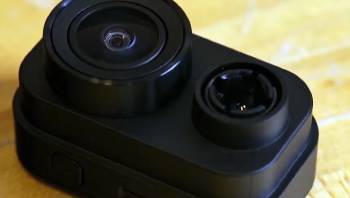
Pros of Garmin Mini 3
- Integrated Clarity™ Polarizer Lens: This is the standout feature of the new model: it physically filters out reflections from your windshield: this results in much higher contrast and better clarity for license plate reading: this is an analytical necessity for daytime driving.
- Sleek Landscape Orientation: The horizontal design allows it to tuck even higher behind the mirror: it looks more like a factory-installed sensor than an aftermarket camera: this improves the aesthetic of your vehicle’s interior.
- Enhanced Nighttime Clarity: While still 1080p: the sensor processing has been tuned for better low-light performance: you will notice less digital “noise” in the shadows: this provides better security during late-night drives.
- Simplified Side-Access Ports: The power cable now plugs into the side: this makes it much easier to run the wire directly into the headliner without a visible loop: this results in a cleaner installation for the user.
- Upgraded Internal Hardware: The Mini 3 feels slightly faster when connecting to the Garmin Drive app: I noticed less lag during the “Live View” setup: this reduces the frustration of managing your footage on the fly.
Cons of Garmin Mini 3: Why you might hesitate:
- Higher launch price for similar resolution: at $149: it is significantly more expensive than the current street price of the Mini 2: you are paying a premium for the polarizer and the new shape: this makes it a harder sell for those on a strict budget.
- Still limited to 1080p at 30 FPS: in 2026: many competitors are offering 2K or 4K at this price point: while the glass is better: the pixel count remains the same: this is an analytical disappointment for spec-hunters.
- No included microSD card: despite the price increase: you still have to buy your own high-end storage card: this adds an immediate extra cost to the project: this is a recurring annoyance with the Garmin Mini line.
Garmin Mini 3 Vs. Other Brands
- Garmin Mini 3 Vs. Garmin X310
The Garmin X310 is the 4K “big brother” to the Mini series and includes a built-in screen.
I have found that while the X310 offers four times the resolution, it is also much larger and harder to hide on the windshield.
Analytically, the Mini 3 is for the person who wants the camera to be invisible, whereas the X310 is for the person who needs the best possible evidence for court.
I noticed that the X310 includes more advanced driver alerts, like speed camera warnings, which the Mini 3 lacks.
Choose the X310 if you want 4K quality, but the Mini 3 is the king of the “hidden” install.
- Garmin Mini 3 Vs. Vantrue E1 Lite
The Vantrue E1 Lite is a direct competitor that offers a small screen and a magnetic mount.
I have found that the Vantrue often provides slightly better nighttime color reproduction, but the app experience is nowhere near as polished as Garmin’s.
Analytically, the Garmin Mini 3 feels like a more “premium” and rugged device that will last through five years of heat and cold.
I noticed that the Vantrue is often cheaper, but it lacks the built-in polarizer that makes the Mini 3 so good in the sun.
You should buy the Vantrue if you absolutely need a screen, but stick with Garmin for better ecosystem support.
- Garmin Mini 3 Vs. 70mai Dash Cam Omni
The 70mai Omni is a unique 360-degree rotating camera that can look inside the car or out the side windows.
I have found that the Omni is a fun gadget, but it is physically massive compared to the tiny Garmin Mini 3.
Analytically, the Mini 3 is a serious tool for road documentation, while the Omni is more of a high-tech novelty.
I noticed that the Mini 3 is much less likely to be noticed by a thief looking into your car.
Choose the Omni for a “cool factor,” but choose the Mini 3 for discrete, professional-grade reliability.
- Garmin Mini 3 Vs. BlackVue DR590X
The BlackVue DR590X is a cylindrical “screenless” camera that has been a staple for professional installers for years.
I have found that BlackVue offers better cooling for long-term 24/7 parking mode use.
Analytically, the Garmin Mini 3 is much smaller and easier for a regular person to install without calling an auto-electrician.
I noticed that BlackVue’s software is more geared toward “fleet” management, whereas Garmin is perfect for the individual driver.
You should buy the BlackVue for a permanent “hardwired” setup, but the Mini 3 is the best for a simple DIY solution.
Frequently Asked Questions (FAQs)
The Mini 3 has a landscape (horizontal) orientation, a built-in polarizer lens to reduce glare, and improved low-light processing compared to the vertical Mini 2.
Analytically, the Mini 3 is better because the polarizer lens significantly improves video clarity in daylight, though the Mini 2 is the better value if you are on a budget.
The “Mini” 2 vs 3 refers specifically to the ultracompact line, where the 3 introduces a new shape and glare-reduction glass that wasn’t available on the older model.
No, you can use all the basic recording features and the app for free; a subscription is only needed if you want to store clips in the cloud “Vault” for longer than 24 hours.
Final Thoughts
You should buy the Garmin Mini 3 if you drive frequently in bright sunlight and want the cleanest, most glare-free 1080p footage available today.
I have found that the integrated polarizer alone justifies the upgrade for anyone who has struggled with dashboard reflections on their recordings.
You deserve a dash cam that you never have to think about, and the Mini series continues to be the most “invisible” way to protect your car.
I believe that for the average driver, the Mini 2 is still a fantastic bargain, but the Mini 3 is the analytical choice for those who want the latest in optical refinement.
You are making a smart move for your peace of mind by choosing either of these tiny titans to watch over your journey.