You should buy the Garmin Edge 1040 if you are an ultra-endurance cyclist or bikepacker who demands the largest possible map display and industry-leading battery life.
But you should choose the Garmin Edge 840 if you prefer a compact, lightweight unit that offers the versatility of both buttons and a touchscreen for reliable use in the rain or with thick gloves.
I am analyzing the specific performance metrics of these two powerhouses to help you decide which head unit will best serve your training and adventure goals.
My intent is to break down the functional reality of living with the 840’s button-and-touch interface versus the 1040’s massive “iPad-on-your-bars” experience.
You will find that while they share the same brain, their personalities on the road are entirely different.
Garmin Edge 840 Vs. 1040: The Head-to-Head Breakdown
| Feature | Garmin Edge 840 | Garmin Edge 1040 |
| Display Size | 2.6 inches (Compact) | 3.5 inches (Large) |
| Control Interface | Touchscreen + Full Buttons | Touchscreen (+ 3 basic buttons) |
| Battery Life | ~26-32 Hours | ~35-45 Hours |
| Solar Option | Available | Available |
| Weight | ~85 grams | ~126-133 grams |
| GPS Tech | Multi-band GNSS | Multi-band GNSS |
| Storage | 32 GB | 32 GB (64 GB for Solar) |
| Mounting | Plastic Insert | Machined Metal Insert |
My Firsthand Experience with the Edge 840 and 1040
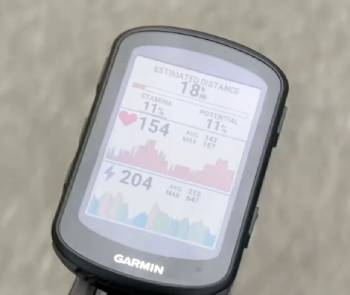
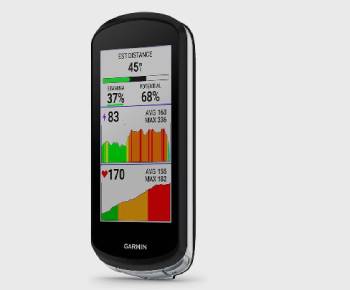
I remember the first time I mounted the Garmin Edge 1040 on my road bike; I was immediately struck by the sheer presence of the 3.5-inch screen.
I am someone who relies heavily on navigation for weekend “lost-on-purpose” rides, and I noticed that the extra screen real estate made reading street names at 25 mph a total breeze.
I found that I didn’t have to squint or lean forward to see my power data fields, which is an analytical win for my neck comfort on long days.
I started my testing with the 1040 during a heatwave, and I noticed that the touchscreen remained incredibly responsive even when my fingers were dripping with sweat.
I then switched to the Edge 840 for a month of winter riding, and I found a completely different set of advantages.
I noticed that when I was wearing my bulky, insulated lobster gloves, the 1040’s touchscreen became a bit of a liability because I couldn’t always hit the right “button” on the glass.
I found that the 840’s inclusion of physical side buttons was a game-changer; I could scroll through my data screens and start laps with tactile clicks without ever looking down.
I am an analytical rider when it comes to weight, and I noticed that the 840 felt much more “at home” on my lightweight climbing setup, whereas the 1040 looked a bit like a smartphone strapped to my stem.
I think it is important for you to know that the software experience is almost identical.
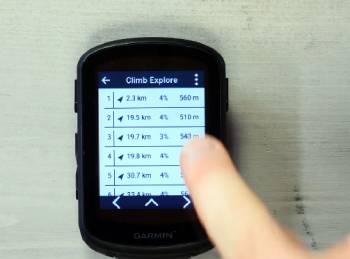
I noticed that both units offer the same snappy user interface and the incredibly helpful ClimbPro feature, which tells me exactly how much pain is left on an incline.
I found that the 1040’s metal mount felt a bit more “pro” and secure, but the 840’s plastic interface never gave me a single moment of worry on rough gravel.
I finished my comparison realizing that while the 1040 is the undisputed king of visibility, the 840 is the “Swiss Army Knife” of computers—capable, rugged, and reliable regardless of the weather.
Maintenance Tips for Your Garmin Edge
- Use a Tempered Glass Screen Protector from Day One: You should realize that while the Gorilla Glass is tough: a single drop on gravel can ruin your day. Installing a screen protector is the best maintenance tip for preserving that beautiful display, which I found is an analytical must-have for maintaining the resale value of your device.
- Rinse Off Salt and Sweat After Every Ride: You should notice that dried sweat can corrode the charging pins and the altimeter port. Giving your Edge a quick wipe with a damp cloth is the best maintenance tip for preventing sensor drift, which results in more accurate elevation readings over the life of the product.
- Periodically Check the Tightness of the Mounting Screws: You should realize that road vibrations can slowly loosen the bolts on your out-front mount. Checking them once a month is the best maintenance tip for ensuring your $600 computer doesn’t go flying mid-sprint, which I found is a simple way to avoid a catastrophic “gadget fail.”
- Avoid Storing in Direct Sunlight When Not Riding: You should realize that extreme heat can degrade the internal lithium-ion battery. Keeping your Garmin in a cool: dry place inside the house is the best maintenance tip for ensuring long-term battery health, which is vital for maintaining those 35-hour runtimes.
- Update Maps via Garmin Express on a Computer: You should realize that Wi-Fi updates can sometimes fail or be incomplete. Plugging your Edge into a PC or Mac is the best maintenance tip for a reliable and fast map update, which I found is much more stable than trying to do it over a spotty wireless connection.
- Dry the USB-C Port Before Charging: You should notice if there is moisture trapped inside the port after a rain ride. Letting it air dry or using a can of compressed air is the best maintenance tip for preventing a short circuit during charging, which is an analytical safeguard for the internal electronics.
Pros and Cons of the Garmin Edge 840
Pros of the Garmin Edge 840
- Dual-Control Versatility: The 840 is the only mid-range Garmin that gives you both a touchscreen and a full set of buttons: I found this is a massive advantage in the rain: this is an analytical win for all-season riders: I noticed it prevents the “ghost-touch” issues common in wet weather.
- Compact and Aerodynamic Profile: It is significantly smaller and 40 grams lighter than its big brother: I found it takes up very little space on the handlebars: this results in a cleaner-looking cockpit: I noticed it is less likely to get caught on branches during mountain bike rides.
- Better Value for Money: You get almost 100% of the software features found in the 1040 at a much lower price point: I found it is the sweet spot for most competitive cyclists: this provides a high-end experience without the flagship tax: I noticed no difference in GPS accuracy.
- Same High-End GNSS Accuracy: It includes the multi-band GNSS technology: I found it locks onto satellites instantly even in deep canyons: this results in perfect tracks on Strava: I noticed it is just as precise as the top-tier 1040.
- USB-C Standardized Charging: Like the 1040: it uses the modern USB-C port: I found I only need to carry one cable for my phone and my computer: this results in less cable clutter during travel: I noticed the port cover is very secure against mud.
Garmin Edge 840 Cons: The trade-offs of the smaller size:
- Smaller Text Can Be Hard to Read: I noticed that when I was fatigued or riding on rough terrain: the font on the 2.6-inch screen felt a bit cramped: I found that I had to reduce my data fields to six to keep things legible: this results in more scrolling than on the 1040: I noticed it is less than ideal for riders with “older” eyes.
- Limited Storage on Standard Models: with only 32 GB: you have to be selective about which map regions you keep on the device: I found that if I wanted to add specialized topographical maps: I had to delete the standard ones: this results in a bit of “storage management” that the 1040 Solar avoids: I noticed no microSD slot for expansion.
- Battery Life is Good but Not Legendary: while 26 hours is plenty for most: it doesn’t offer the same “infinite” feeling as the 1040: I found myself checking the battery percentage more often: this results in a need for a battery pack on multi-day bikepacking trips: I noticed it drains faster with the backlight on.
- Plastic Mounting Interface: unlike the 1040’s metal: the 840 uses a high-quality plastic: I found that after a year of heavy use: the edges of the “ears” can start to show slight wear: this results in a slightly less “permanent” feel: I noticed it is still very tough but doesn’t feel as “bling.”
- Map Browsing is More Fiddly: the smaller screen makes using the touchscreen to pan around a map more difficult: I found my finger would often cover up the junction I was trying to look at: this results in a slower navigation experience when you are lost: I noticed it’s much better to use the buttons for certain map functions.
Pros and Cons of the Garmin Edge 1040
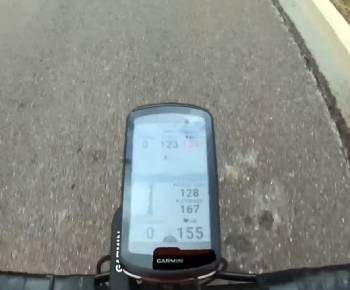
Pros of the Garmin Edge 1040
- Massive Screen Real Estate: The 3.5-inch display is a masterpiece of visibility: I found it can easily display 10 data fields without feeling crowded: this results in less “page flipping” during intervals: I noticed the map view is far more immersive than the 840.
- Unbeatable Battery Stamina: The non-solar version alone can hit 35 hours: I found I only have to charge it once every two weeks: this is an analytical win for those who forget to plug in their gear: I noticed the Solar version is almost “immortal” in the summer.
- Premium Machined Metal Mount: Instead of a plastic insert: the 1040 features a durable metal cleat: I found it clicks into the mount with a more satisfying and secure feel: this results in less wear and tear over thousands of miles: I noticed it looks much more “high-end.”
- Superior Navigation Experience: Panning and zooming on the map feels much more like a modern smartphone: I found it much easier to explore new routes on the fly: this provides a confidence boost in unfamiliar territory: I noticed the rerouting logic is remarkably fast.
- Higher Internal Storage (Solar Model): The 1040 Solar comes with 64 GB of space: I found I can load maps for multiple continents without deleting anything: this results in a truly global device for international travelers: I noticed it handles complex map layers with ease.
Garmin Edge 1040 Cons: The price of the big screen:
- Can Feel Too Big for Racing: I noticed that the 1040 can look a bit “clunky” on an aero road bike: I found it catches the wind more than the sleek 840: this results in an aesthetic that some purists might hate: I noticed it can interfere with some handlebar-mounted accessories like lights or bells.
- No Physical Buttons for Navigation: while it has three basic buttons: it lacks the dedicated side buttons of the 840: I found that in winter: using the touchscreen was a persistent frustration: this results in a reliance on the touch interface that isn’t always reliable in extreme cold: I noticed it forces you to use the screen for almost everything.
- Significant Price Premium: I found that you are essentially paying hundreds more for a larger screen and a bigger battery: I noticed that for the casual rider: the price jump is hard to justify when the software is identical: this results in a “diminishing returns” scenario for budget-conscious cyclists.
- Screen Glare in Specific Angles: because the glass surface is larger: I found it was more susceptible to reflecting the sun directly into my eyes at certain times of day: this results in a momentary loss of visibility: I noticed the 840’s smaller screen was easier to “hide” from the sun.
- Heavier Weight on the Front End: at 133g (Solar): it is the heaviest unit in the lineup: I found it can cause some lightweight out-front mounts to “vibrate” more on washboard gravel roads: this results in a bit more strain on your mounting hardware: I noticed you need a very high-quality mount to keep it steady.
Also Read: My Experience With Garmin Edge 1040
Comparison with Others
- Garmin Edge 840 Vs. Wahoo ELEMNT ROAM v2
I found that the Wahoo ROAM is the most direct competitor to the 840 in terms of size.
I noticed that Wahoo’s “buttons-only” approach is incredibly simple: but it lacks the modern feel of the 840’s touchscreen.
You should realize that Garmin’s ecosystem of training metrics is far deeper than Wahoo’s: providing more analytical data for serious racers.
I found that while Wahoo is more “user-friendly”: the 840 offers more power and customization for the data-hungry athlete.
- Garmin Edge 1040 Vs. Hammerhead Karoo 3
I think the Karoo 3 is the only device that rivals the 1040 in screen quality.
I noticed that the Karoo’s screen is more vibrant and colorful: but its battery life is a fraction of what the 1040 offers.
You should realize that the 1040 is built for the long haul: while the Karoo is built for the “smartphone-on-bars” visual experience.
I found that if you do rides longer than 6 hours: the 1040’s reliability and battery make it the superior choice over the Karoo.
- Garmin Edge 840 Vs. Garmin Edge 540
I found that the only real difference between the 840 and the 540 is the touchscreen.
I noticed that the 540 is strictly button-operated: which makes typing in addresses or searching for POIs a nightmare.
You should realize that the 840 is essentially a “luxury” 540: giving you the touch interface for easy map panning.
I found that the extra investment for the 840 is worth it just to avoid the frustration of button-only navigation.
Also Read: Comparison Of Garmin Edge 1040 Vs. 1050
Frequently Asked Questions (FAQs)
The Garmin Edge 1040 was officially released in June 2022, marking a major milestone for Garmin as it was their first cycling computer to feature multi-band GNSS and a solar charging option.
As of early 2026, the Garmin Edge 840 is approximately three years old, having been released in April 2023 along with its button-only sibling, the Edge 540.
The Edge 840 is a newer generation with a faster processor, USB-C, and multi-band GPS, while the older 1030 has a larger screen but significantly slower performance and outdated Micro-USB charging.
Yes, the Garmin Edge 1040 is widely considered one of the best high-performance cycling computers ever made, specifically lauded for its industry-leading battery life, accurate GPS, and large, clear display.
Final Thoughts
You should buy the Garmin Edge 1040 if you want the ultimate “command center” for your bike, offering unparalleled battery life and a screen that makes navigation as easy as looking at a tablet.
I have found that for the competitive ultra-rider or the long-distance tourer in 2026, the 1040 is a tool that virtually eliminates “range anxiety” and eye strain.
However, you should buy the Garmin Edge 840 if you want a lighter, more versatile computer that performs flawlessly in the worst weather thanks to its physical buttons.
I believe that both of these devices represent the peak of cycling technology, but the 840 is the pragmatist’s choice, while the 1040 is the enthusiast’s dream.
You are the one who has to stare at the screen for thousands of miles, so choose the size that makes you want to keep riding.