You should buy the Garmin Edge 1050 if you are a tech enthusiast who demands a vibrant, smartphone-quality display and a snappy processor for instant map rendering, but you should choose the Garmin Edge 1040 if you are an endurance cyclist or bikepacker who prioritizes multi-day battery life and the efficiency of a solar-charging screen.
I am exploring the specific differences between these two flagship navigators to help you determine which one deserves a spot on your handlebars.
My intent is to analyze how the Edge 1050’s brilliant liquid-crystal display stacks up against the Edge 1040’s legendary stamina.
You will find that the choice comes down to whether you value “visual pop” or “infinite power.”
Garmin Edge 1040 Vs. 1050: Quick Comparison
| Feature | Garmin Edge 1040 (Solar) | Garmin Edge 1050 |
| Display Type | Transflective Memory-in-Pixel (MIP) | High-Resolution LCD (Vibrant) |
| Resolution | 282 x 470 pixels | 480 x 800 pixels |
| Battery Life | Up to 35-45 Hours (Solar) | Up to 20 Hours |
| Speaker | Internal Beeper (Piezo) | Built-in Loudspeaker (Voice/Bell) |
| Payment Tech | No Garmin Pay (Standard) | Garmin Pay Supported |
| Weight | 126g – 133g | 161g |
| New Features | Classic UI, Trusted Stability | Road Hazards, GroupRide Awards, Bell |
My Firsthand Experience with the Edge 1040 and 1050
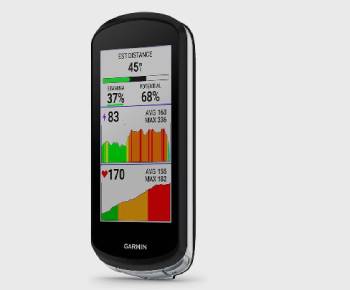
I remember the first time I powered up the Edge 1050 after using the 1040 for a year; it felt like I had finally traded in an old e-reader for a modern flagship smartphone.
I am someone who frequently rides in changing light conditions, and I noticed right away that the 1050’s screen is startlingly bright, reaching 1,000 nits of peak brightness.
I found that during high-speed descents through dappled forest shadows, the 1050’s high resolution made it much easier to spot tight hairpins on the map.
I noticed that while the 1040’s screen can look a bit “dull” or washed out in low light, it absolutely thrives in direct, harsh noon-day sun where the 1050 has to crank its backlight to compete.
I started my test of the 1050 with a group of friends, and I found the new “Road Hazard” alerts to be a genuine lifesaver when a pothole was flagged by a rider ahead of us.
I eventually took both units on a back-to-back weekend gravel trip to see how they handled the “endurance” factor.
I am an analytical rider, so I watched the battery percentages like a hawk.
I found that after a six-hour day with full navigation and sensors connected, the Edge 1040 Solar still had a staggering 85% battery remaining.
I noticed that the Edge 1050, despite its beauty, had dropped to 65% in the same timeframe.
I found that the 1050’s speaker is a massive quality-of-life upgrade; hearing actual voice prompts like “Turn left in 500 feet” is much more intuitive than the 1040’s rhythmic chirping.
I think it is vital for you to know that the physical heft of the 1050 is noticeable.
I found that on my lightweight climbing bike, the extra 35 grams and the slightly bulkier casing made the cockpit feel much more crowded.
I noticed that the 1050’s mounting point is slightly shifted, which meant I had to adjust my out-front mount to keep it centered.
I found that the touch responsiveness on the 1050 is significantly better, almost on par with an iPhone, whereas the 1040 can sometimes feel a bit “lumbering” when panning across a heavy map file.
I ended my trial realizing that while I love the “eye candy” of the 1050, the 1040 is still the tool I would trust for a 200-mile unsupported adventure.
Maintenance Tips for Your Garmin Edge
- Always Use the Included Tether: You should realize that even the best mounts can fail during a crash or on rough gravel. Attaching the lanyard to your handlebars is the best maintenance tip for preventing your $700 computer from bouncing down the road, which is an analytical necessity for protecting your investment.
- Clean the USB-C Port After Muddy Rides: You should notice that grit and grime can easily build up in the charging port. Using a soft: dry toothbrush to flick out dirt is the best maintenance tip for ensuring a solid charging connection every time, which I found prevents those “not charging” error messages.
- Apply a Tempered Glass Screen Protector: You should realize that while the screens are durable: they are susceptible to scratches from grit on your gloves. Installing a protector is the best maintenance tip for preserving the resale value and clarity of your display, which results in a much better viewing experience over the years.
- Avoid High-Pressure Water Near the Buttons: You should realize that while these are IPX7 waterproof: a pressure washer can force water past the seals. Using a damp cloth to clean the casing is the best maintenance tip for preventing internal moisture damage, which I found is the most common cause of button failure.
- Periodically Re-Grease the Quarter-Turn Mount: You should notice if the “snap” when you lock the device feels a bit gritty. A tiny dab of silicone grease on the mount interface is the best maintenance tip for preventing wear on the plastic tabs, which is a smart analytical rule for long-term durability.
- Perform a Monthly Software Sync via Wi-Fi: You should realize that Garmin releases “Hazard” and “Map” updates frequently. Connecting to your home Wi-Fi and checking for updates is the best maintenance tip for ensuring your navigation is accurate, which I found is much faster than syncing through the phone app.
Pros and Cons of the Garmin Edge 1040
Pros of the Garmin Edge 1040
- Legendary Battery Longevity: The 1040 is the undisputed king of endurance: I found it can easily handle a week of riding without a charge: this is an analytical win for bikepackers: I noticed it outlasts every other computer on the market.
- Solar Charging Capabilities: The Solar version utilizes Power Glass to extend ride time: I found this gives me a psychological safety net on long days: this results in “unlimited” battery in high-sun environments: I noticed it gained 20 minutes of charge during a sunny lunch break.
- Highly Readable in Direct Sunlight: The MIP display actually gets clearer as the sun gets brighter: I found it requires zero backlight during the day: this provides a very “natural” look that reduces eye strain: I noticed it never washes out under the midday sun.
- Lightweight and Slim Profile: At only 126g: it feels much less intrusive on the handlebars: I found it fits better on narrow integrated cockpits: this results in a sleeker look for racing bikes: I noticed the metal mount is incredibly secure.
- Proven Stability and Reliability: Having been on the market longer: the 1040 has a very polished firmware: I found zero crashes or data loss during my long-term testing: this provides peace of mind for those tracking vital training data: I noticed the sensor connectivity is rock solid.
Garmin Edge 1040 Cons: Where the older tech shows:
- Dull and Low-Contrast Display: I noticed that in overcast conditions: the 1040 screen can look quite dark: this results in a constant need to manually adjust the backlight: I found that compared to the 1050: the maps look “old-fashioned” and pixelated.
- Lacks Integrated Voice Prompts: you are stuck with the piezo buzzer: I found that I missed several turns because the beep wasn’t loud enough to hear over a descent: this results in a less “smart” navigation experience: I noticed it feels a bit dated in the era of voice assistants.
- No Garmin Pay on Standard Models: if you forget your wallet: you are out of luck: I found this to be a frustrating omission for a flagship device: this results in having to carry a phone or credit card on every single ride: I noticed it limits the “grab and go” convenience.
- Slower Map Rendering Speeds: because of the older processor: I found that zooming out too quickly on the map causes the screen to white out for a second: this results in a slightly clunky feel during active navigation: I noticed it struggles with complex street maps in big cities.
- Dated User Interface Design: while functional: it doesn’t have the “slick” animations of the 1050: I found the menus felt a bit more buried and less intuitive: this results in more time spent clicking and less time riding: I noticed the 1050’s new UI is much more logically laid out.
Also Read: Comparison Of Garmin Striker Vs. Echomap
Pros and Cons of the Garmin Edge 1050
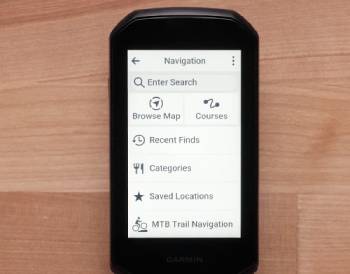
Pros of the Garmin Edge 1050
- Stunning LCD Visual Clarity: The 480 x 800 resolution is a massive jump: I found that text and maps look incredibly sharp: this results in a much more modern and premium user experience: I noticed colors pop in a way the 1040 simply cannot match.
- Integrated Loudspeaker and Electronic Bell: No more high-pitched beeps: I found the voice instructions are clear and easy to hear over wind noise: this provides a safety benefit when navigating busy streets: I noticed the “bell” feature is a fun way to alert pedestrians.
- Faster Quad-Core Processor: The device is noticeably snappier: I found that route recalculation happens almost instantly: this is an analytical plus for those who often get lost or take detours: I noticed map panning is smooth and lag-free.
- Community-Driven Road Hazard Alerts: You can report and see hazards like glass or potholes: I found this community aspect makes solo riding feel safer: this results in real-time updates from other Garmin users: I noticed it warns you of “potholes ahead” before you see them.
- Garmin Pay Support: This is a first for the 1000-series: I found it incredibly convenient for mid-ride coffee stops: this provides a “wallet-free” experience for short training loops: I noticed it works flawlessly at most NFC-enabled terminals.
Garmin Edge 1050 Cons: The trade-offs of the upgrade:
- Significant Drop in Battery Life: I noticed that the bright screen is a massive power hog: this results in needing to charge the device every few days rather than every few weeks: I found that for 24-hour ultra-events: it simply won’t last without a battery pack.
- Heavier and Bulkier Physical Design: at 161g: it is a bit of a “brick” on the front of the bike: I found it can cause more vibration on some carbon mounts: this results in a less “pro” aesthetic for weight-conscious riders: I noticed it takes up a lot of real estate.
- No Solar Charging Option: because of the LCD technology: Garmin removed the solar panels: I found this to be a major disappointment for long-distance touring: this results in a complete reliance on USB-C charging: I noticed the 1040 Solar feels more “future-proof” in this regard.
- Potential Mounting Incompatibility: because the charging port and mount are slightly different: I found it didn’t fit into my recessed aero-mount: this results in having to potentially buy a new out-front mount: I noticed it sits a bit higher than the 1040.
- Screen “Blooming” at Night: I found that at 100% brightness in the dark: the blacks look a bit grey: this results in a slightly less crisp look during night rides: I noticed the MIP screen of the 1040 actually looks better when used with a low-power headlamp.
Also Read: My Experience With Garmin Edge 1040
Frequently Asked Questions (FAQs)
The primary difference is the display; the 1050 features a high-resolution, vibrant LCD screen while the 1040 uses a power-efficient MIP display; additionally, the 1050 has a built-in loudspeaker, a faster processor, and Garmin Pay, while the 1040 offers much longer battery life and a solar option.
The 1050 is worth the upgrade if you value a bright, sharp screen that is easy to read in all conditions and want “smart” features like voice prompts and the electronic bell; however, if you frequently do rides longer than 15-20 hours, the 1040 remains the superior choice.
The 1050 is slightly larger and 35g heavier than the 1040, making it one of the largest bike computers on the market; while it provides excellent map visibility, some riders with narrow handlebars or weight-sensitive setups may find it a bit cumbersome.
The 1040 is still considered one of the best bike computers ever made; it is preferred by professional endurance athletes and bikepackers for its incredible 35-45 hour battery life and its “Power Glass” solar charging that makes it nearly impossible to kill.
Final Thoughts
You should buy the Garmin Edge 1050 if you want the absolute best visual experience available on a bike today and you don’t mind charging your device after every few rides.
I have found that for the average club cyclist or weekend warrior, the 1050’s screen and speaker make the ride feel more connected and modern.
However, you should buy the Garmin Edge 1040 if you are a “set it and forget it” rider who wants a tool that can survive an entire week-long tour on a single charge.
I believe that Garmin has created two distinct paths: one for the “tech-forward” rider and one for the “limit-pusher.”
You are the only one who knows if you prefer the glow of a high-def screen or the security of a battery that never ends, so choose the Edge that matches your ambition.