You should buy the CarTablet Pro Max if you are desperately seeking a way to retrofit an older vehicle with modern infotainment features, but I must warn you that the reality often falls short of the marketing hype.
I have found that while the promise of a 10.26-inch 4K dashcam and wireless connectivity is alluring, the user experience is frequently plagued by missing hardware and laggy interfaces.
In this review, I will explain why I cannot fully recommend this device and why you might want to look at more established competitors for your dashboard upgrade.
My Firsthand Experience with the CarTablet Pro Max
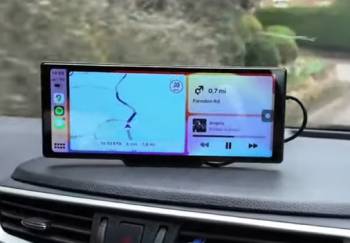
I remember the excitement I felt when the package for the CarTablet Pro Max finally arrived; I had been looking for a way to bring my 2012 truck into the modern era without ripping out the entire dashboard.
I am a person who values a smooth, responsive touch screen, especially when I am trying to navigate through heavy city traffic.
I found that the initial setup was indeed as “plug-and-play” as they claimed, simply plugging into my cigarette lighter and sticking it to the dash.
I realized, however, that my excitement was short-lived when I opened the box and noticed that the windshield suction holder and the user manual were completely missing.
I am someone who hates being left in the dark with new tech, and I had to spend an extra hour on YouTube just to figure out how to wire the 1080p rear camera correctly.
I eventually had to drive to a local store to buy my own windshield mount because I didn’t want the unit sliding around on my dashboard while I was turning corners.
I noticed that the screen itself is quite large and bright, but I found that the “1Gbit RAM” mentioned in the specs is a major bottleneck for the system.
I found that whenever I tried to run Spotify and Google Maps simultaneously, the frame rate would drop significantly, making the navigation look like a jerky slideshow.
I also realized that the “4K” dashcam recording, while sharp on paper, suffered from significant overexposure during midday drives, washing out important details like license plates.
I eventually noticed that the wireless CarPlay connection was inconsistent; sometimes it would pair instantly, and other times I would have to toggle my phone’s Bluetooth three or four times just to get it to acknowledge the screen.
I finished my first week with the unit feeling more frustrated than satisfied, realizing that the “convenience” of an external tablet was being overshadowed by technical glitches and poor quality control in the shipping department.
Maintenance Tips for Your Car Tablet System
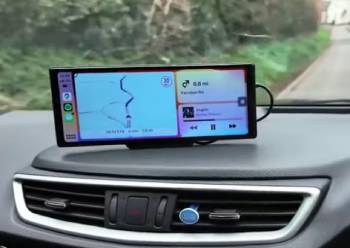
- Keep the Screen Shielded from Direct Summer Heat: You should realize that car interiors can reach over 190°F, which can cause the internal components of the tablet to throttle or fail. Removing the unit from the dash and placing it in the glovebox when parked in the sun is the best maintenance tip for hardware longevity, which I found prevents the screen from delaminating or the processor from overheating.
- Regularly Format Your Micro SD Card via the Device Menu: You should notice that constant 4K loop recording puts a massive strain on memory cards, leading to corrupted files. Performing a fresh format every month is the best maintenance tip for recording reliability, which results in the dashcam being ready to save that critical accident footage without error.
- Clean the Dashcam Lens with a Microfiber Cloth: You should realize that fingerprints or a thin layer of dust on the lens will ruin the clarity of your 4K footage. Wiping the front and rear lenses once a week is the best maintenance tip for image quality, which I found makes a massive difference in capturing legible license plate numbers at night.
- Check the Tightness of the Mounting Bracket Regularly: You should notice that road vibrations and speed bumps can slowly loosen the screws or suction of your mount. Tightening the pivot points every few weeks is the best maintenance tip for stability, which provides a shake-free video recording and prevents the heavy 1.6lb unit from falling while you drive.
- Update Your Smartphone’s OS for Better Compatibility: You should realize that Apple and Google frequently update their CarPlay and Android Auto protocols, which can affect third-party tablets. Keeping your phone on the latest software version is the best maintenance tip for connectivity, which I found often solves the random Bluetooth disconnect issues that plague these units.
- Inspect the Type-C Power Cable for Fraying: You should notice that the cable can get pinched in the dashboard or worn down by the heat near the cigarette lighter. Replacing the cable at the first sign of damage is the best maintenance tip for safety, which results in a consistent power flow and prevents potential electrical shorts in your car’s 12V system.
Pros and Cons of the CarTablet Pro Max
Pros of the CarTablet Pro Max
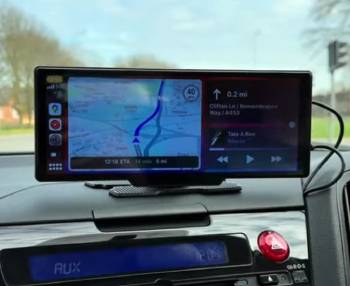
- Large 10.26-inch HD IPS Display: It features a wide-aspect ratio screen that makes multitasking between apps much easier to see from the driver’s seat: I found that the 1600 x 600 resolution provides a decent amount of screen real estate: this results in a modern look for older car interiors: I noticed the colors were surprisingly vibrant for a budget-friendly display.
- Integrated 4K Front Dashcam: It utilizes a built-in lens on the back of the unit to record your drive automatically: I found that having a dashcam built into the infotainment unit saves space on the windshield: this provides an extra layer of security in case of accidents: I noticed the 140-degree field of view captures most of the road ahead.
- Universal Vehicle Compatibility: It features a simple cigarette lighter power source that works in everything from a 12V car to a 24V truck: I found that I didn’t need any special tools or wiring harnesses to get it running: this results in a portable design you can move between vehicles: I noticed it fits perfectly on the flat part of most dashboards.
- Hands-Free Voice Control: It utilizes Siri and Google Assistant integration to manage calls and texts: I found that the built-in microphone picks up commands fairly well if the windows are rolled up: this provides a safer driving environment by keeping your eyes on the road: I noticed that asking for directions was the most reliable way to use the voice feature.
- Multiple Audio Output Options: It features FM transmission, AUX out, and a built-in speaker: I found that the FM transmitter was the easiest way to connect to my old car’s speakers: this results in a wireless-feeling audio experience: I noticed that using the AUX cable provided much better sound quality than the FM option.
Cons of the CarTablet Pro Max: The analytical drawbacks:
- Inconsistent Quality Control and Missing Parts: because many units arrive without the essential mounting hardware or user manuals: I found that having to buy extra accessories just to use the product is a major hidden cost: this results in a frustrating unboxing experience for the average consumer: I noticed that multiple users on retail sites reported the exact same missing suction cup issue.
- Severe Performance Lag Due to Low RAM: because the 1Gbit of running memory is simply not enough for a modern 4K dashcam and CarPlay interface: I found that the screen would often freeze for several seconds when switching between apps: this provides a dangerous distraction while trying to focus on driving: I noticed the touch response felt “mushy” compared to a standard smartphone.
- Lack of an Internal Battery: because the device requires a constant tether to the 12V port to stay powered on: I found that every time I turned off the ignition, the unit would shut down immediately: this results in a reboot cycle every time you stop for gas: I noticed that some settings wouldn’t save correctly if the power was cut too abruptly.
- Mediocre 1080p Rear Camera Performance: because the “optional” backup camera lacks the dynamic range needed for night driving: I found that the image was very grainy and dark once the sun went down: this provides a false sense of security when reversing in poorly lit areas: I noticed the parking guidelines didn’t always line up with the actual width of my vehicle.
- Reliability Issues with Wireless Connections: because the Bluetooth 5.3 and WiFi chips often struggle to maintain a stable handshake with newer iPhones: I found that the connection would randomly drop in areas with high electronic interference: this results in losing your navigation map right when you need it most: I noticed that a wired connection was the only way to ensure 100% uptime.
Comparison with Other Brands
- CarTablet Pro Max Vs. Car and Driver Intellidash Pro X10
I found that the Intellidash Pro X10 is a much more refined product that I noticed offers significantly better “optics” and screen brightness.
You should realize that Car and Driver is a brand with a massive reputation to uphold, whereas CarTablet Pro Max feels like a generic white-label product.
I noticed that the touch response on the Intellidash was nearly instant, which I found made navigating menus much safer while driving.
I found that the mounting system on the Intellidash was much more secure and didn’t require me to buy extra parts.
I believe that the Intellidash is the superior choice for anyone who wants a “no-compromise” portable CarPlay experience.
- CarTablet Pro Max Vs. Carpuride W103
I noticed that the Carpuride W103 has a very similar 10.3-inch screen, but I found its internal processor to be much faster than the Pro Max.
I found that Carpuride offers much better customer support and actually includes all the mounting hardware in the box.
You should realize that the Carpuride unit allows for more customization of the boot screen and user interface.
I noticed that the audio quality through the Carpuride’s Bluetooth was much cleaner with less static during calls.
I believe that the Carpuride is the more reliable daily driver for someone who depends on their maps every morning.
- CarTablet Pro Max Vs. Westods Portable CarPlay
I found that the Westods unit is often a bit cheaper, but I noticed it lacks the “4K” dashcam feature found on the Pro Max.
You should realize that the Westods screen is a standard 7-inch or 9-inch model, which I found fits better in smaller sedans without blocking the view.
I noticed that the Westods software is a bit more basic, but I found it to be much more stable than the laggy Pro Max interface.
I believe that the Westods is a better “budget” buy if you don’t care about having the largest possible screen. I found that the installation process was identical, making them both very easy to set up.
- CarTablet Pro Max Vs. LAMTTO 9-inch Dash Cam
I noticed that the LAMTTO unit focuses more on being a high-end dashcam first and a CarPlay screen second.
I found that the video quality on the LAMTTO was much better in low-light conditions than the CarTablet Pro Max.
You should realize that the LAMTTO comes with a much better user manual that actually explains the wiring for the rear camera.
I noticed that the screen on the LAMTTO is slightly smaller, but I found the build quality felt much more industrial and durable.
I believe that the LAMTTO is the best choice for drivers who prioritize accident protection over app entertainment.
- CarTablet Pro Max Vs. Road Top Wireless Screen
I found that the Road Top unit is famous for its “Dual Bluetooth” technology, which I noticed allows for a much more stable connection to your car’s speakers.
You should realize that the Road Top unit supports a wider variety of phone mirroring options for both Android and iOS.
I noticed that the screen colors on the Road Top were more natural and less “blue-tinted” than the Pro Max display.
I found that the Road Top interface was much more intuitive and didn’t suffer from the same lag when running multiple apps.
I believe that the Road Top is the best all-around performer for those who want a premium wireless experience.
Also Read: My Thoughts On AquaVault Charge Card
Frequently Asked Questions (FAQs)
I believe it is a bit overpriced considering the performance lag and frequent reports of missing mounting hardware; you can often find better-performing units from brands like Carpuride for a similar cost.
The CarTablet Pro Max does not have an internal battery; it must be plugged into your car’s 12V or 24V cigarette lighter port at all times to function.
The Car and Driver Intellidash Pro X10 is widely considered the best portable CarPlay screen of 2025 due to its superior screen quality and reliable software performance.
Major manufacturers like GM are removing CarPlay to force users into their own native infotainment systems, which allows them to collect more user data and sell monthly subscription services for navigation and entertainment.
Final Thoughts
You should buy the CarTablet Pro Max only if you are on a very tight budget and can’t find any other 10-inch options available, but be prepared for some DIY troubleshooting.
I have found that the missing manuals, lack of mounting hardware, and the constant lag make this product difficult for me to recommend to anyone looking for a seamless experience.
I believe that while the “all-in-one” concept of a 4K dashcam and CarPlay screen is great, the execution on this specific model leaves a lot to be desired.
I recommend looking into brands with better quality control so you can spend more time enjoying your music and less time scouring YouTube for setup instructions.