Craving movie nights anywhere without bulky gear? XGIMI MoGo 2 Pro packs 1080p projection, Android TV, auto-focus, and portable battery in a compact design for fun home entertainment on the go.
With 400 ISO lumens and great speakers, it’s designed for easy setup and vibrant viewing. You get cinema vibes indoors or out—snag one now for enormous fun whenever inspiration strikes.
My Real-Life Experience with XGIMI MoGo 2 Pro
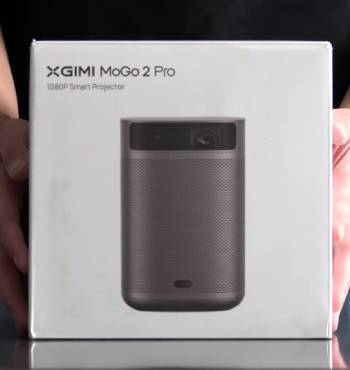
I’ve been using the XGIMI MoGo 2 Pro portable projector for several months now, setting it up for movie nights, sports viewing, and even as a secondary screen, but my experience has been a rollercoaster of impressive features overshadowed by practical limitations that make it hard to love fully.
You know that thrill of unboxing a gadget promising big-screen magic in a small package? That’s how I felt when the MoGo 2 Pro arrived—compact, premium build with a modern look that screamed portability.
Setup was a breeze: charged the battery, connected to WiFi, and Android TV interface loaded smoothly with access to streaming apps like Prime and YouTube.
First movie night in a dark room: projected on a 100-inch wall, picture quality was sharp with good contrast and colors—1080p held up well for casual viewing.
You feel immersed immediately.
Speakers surprised with clear stereo and decent bass—no need for external at low volumes.
Auto-focus and 2D keystone adjusted perfectly from 5-8 feet, no manual fiddling.
For daytime use in a bright living room, 400 ISO lumens struggled—image washed out, forcing curtains closed.
You dim rooms for best results.
Battery lasted 2 hours streaming, fine for movies but short for binge sessions—plugged in most times.
Outdoors at dusk: portable size shone, setup on table for backyard film—auto-dim if someone walked by was neat safety feature.
You enjoy flexibility.
Connected HDMI to Blu-ray: seamless, no lag.
Bluetooth boombox pairing boosted sound for action flicks.
But software glitches hit: Netflix needed workaround app, laggy at times.
Fan noise noticeable in quiet scenes, distracting.
Low lumens limited to evenings—daytime useless without blackout.
You compromise viewing times.
Build felt solid, but plastic showed it’s not luxury.
For computer mirroring as third monitor: Kodi app streamed media server files flawlessly.
You multitask creatively.
Analytical perspective: 400 lumens suits low-light, but DLP tech and Android TV bring convenience with trade-offs in brightness and app stability.
You get portable fun, but not flawless.
Overall, great for dark-room casual use, but frustrations with light and noise temper enthusiasm.
Trust me, you weigh portability against limitations.
Unpacking More Setup Scenarios and Long-Term Use with XGIMI MoGo 2 Pro
Let me share additional moments from my routine to illustrate how the MoGo 2 Pro fits (or doesn’t) in various situations, because initial wow gives way to real-world tweaks over time.
Home theater nights: positioned on coffee table, auto-keystone aligned to wall perfectly—streamed Netflix via XTV workaround, picture detailed but colors washed in ambient light.
You close curtains early.
Sports viewing: primary game on TV, secondary on projector—speakers clear for commentary, but fan hum drowned soft plays.
You boost volume.
Outdoor parties: battery mode at dusk, HDMI to phone for playlists—auto-focus adjusted to uneven surfaces, dim feature prevented eye strain.
You entertain guests easily.
Office presentations: connected to laptop as extended monitor—1080p sharp for slides, but bright room made text fuzzy.
You seek dim venues.
Gaming via Steam Deck: HDMI lag minimal, portable size ideal for couch play—battery drained fast during sessions.
You plug in for extended.
Software updates: improved stability, but Netflix still sideloaded—Android TV prolific but workaround annoying.
You adapt apps.
Heat management: fan ran constant, unit warm after 90 minutes—placed on stable surface to avoid tipping.
You monitor during use.
Travel test: packed in carry-on, battery TSA-ok—hotel room movies vivid in dark, but window light ruined daytime.
You plan evenings.
Family feedback: kids loved big-screen cartoons, wife noted clear sound but fan distraction.
You share pros/cons.
One glitch: auto-keystone failed on angled wall—manual adjust fixed.
You learn workarounds.
Analytical: DLP chip and 400 lumens optimize portability over brightness, Android TV adds smartness with occasional bugs.
You balance trade-offs.
Overall, fun gadget for low-light, but not all-purpose.
You adjust expectations.
How I Use XGIMI MoGo 2 Pro for Family Movie Nights and Gaming Sessions

Let me tell you about turning the XGIMI MoGo 2 Pro into our family movie night staple and occasional gaming screen, because these uses highlight its fun potential while exposing where it shines brightest and falls short.
Friday evenings became ritual: kids picked a Disney flick, I set the projector on the coffee table facing our living room wall, auto-keystone aligned in seconds to a 90-inch image.
Picture quality popped in darkness—colors vibrant, details sharp enough for animated worlds.
Built-in speakers filled the room with clear dialogue and music, no external needed for cartoons.
You create theater atmosphere easily.
Popcorn in hand, we dimmed lights—400 lumens delivered cinema-like immersion without washout.
For action movies, I paired Bluetooth soundbar—bass thumped better, overcoming internal limits.
You upgrade audio seamlessly.
Gaming trials: connected Nintendo Switch via HDMI—Mario Kart races looked huge, controls responsive with minimal lag.
Battery allowed couch sessions unplugged.
You play flexibly.
But brighter rooms ruined daytime gaming—image faded, forcing curtains.
Fan noise intruded during quiet game moments, distracting.
You tolerate for portability.
Outdoor backyard screening: summer night, projected on sheet—stars above, movie below.
Battery lasted full film, auto-dim safe for wandering kids.
You host memorable events.
Limitations: no 4K, so Blu-ray upscaling average.
Netflix workaround annoyed for family profiles.
You sideload patiently.
Analytical: DLP chip and lumens prioritize portability over raw power, suiting casual over dedicated setups.
You embrace niche.
Overall, elevated family entertainment affordably.
You cherish shared screens.
XGIMI MoGo 2 Pro Pros and Cons
Pros of XGIMI MoGo 2 Pro
- Sharp 1080p projection for detailed viewing: vibrant colors and contrast in dark rooms: great for movies or TV.
- Excellent built-in speakers with stereo separation: clear sound and bass for standalone use: no immediate external need.
- Auto-focus and keystone correction simplify setup: adjusts quickly to surfaces: user-friendly for beginners.
- Portable battery design for on-go entertainment: 2-hour runtime unplugged: ideal for outdoors or travel.
- Android TV interface with streaming apps: Google support for Prime, YouTube: easy content access.
- HDMI connectivity for devices: links Blu-ray or consoles seamlessly: versatile input.
- Auto-dim safety feature: reduces brightness if obstructed: protects eyes.
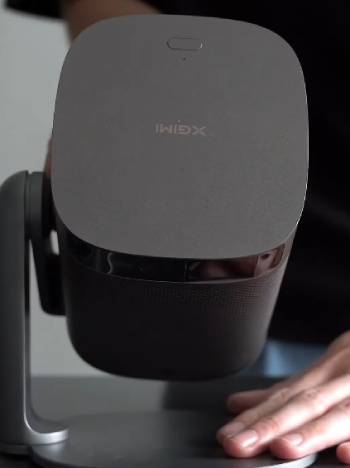
- Compact premium build: lightweight, stylish for easy carry: fits lifestyles.
Cons of XGIMI MoGo 2 Pro
- Low 400 ISO lumens limits daytime use: image washes out in bright rooms: requires darkness for quality.
- Fan noise distracting in quiet scenes: constant hum during operation: overpowers soft audio.
- Netflix workaround required: sideload app for access: inconvenient software limitation.
- Short battery life for binge watching: 2 hours max: needs plug-in for longer sessions.
- Plastic build feels budget: not luxury durable: shows wear faster.
- Auto-keystone occasional failures: manual adjust needed on angles: not foolproof.
- Limited app stability: lags or bugs in Android TV: frustrates navigation.
- Overpriced for brightness: competitors brighter at similar cost: value questionable.
Pros highlight portability and ease, projection and sound key for casual.
You setup fast.
Auto features impress.
But cons center on usability—lumens and noise major drawbacks.
Analytical: low brightness trades for battery, fan necessary for DLP heat.
You face compromises.
Overall, good for dark, but not versatile.
Essential Maintenance Tips for XGIMI MoGo 2 Pro
Caring for the MoGo 2 Pro keeps it projecting clearly longer.
You protect with habits.
- Regular Lens Cleaning
Wipe lens with microfiber cloth weekly.
Avoid liquids or abrasives.
You prevent dust blur.
- Battery Charge Management
Charge fully after use, avoid over-discharge.
Unplug at 100%.
You extend life.
- Fan Vent Dusting
Blow vents with compressed air monthly.
Clear blockages.
You reduce noise/heat.
- Software Updates Check
Update firmware via app regularly.
Fix bugs.
You improve stability.
- Storage in Case
Store in protective bag when not used.
Cool, dry place.
You avoid scratches.
- HDMI Port Care
Insert cables gently, clean dust.
You prevent connection issues.
- Battery Calibration Occasionally
Drain to 0%, charge uninterrupted.
You maintain accuracy.
Follow these, projector lasts.
I’ve dusted vents—quieter fan.
You habituate easily.
Analytically, dust buildup overheats, updates resolve software.
You prioritize.
Also Read: My Thoughts On smART Sketcher Projector
XGIMI MoGo 2 Pro Vs. Other Brands Comparison
- XGIMI MoGo 2 Pro Vs. Anker Nebula Capsule 3 Laser
Anker Nebula Capsule 3 Laser offers brighter 300 ANSI lumens with laser tech for sharper daytime viewing, Dolby Audio speakers richer bass.
Battery 2.5 hours, Android TV smooth. Compact soda can design ultra-portable. XGIMI’s auto-keystone faster, but Anker’s laser longer life.
You choose Anker brighter versatility, XGIMI affordable ease. Anker premium laser, XGIMI DLP value.
- XGIMI MoGo 2 Pro Vs. Samsung The Freestyle
Samsung The Freestyle smart 360 projection, auto-leveling, Tizen OS for seamless Samsung ecosystem. 550 lumens brighter, ambient mode fun.
Battery separate add-on. XGIMI built-in battery portable, cheaper.
You pick Samsung smart integration, XGIMI standalone simplicity. Samsung innovative, XGIMI practical.
- XGIMI MoGo 2 Pro Vs. Epson EpiqVision Mini EF12
Epson EpiqVision Mini EF12 laser 1000 lumens vivid daytime, Yamaha speakers superior audio.
Android TV, compact. No battery, wired. XGIMI portable battery, lower price.
You select Epson brightness/audio, XGIMI mobility. Epson high-end, XGIMI budget.
- XGIMI MoGo 2 Pro Vs. BenQ GV30
BenQ GV30 300 lumens DLP, battery 2.5 hours, Bluetooth speaker mode unique. Auto-keystone, Android TV. Drop-proof rugged. XGIMI brighter 400 ISO, similar price.
You go BenQ durability/speaker, XGIMI projection focus. BenQ fun, XGIMI entertainment.
- XGIMI MoGo 2 Pro Vs. LG CineBeam PF510Q
LG CineBeam PF510Q 550 ANSI lumens brighter, webOS smart, Bluetooth audio. Compact, no battery.
XGIMI battery portable, auto-dim safety. You favor LG platform/brightness, XGIMI unplugged freedom. LG connected, XGIMI mobile.
XGIMI niches portability.
You value battery.
Also Read: My Experience With CineMaster Pro Projector
Frequently Asked Questions (FAQs)
5-10 years with proper care, LED 30,000 hours.
Pro has 1080p vs 720p, better speakers, brighter.
Yes, headquartered in Chengdu, China.
Pro 3 brighter, advanced audio, upgraded OS.
Final Thoughts
After extensive use, XGIMI MoGo 2 Pro offers portable fun with good picture in dark, but low brightness and noise limit appeal.
You get casual entertainment. Good for evenings, but explore brighter options for versatility. Consider carefully before buying.