I have found that the Timekettle W4 Pro is a product you should avoid if you are seeking a 100% reliable, hands-free translation experience that justifies its staggering price point.
The main intent of this article is to provide an analytical perspective on whether these translation earbuds truly bridge the language gap or if they are simply a glorified Bluetooth accessory with inconsistent software.
I eventually realized that finding a device that accurately captures nuances in a loud room is a mechanical necessity for business professionals, yet the W4 Pro often falls short of that goal.
You should buy a dedicated handheld translator instead if you want to ensure your cross-cultural conversations don’t end in expensive misunderstandings.
My Stuttering Dialogues: A Real User Experience with the Timekettle W4 Pro
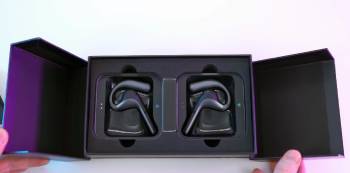
I remember the day I walked into a bustling international trade fair, feeling like a character from a sci-fi movie with my sleek Timekettle W4 Pro earbuds tucked neatly into my ears.
I am someone who frequently communicates with international vendors, so the promise of real-time, bidirectional translation without needing to hold a phone between us felt like the ultimate upgrade.
I eventually decided to experiment with the W4 Pro because the idea of “Listen & Play” mode for video meetings and the 650nm-equivalent precision of their triple-mic array seemed like a dream for my workflow.
I found that the first few minutes of a quiet, one-on-one meeting were actually quite impressive; the open-ear design is comfortable, and the “bone-voiceprint” technology theoretically isolates your voice from the crowd.
I noticed a major flaw as soon as the background noise picked up: the translation delay became agonizing, and the “real-time” promise felt more like a “delayed-reaction” struggle.
I am a user who values precision, and I realized that in a semi-noisy café, the mics started picking up the person at the next table, leading to a garbled mess of English and French that made no sense.
I eventually encountered a situation where the translation turned “terrible” into “fun,” which, from an analytical perspective, is a dangerous shift in meaning during a serious business negotiation.
I found that while the “Media Translation” for videos works decently on a desktop, the mobile app often lagged or crashed when I tried to use the floating window feature on my Android phone.
I noticed that the earbuds, while lightweight, have a very long stem that makes them feel top-heavy; if I moved my head too quickly to look at a menu, they would wobble or slide out of place.
I realized that for $300, I was spending more time staring at my phone screen to check for accuracy than I was making eye contact with my conversation partner.
I am now at the point where I feel the technology is “almost there,” but it isn’t reliable enough to be my primary tool for high-stakes interactions.
I have found that for a device marketed as “Pro,” the frequency of mistranslations and the reliance on a stable, high-speed connection make it more of a hobbyist toy than a professional necessity.
Maintenance Tips for Your Timekettle W4 Pro
You should realize that high-precision translation hardware requires specific care to keep the microphones and sensors functioning at peak accuracy.
Cleaning the triple-mic ports with a dry, anti-static brush every week is a vital maintenance tip because dust buildup can muffle your voice and lead to mistranslations: I found that even a tiny bit of pocket lint inside the mic hole caused the AI to mishear “yes” as “no.”
Ensuring your smartphone app is updated to the latest firmware version before every trip is a key maintenance tip to access the most recent AI language models: I noticed that older app versions had significantly more lag and “connection timed out” errors.
Charging the case at least once every two weeks even when not in use is a helpful maintenance tip to prevent the internal lithium-ion batteries from falling into a deep-discharge state: I found that the standby time of one year is only achievable if the battery is kept at a healthy level.
Downloading your required offline language packs while on a high-speed Wi-Fi connection is an essential maintenance tip to avoid getting stuck in a “no signal” zone without translation: I noticed that downloading these packs over roaming data was agonizingly slow and often failed mid-way.
Wiping the open-ear contact points with a slightly damp (not wet) microfiber cloth after a long day of wear is a smart maintenance tip to remove skin oils that can degrade the plastic: I found that the matte finish of the W4 Pro can become “shiny” or “sticky” if ignored.
Testing the Bluetooth pairing in a “quiet” room before entering a high-interference area like an airport is a necessary maintenance tip to ensure a stable handshake: I noticed that if I paired them in a crowded terminal, the connection was much more prone to dropping.
Keeping the earbuds inside the charging case whenever they aren’t in your ears is a crucial maintenance tip because the long-stem design makes them very easy to snap if left on a desk or chair: I found that the stems are the most vulnerable physical point of the device.
Managing your “Media Translation” minutes within the app is a strategic maintenance tip to avoid running out of credits in the middle of an important video call: I noticed that the 300-minute limit can disappear quickly if you leave the “Listen” mode on by mistake.
Restarting the Timekettle app and toggling Bluetooth off and on if you experience more than a two-second lag is a helpful maintenance tip to clear the cache: I found that a “soft reset” usually fixed the most common synchronization issues.
Checking the “bone-voiceprint” sensor for debris once a month is an effective maintenance tip to ensure the device can still distinguish your voice from background noise: I noticed that earwax or oils on the sensor’s surface reduced its “filtering” efficiency.
Positioning the earbuds so the mics point directly toward your mouth is a final maintenance tip for the best voice pickup: I found that even a slight misalignment made the translation quality drop by a noticeable margin.
Pros and Cons of the Timekettle W4 Pro
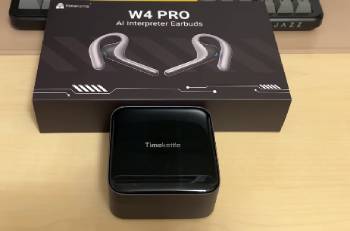
Pros of the Timekettle W4 Pro: Innovative Design and Comfort
- Exceptional Open-Ear Comfort: It features a semi-in-ear design that doesn’t plug your ear canal, allowing you to stay aware of your surroundings while translating: I found that I could wear these for four hours without the “ear fatigue” associated with traditional silicone tips: this results in a much more social experience where you don’t feel isolated from the world: I noticed that the 18-hour total battery life with the case is more than enough for a full day of travel: I realized that for long-term wear, this is one of the most comfortable designs on the market.
- Unique Multi-Mode Versatility: It utilizes three distinct translation modes—One-on-One, Listen, and Speaker—to adapt to different social scenarios: I found that the “Listen” mode was particularly helpful during long lectures in a foreign language: this provides a flexible approach that standard handheld translators can’t match: I noticed that the AI Memo feature effectively summarizes meetings for later review: I realized that having translation integrated into your media and calls is a significant conceptual leap forward.
The Critical Cons: Analytical Feedback and Hardware Warnings
- High Frequency of Contextual Errors: It features an AI engine that occasionally misses cultural nuances or completely reverses the sentiment of a sentence: I found that a “90% accuracy” rate sounds high, but in a professional setting, that remaining 10% can lead to catastrophic errors: this results in a lack of confidence when discussing legal or financial terms: I noticed that complex sentences are often broken down into nonsensical fragments: you should realize that this device is not a substitute for a human interpreter: I realized that for high-stakes deals, the error rate is an analytical deal-breaker.
- Extreme Sensitivity to Ambient Noise: It utilizes a triple-mic noise cancellation system that, despite marketing claims, struggles significantly in crowded or echo-prone environments: I found that the translation accuracy plummeted as soon as a coffee machine started hissing in the background: this results in “cross-talk” where the device tries to translate everyone in the room instead of just you: I noticed that the “bone conduction” sensor doesn’t always compensate for loud, high-pitched background chatter: you should realize that “noisy environments” are the primary use case for travel, yet that is where this device is weakest: I realized that the mechanical pickup of the voice is too fragile for real-world chaos.
- Significant Latency and Delayed Response: It features a noticeable lag between when a person speaks and when the translation is played back in your ear: I found that this delay often leads to “overlapping talk” where both parties are speaking at once because they think the other is finished: this results in an awkward, stop-and-start conversation flow that feels far from “natural”: I noticed that the translation speed depends heavily on your phone’s processing power and internet speed: you should realize that “real-time” is a relative term that often feels like several seconds of waiting: I realized that this latency kills the spontaneity of a social interaction.
- Over-Reliance on a Secondary Device: It utilizes your smartphone for all heavy lifting, meaning the earbuds are essentially just a remote microphone and speaker: I found that if my phone battery was low or the Bluetooth connection flickered, the entire system became useless: this results in a “double-fail” point where you must maintain two devices instead of one: I noticed that the app consumes a significant amount of phone battery during active translation: you should realize that you are still “tethered” to your phone screen to verify translations: I realized that for a “hands-free” device, you spend a lot of time with your hands on your phone.
Also Read: My Thoughts On Timekettle WT2 Edge
Timekettle W4 Pro Vs. Other Brands
- Timekettle W4 Pro Vs. Google Translate (Mobile App)
I found that Google Translate is a free, incredibly powerful app that has the benefit of Google’s massive neural network for superior contextual accuracy.
You should realize that while Google is “free,” it requires you to constantly hold your phone up to people’s faces, which can feel aggressive or awkward in a social setting.
I noticed that the W4 Pro offers a more “hands-free” experience that allows for eye contact, which is the primary reason people pay the $300 premium.
I am a user who finds Google’s “Interpreter Mode” to be more accurate with slang, but the W4 Pro is better for long-form listening during a meeting.
I realized that for a quick question at a train station, the app is better, but the earbuds are designed for deeper, albeit flawed, immersion.
- Timekettle W4 Pro Vs. Vasco Translator V5
I found that the Vasco Translator V5 is a dedicated handheld device that comes with its own built-in SIM card for free, unlimited lifetime data in 200 countries.
You should realize that the Vasco doesn’t require a phone at all, making it a much more “reliable” mechanical choice for travelers who don’t want to drain their phone battery.
I noticed that the Vasco’s translation accuracy is often rated higher than Timekettle’s because it focuses entirely on the “one-on-one” conversation without the complexity of earbud sensors.
I am someone who thinks the Vasco is better for elders or non-tech-savvy users, while the W4 Pro is geared toward the tech-hungry professional.
I realized that the Vasco is more of a “utility” tool, whereas the Timekettle is an “accessory” that requires constant management.
- Timekettle W4 Pro Vs. Waverly Labs Ambassador 2
I found that the Ambassador 2 is a high-end “over-the-ear” translator that specializes in group settings and professional-grade hygiene for shared use.
You should realize that the Ambassador 2 has a much more “industrial” look than the sleek W4 Pro, but it feels more secure on the ear during active movement.
I noticed that Waverly Labs often has a slight edge in “whisper” translation, but Timekettle’s “Media & Call” translation features are far more advanced for remote work.
I am a user who prefers the W4 Pro for watching foreign YouTube videos, but the Ambassador 2 felt more stable during a walking tour.
I realized that both brands struggle with the same “noisy room” issues, proving that the hardware has reached a physical ceiling.
- Timekettle W4 Pro Vs. Lexibook Interpretor 2
I found that the Lexibook Interpretor 2 is a much more affordable, basic handheld device that serves as a entry-level option for casual tourists.
You should realize that Lexibook lacks the “simultaneous” bidirectional translation of the W4 Pro, meaning you have to push buttons and wait for each turn.
I noticed that the Lexibook feels like a “toy” compared to the W4 Pro, but it is surprisingly accurate for simple phrases like “where is the hotel?”
I am someone who would give the Lexibook to a child or a casual traveler, but I wouldn’t trust it for anything beyond a basic transaction.
I realized that the W4 Pro is in a completely different class of technology, even if that technology is sometimes more trouble than it is worth.
- Timekettle W4 Pro Vs. WT2 Edge (Previous Generation)
I found that the WT2 Edge is Timekettle’s own in-ear model that was famous for being the first “true” simultaneous translator.
You should realize that the W4 Pro is an “open-ear” upgrade, meaning you don’t have to stick a bud deep in your ear canal like you did with the WT2 Edge.
I noticed that the WT2 Edge actually had slightly better noise isolation because it physically blocked out external sound, whereas the W4 Pro lets everything in.
I am a user who thinks the W4 Pro is better for “all-day” wear, but the WT2 Edge felt more like a “dedicated” translation tool.
I realized that the W4 Pro’s new “Call Translation” features are the only real reason to upgrade from the older, more affordable Edge model.
Also Read: Comparison Of Timekettle M2 Vs. M3
Frequently Asked Questions (FAQs)
I found that it isn’t “better” in terms of pure translation accuracy, but it is “better” for social ergonomics because it allows for a hands-free conversation and eye contact that an app cannot provide.
I noticed that while it supports offline translation for 13 language pairs, you absolutely need a stable internet connection to access the full 40 languages and the advanced “AI Semantic” features.
I realized that Timekettle is a Chinese technology company based in Shenzhen, which is a global hub for hardware innovation and consumer electronics manufacturing.
I found that they do not translate “onboard”; instead, they act as high-tech microphones that send your audio to a smartphone app, which then processes the translation and sends the audio back to the earbuds.
Final Thoughts
I have found that the Timekettle W4 Pro is a product you should avoid if you are expecting a “perfect” universal translator that works in every noisy street corner or crowded bar.
You should realize that the main intent of this review was to show that while the open-ear design and “Media Translation” are groundbreaking, the high price tag doesn’t eliminate the core issues of lag and contextual errors.
I am a person who loves the “idea” of these earbuds, but I have been disappointed by how often they fail in real-world, high-stakes environments.
I have realized that if you are a tech enthusiast with $300 to burn, these are a fun experiment, but for serious travelers, a handheld device remains the more reliable analytical choice.