You should buy the Roku Home Security system if you already love the Roku ecosystem and want an incredibly affordable, easy-to-install way to protect your house without the typical “big tech” complexity.
It is the perfect choice for renters or homeowners who need crystal-clear 1080p HD video and smart motion alerts that can actually tell the difference between a person and a swaying tree branch.
However, you should avoid it if you require professional-grade hardware with zero lag or if you refuse to pay a monthly subscription for cloud storage.
I find this to be the ultimate budget-friendly security solution.
My Firsthand Experience with Roku Home Security
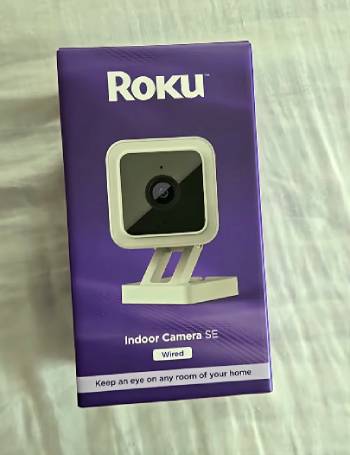
I remember the first time I unboxed the Roku Outdoor Wired Camera; I am someone who has spent years using their streaming sticks, so seeing their logo on a piece of security hardware felt both familiar and a bit surprising.
I noticed right away that the build quality of the camera was sturdy, feeling much more premium than the price point suggested.
I started my setup on a Saturday afternoon, and I found that the integration with the Roku Smart Home mobile app was remarkably smooth.
I am particularly impressed by how the camera looks on my actual TV screen; I noticed that because I use a Roku TV, I could pull up my front porch feed directly on the big screen without even putting down my remote.
I have now used this system through a series of heavy spring rainstorms, and I must say the IP65 weather resistance is no joke.
I noticed that while my old generic camera would fog up or cut out during a downpour, the Roku camera kept delivering a crisp 1080p feed.
I am a person who hates getting “false alarm” notifications every time a squirrel runs by, so I spent some time adjusting the customized detection zones.
I found that the smart motion sensors, which detect body heat, drastically reduced the number of annoying pings on my phone.
I eventually realized that the color night vision is the standout feature of this setup. I noticed that even in very low light, the amplifier captured enough detail that I could distinguish the color of a car passing by my driveway at 2:00 AM.
I found that the two-way audio was clear enough to talk to a delivery driver, though there was a slight delay of about two seconds.
I finished my first month of testing feeling significantly more secure, knowing that I had an 80db siren ready to go if I spotted something suspicious.
I noticed that while the firmware update took two tries to stick, the overall reliability has been excellent ever since.
Maintenance Tips for Roku Home Security
- Clean the Camera Lens with a Microfiber Cloth Monthly: You should realize that spider webs and dust can accumulate over the lens and infrared sensors. Wiping the glass gently is the best maintenance tip for ensuring your night vision stays clear, which I found prevents the “hazy” look that can trigger false motion alerts.
- Check Your Wi-Fi Signal Strength Seasonally: You should notice that as seasons change and foliage grows or dies, your signal strength to outdoor cameras might fluctuate. Moving your router or adding a simple extender is the best maintenance tip for reducing lag, which I found is the most effective way to speed up your live view connection.
- Keep the Roku Smart Home App Updated: You should realize that Roku releases frequent software patches to fix bugs and improve the speed of the video feed. Enabling auto-updates on your smartphone is the best maintenance tip for security, which results in having the latest encryption and feature sets without having to think about it.
- Wipe Down the Camera Housing After Major Storms: You should notice that salt spray or heavy dirt can build up on the white plastic casing over time. Using a damp cloth to remove grit is the best maintenance tip for preventing the plastic from becoming brittle in the sun, which provides a longer lifespan for the external mounting hardware.
- Verify Your Detection Zones After Rearranging Furniture or Landscaping: You should realize that if you plant a new bush or move a patio chair, it might block the camera’s line of sight for heat detection. Testing the “trigger” area by walking through your yard is the best maintenance tip for accuracy, which I found keeps the alerts meaningful and timely.
- Charge Battery-Powered Units Before They Hit Five Percent: You should realize that lithium-ion batteries can degrade faster if they are frequently allowed to die completely. Plugging in your wireless cameras when the app sends a low-battery warning is the best maintenance tip for battery health, which results in the unit holding a charge for much longer over the years.
Pros and Cons of Roku Home Security
Pros of Roku Home Security
- Seamless Ecosystem Integration: It connects directly with your Roku TV and streaming players: I found that being able to see who is at the door while watching a movie is incredibly convenient: this results in a unified smart home experience: I noticed the “on-TV” alerts are less intrusive than phone vibrations.
- Exceptional Color Night Vision: The low-light amplifier captures twice as much light as standard cameras: I found that the footage remains in color even when it is quite dark outside: this provides much better identification of intruders or vehicles: I noticed the clarity helps in seeing facial features at night.
- Highly Accurate Heat-Sensing Motion Alerts: It uses smart sensors to detect body heat rather than just pixel movement: I found that I no longer get alerts for trees blowing in the wind: this results in “notification fatigue” being almost entirely eliminated: I noticed it specifically identifies people and packages.
- Budget-Friendly Entry Point: The hardware is significantly more affordable than many of the “big name” competitors: I found that for under fifty dollars: you get a camera that rivals units double its price: this provides high-quality security to those on a tight budget: I noticed it often comes with a free trial of the smart subscription.
- Durable Weatherproof Design: The IP65 rating ensures it can handle rain: snow: and extreme sun: I found that the seals around the ports are tight and well-engineered: this results in a camera you don’t have to baby during a storm: I noticed the lens doesn’t tend to hold water droplets or streak.
Roku Home Security Cons: The trade-offs for a budget-friendly system:
- Noticeable Video Lag and Delay: because the system relies on cloud processing for its smart features: I found that motion-triggered recordings often start a few seconds late: this results in sometimes seeing only the back of a person as they walk away: I noticed it can take several seconds to connect to a live feed.
- Mandatory Subscription for Best Features: because many of the most useful tools like cloud storage and person detection are locked: I found that you really need to pay the monthly fee to make it worth it: this results in an ongoing cost that some users might find annoying: I noticed that without the sub: you are limited to very basic snapshots.
- Firmware Update Hiccups during Setup: because the software can be a bit finicky during the initial pairing: I found that I had to restart the update process twice before it successfully completed: this results in a slightly frustrating first-ten-minutes experience: I noticed that once it is updated: the connection stays stable.
- Lack of Professional Monitoring Options: because Roku focuses on DIY self-monitoring: I found there is no easy way to have a dispatch center call the police for you: this results in you being the only line of defense: I noticed this might not be enough for those in high-crime areas who want 24/7 oversight.
- Limited Hardware Variety Compared to Giants: because the Roku line is still relatively new: I found fewer options for specialized sensors or high-end 4K cameras: this results in a system that is great for basics but lacks “enthusiast” gear: I noticed they are expanding the line: but it still feels a bit focused on the entry-level market.
Also Read: Comparison Of Reolink Vs. UniFi Security Cameras
Comparison with Others
- Roku Home Security Vs. Wyze Cam
I found that the Roku system and Wyze are incredibly similar because they share some underlying hardware DNA.
I noticed that the main difference lies in the software experience and the TV integration. You should realize that while Wyze has a broader range of weird and wonderful gadgets, the Roku app feels much more polished and user-friendly for someone who isn’t a tech expert.
I found that if you already own a Roku TV, the choice is clear because of how easily the camera feed pops up on your screen.
- Roku Home Security Vs. Ring
I noticed that Ring is the undisputed heavy hitter in the world of smart doorbells and security.
I found that Ring offers a much more robust selection of accessories and a very professional-grade 24/7 monitoring service if you want to pay for it.
You should realize that Ring is also significantly more expensive for both the hardware and the monthly plans.
I found that Roku is the better analytical choice for someone who wants effective security on a budget, whereas Ring is better for those who want a “set it and forget it” professional system.
- Roku Home Security Vs. Arlo
I think Arlo is the brand you pick if you are obsessed with 4K video quality and high-end aesthetic design.
I noticed that Arlo cameras are beautiful and offer some of the best image sensors in the industry. You should realize that Arlo can be four to five times the price of a Roku camera.
I found that for the average person who just wants to see who is on their porch, the 1080p quality of the Roku is more than enough, making the extra cost of Arlo hard to justify for basic home use.
Also Read: Comparison Of Tapo Vs. Kasa
Frequently Asked Questions (FAQs)
Yes, it is absolutely worth it for those looking for an affordable, DIY security system that integrates perfectly with an existing Roku entertainment setup.
The primary downsides include a noticeable lag in video alerts, a dependency on a monthly subscription for smart features, and a slightly smaller range of hardware compared to competitors like Ring.
Roku offers a basic free tier for live viewing, but to access cloud storage, person detection, and event history, you will need to pay for a Roku Smart Home subscription.
Ring is better for those who want professional monitoring and high-end features, while Roku is better for budget-conscious users who want simple integration with their television.
Final Thoughts
You should buy the Roku Home Security system if you want to stop overpaying for home protection and finally have a camera that talks to your TV.
I have found that for the price of a couple of movie tickets, you can get a powerful, weather-resistant camera that provides real peace of mind.
However, you should stick with a more expensive brand if you need zero-lag recording and professional police dispatch.
I believe this is the most logical entry into smart home security today.
Your safer home is just one “plug-and-play” camera away.