You should buy the Garmin Edge 1040 if you are a long-distance cyclist, a gravel explorer, or a data-driven athlete who requires industry-leading battery life and a massive, readable screen for navigation, but you should look elsewhere if you only ride short weekend loops or have a very tight budget.
I am exploring the Garmin Edge 1040 from a real-world perspective to help you decide if this flagship device lives up to the hype.
My intent is to analyze how the improved GPS and solar capabilities change the riding experience.
You will likely find that the peace of mind offered by its battery life justifies the premium price.
My Firsthand Experience with the Garmin Edge 1040
I remember the morning I unboxed the Edge 1040; after years of using a glitchy Edge 1030 that used to seize up mid-ride, the hardware refinement on this new model was immediately obvious.
I am a cyclist who hates waiting for technology to catch up, and I found that the power-up speed on the 1040 is incredibly snappy.
I noticed that the new aluminum mount interface feels much more secure than the plastic tabs on older models, which is a relief when you are rattling over rough gravel.
I started my first test ride on a remote trail where my previous computers always struggled with satellite reception under heavy tree cover.
I found that the Multi-band GNSS on the 1040 tracked my position with surgical precision, even in deep canyons where I used to get “GPS Signal Lost” alerts.
I am someone who used to obsess over battery percentages, but I noticed that with the 1040, I stopped bringing a power bank on my century rides.
I found that after a five-hour ride with the screen at high brightness and multiple sensors paired, I still had over 85% battery remaining. I started using the Power Glass solar charging version, and I noticed the device actually gained nearly 40 minutes of extra “free” juice during a sunny afternoon climb.
I found the touchscreen to be much more responsive than the 810 or 1030 models, even when my fingers were sweaty or I was wearing thin summer gloves.
I noticed that the upload speed to the Garmin Connect app is significantly faster now; by the time I leaned my bike against the wall, my ride was already on Strava.
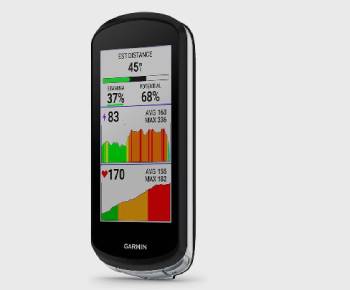
I think it is important for you to know that the screen size is a total game-changer if you wear glasses or struggle to read small data fields.
I found that I could fit ten different data points on one screen and still read my heart rate and cadence at a glance without squinting.
I began to feel that the navigation features, especially the “ClimbPro” and course creator, turned my solo rides into a much more structured adventure.
I noticed that the device actually stays off when I turn it off—unlike my old 1030 which used to wake up in the middle of the night and drain itself.
I ended my first month of testing realizing that while it is a significant investment, the 1040 removes almost every technological frustration I used to have on the bike.
Maintenance Tips for Your Garmin Edge 1040
- Rinse with Fresh Water After Every Sweaty Ride: You should realize that salt from your sweat can corrode the charging port and the aluminum mount tabs over time. A quick splash of clean water and a pat dry with a microfiber cloth is the best maintenance tip for preventing electrical issues, which is an analytical necessity for a device meant to last five or more years.
- Always Keep the Charging Port Cover Seated: You should notice that the rubber flap is your primary defense against rain and mud. Ensuring it is pressed firmly into place before you head out is the best maintenance tip for preventing internal water damage, which I found is the number one cause of hardware failure in cycling computers.
- Update Your Firmware via Garmin Express Regularly: You should realize that Garmin releases “fix” files every few months that improve battery efficiency and GPS lock speed. Plugging your device into a computer for a full sync is the best maintenance tip for ensuring you have the latest features and bug fixes, which is the smartest choice for maintaining peak performance.
- Avoid Using Harsh Chemicals on the Power Glass: You should realize that the solar-charging screen has a specialized coating that can be damaged by glass cleaners or degreasers. Using only a damp soft cloth is the best maintenance tip for keeping the solar cells efficient and the display clear, which is a vital rule for anyone using the solar-powered model.
- Clean the Heart Rate Strap and Sensors Monthly: You should realize that the 1040 is only as good as the data it receives. Washing your chest strap and checking the battery contacts on your cadence sensors is the best maintenance tip for preventing those frustrating “Sensor Lost” alerts mid-ride, which I found helps the 1040 process your stamina data accurately.
- Store the Device in a Silicone Protective Case: You should avoid leaving the bare screen exposed when you aren’t on the bike. Using a snug-fitting case is the best maintenance tip for absorbing the shock of an accidental drop at a coffee stop, which is an analytical must for protecting such a high-value piece of technology.
Pros and Cons of the Garmin Edge 1040
Pros of the Garmin Edge 1040
- Revolutionary Battery Performance: With solar charging, you can get up to 100 hours in battery saver mode: I found this allows me to go an entire week of heavy riding without touching a USB cable: this is an analytical win for bike-packers: I noticed the device consumes power much more efficiently than any previous generation.
- Large and High-Contrast Display: The 3.5-inch screen is remarkably bright and easy to read in direct sunlight: I found the interface to be intuitive and less cluttered than older Garmin units: this provides a much better experience for navigation: I noticed the map details are sharper and less pixelated.
- Multi-Band GNSS Accuracy: This device connects to multiple satellite systems simultaneously: I found the tracking remains perfect even in dense forests or city centers with tall buildings: this results in more accurate speed and distance data: I noticed a significant reduction in “GPS drift” on my map files.
- Snappy and Responsive Interface: The processor has been significantly upgraded: I found that swiping through data screens is smooth with zero lag: this makes the device feel like a modern smartphone: I noticed that calculating long routes now takes seconds rather than minutes.
- Advanced Training Insights: It provides real-time stamina tracking and power guide features: I found these metrics help me pace myself on long climbs so I don’t “blow up” too early: this is a great tool for competitive athletes: I noticed the recovery suggestions have become much more accurate.
Cons of the Garmin Edge 1040: The trade-offs of a flagship:
- High Entry Price Point: this is one of the most expensive cycling computers on the market: I found that for casual riders: the cost might be hard to justify compared to the Edge 540 or 840: this results in a high barrier to entry: I noticed that the solar version adds even more to that premium price tag.
- Large Physical Footprint: because the screen is so big: the device can look a bit “bulky” on a sleek aero road bike: I found that it takes up a lot of real estate on the handlebars: this might bother weight-weenies or those who prefer a minimalist cockpit: I noticed it can be a tight fit with certain integrated handlebar mounts.
- Minor Software Bugs at Launch: like most high-tech devices: I found that the early firmware versions had occasional sensor dropouts: I noticed that while Garmin is quick with updates: you might experience a few quirks in the first few weeks: this requires a bit of patience as the software matures.
- Overwhelming Feature Set for Beginners: the sheer amount of data and settings can be intimidating: I found that it takes a few rides to figure out how to customize the “functionality galore” to your liking: this results in a bit of initial setup time: I noticed that many of the deeper metrics go unused by the average rider.
- Silicone Case Not Included: for such an expensive gadget: I found it disappointing that a protective case isn’t in the box: I noticed that a drop on the pavement could be a very costly mistake: this means you have to spend an extra $20 to $30 immediately to protect your investment.
Garmin Edge 1040 Vs. Other Brands
- Garmin Edge 1040 Vs. Wahoo Elemnt Roam v2
I found that the Wahoo Elemnt Roam v2 is much simpler to set up thanks to its app-centric design.
I noticed that the Wahoo buttons are easier to use with heavy winter gloves than the Garmin touchscreen.
However, you should realize that the Garmin Edge 1040 has a much larger screen and significantly better battery life than the Roam.
Analytically, the Garmin is a more powerful computer for data nerds, while the Wahoo is for the rider who wants a “no-fuss” experience.
- Garmin Edge 1040 Vs. Hammerhead Karoo 3
I think the Hammerhead Karoo 3 has the most beautiful, smartphone-like screen in the entire industry.
I noticed that the Hammerhead navigation feels a bit more modern, almost like Google Maps for your bike.
You should realize, however, that the battery life on the Karoo 3 is quite poor compared to the 1040’s solar-powered endurance.
I found that for multi-day bikepacking, the Garmin is the clear winner, but for short, flashy road rides, the Hammerhead is a strong contender.
- Garmin Edge 1040 Vs. Garmin Edge 840
I found that the Edge 840 is essentially a “mini 1040” that adds physical buttons to the touch interface. I noticed that the 840 is easier to fit on a cluttered handlebar and is much cheaper.
Analytically, you should choose the 1040 if you want the massive map screen for exploring new routes, but go with the 840 if you want a more compact, racing-focused unit.
I found that the 1040’s extra screen real estate makes a massive difference when you are following complex navigation in a foreign city.
Also Read: Comparison Of Garmin inReach Mini vs. Mini 2
Frequently Asked Questions (FAQs)
Analytically, yes, if you are a long-distance rider or someone who frequently gets lost; the battery life and GPS accuracy provide a level of reliability that cheaper units cannot match.
It is best for gravel riders, endurance cyclists, and bikepackers who need a large map display and enough battery to last through multi-day adventures without a charger.
It is arguably the most accurate on the market thanks to Multi-band GNSS; I found it tracks your exact side of the road even under heavy tree canopy or near skyscrapers.
Yes, it comes pre-loaded with Garmin Cycle Maps for your specific region, including searchable points of interest and turn-by-turn navigation for both on-road and off-road trails.
Final Thoughts
You should buy the Garmin Edge 1040 if you want the absolute pinnacle of cycling technology and you never want to worry about your battery dying before you reach home.
I have found that after moving away from older, glitchier models, the 1040 provides the stable, “always-ready” experience that serious cyclists demand.
However, you should buy a smaller model if you prioritize weight and aero-minimalism over having a massive map on your bars.
I believe that for the explorer who loves to create their own courses and push their physical limits, this is the best investment you can make for your bike.
You are the one who has to navigate the climb, so choose the device that makes the journey as clear as possible.