Suffering from wrist strain during long computer sessions?
The Deltahub Carpio 2.0 offers innovative gliding support that moves with your hand, reducing pressure on sensitive areas while elevating comfort.
Designed with medical input, its premium materials and sleek look make it a standout for desk workers and gamers alike.
Portable and effective for many, it’s worth considering to protect your wrists. Invest in one today for healthier, more productive days.
My Real-Life Experience with Deltahub Carpio 2.0 Wrist Rest
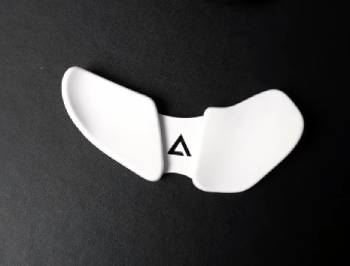
I’ve been using the Deltahub Carpio 2.0 ergonomic wrist rest for several months now, and my experience has been a real eye-opener into how small changes can impact daily comfort.
You probably understand that nagging ache from hours at the computer, whether typing reports or gaming late— that’s what pushed me to try this unique device.
Unlike traditional padded rests, the Carpio 2.0 is a curved, gliding palm support made of durable plastic with silicone pads and PTFE feet, designed to shift pressure away from the carpal tunnel to stronger palm areas.
I ordered the right-handed large size after measuring my hand as per their guide, and it arrived in clever packaging that revealed instructions cleverly.
First impressions were strong: premium build, non-slip base, and a modern aesthetic that fits minimalist setups.
Placing it under my palm while using my Logitech MX Master mouse felt strange initially—the hard surface and gliding motion took getting used to, as I had to consciously reposition sometimes when switching to keyboard.
But after a week or two, muscle memory kicked in, and it started feeling natural.
The teflon feet let it slide smoothly across my desk pad, matching mouse movements without restriction.
During workdays, editing documents or browsing, my wrist stayed elevated, reducing that downward bend that causes fatigue.
I noticed less soreness in evenings, and my posture improved as I used larger arm movements.
For gaming sessions with faster flicks, it provided stable support without hindering speed once adapted.
The silicone pads offered just enough cushion, balancing firmness and comfort.
You feel the difference in extended use—less tension building up.
On travels or hot-desking, its compact size slipped easily into my bag, a huge plus over bulky rests.
Paired with my mechanical keyboard, sliding between mouse and keys kept support consistent.
But not everything was perfect; on rough surfaces, gliding wasn’t as seamless, and occasional repositioning broke flow.
For claw grip users like me, it sometimes shifted palm pressure oddly, causing minor discomfort until adjusted.
The price felt steep for plastic, though quality justified part of it.
You weigh if the benefits outweigh the initial awkwardness.
Overall, it transformed my setup, making long hours more bearable and proactive against strain.
Trust me, you sense the relief building over time.
Expanding on Daily Use with Deltahub Carpio 2.0
Let me dive deeper into how it fits various scenarios, because real-world testing reveals the nuances.
In office mode, crunching spreadsheets, the elevation kept my wrist neutral, cutting that pinch feeling from flat resting.
You move freer, engaging shoulder more.
During intense gaming marathons, it stabilized without restricting aim, though low-sens players might need the strapped G2.0 version.
One month in, I forgot it was there most times, a sign of good integration.
Friends tried it; some loved the freedom, others found the hardness off-putting compared to gel.
You personalize placement for best fit.
On laptop-only days, it bridged the gap to external mouse perfectly.
Analytical note: by offloading to palm, it addresses root causes better than compressive pads.
You build healthier habits unconsciously.
Essential Maintenance Tips for Deltahub Carpio 2.0
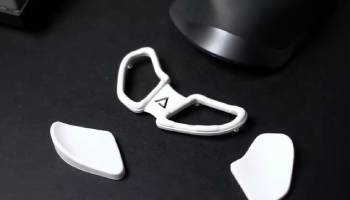
Keeping your Deltahub Carpio 2.0 in top shape is straightforward, ensuring lasting performance and hygiene.
You extend its life easily with habits.
- Regular Cleaning for Hygiene
Wipe with damp cloth and mild soap weekly.
Avoid abrasives or alcohol to preserve silicone and PTFE.
This removes oils and dust buildup.
- Protecting Gliding Feet
Clean feet gently with soft brush if debris collects.
Prevent dropping to avoid scratches.
You maintain smooth motion.
- Storing When Not in Use
Keep in provided pouch or dry spot.
Avoid extreme heat or pressure.
Preserves shape and pads.
- Checking for Wear Periodically
Inspect pads and feet monthly for separation.
Contact support early if issues arise.
Proactive catches problems.
- Using on Optimal Surfaces
Pair with smooth mouse pad for best glide.
Rough desks wear feet faster.
You optimize experience.
- Adjusting Placement Routinely
Fine-tune position as needed for comfort.
Mark desk lightly if helpful.
Ensures consistent support.
- Traveling Safely
Pack in protective case or bag pocket.
Cushion against impacts.
Keeps portable pristine.
Follow these, and your Carpio stays like new.
I’ve wiped mine after sweaty days—quick and effective.
You invest minutes for years of use.
Analytically, durable materials reward care, with PTFE resisting wear well.
You focus on prevention.
Deltahub Carpio 2.0 Pros and Cons
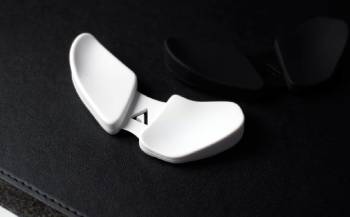
Pros of Deltahub Carpio 2.0 Wrist Rest
- Innovative gliding design moves with hand: PTFE feet enable natural arm motion, reducing wrist deviation and promoting healthier posture.
- Ergonomic pressure redistribution: shifts load from carpal tunnel to stronger palm areas, minimizing strain risk during prolonged use.
- Premium build quality feels durable: high-grade plastic and silicone pads provide stability and longevity.
- Compact and portable form factor: pocket-sized for easy travel, ideal for remote workers or varying setups.
- Sleek minimalist aesthetic enhances desks: modern look blends seamlessly without clutter.
- Non-slip silicone base stays put: grips surfaces well, preventing unwanted shifts.
- Available in left/right-handed versions: accommodates all users, with size options for fit.
- Physician co-designed for credibility: backed by medical input focusing on injury prevention.
Cons of Deltahub Carpio 2.0 Wrist Rest
- Significant adjustment period required: takes days to weeks for natural feel, frustrating initially as hand placement changes: many reposition frequently at start.
- Hard surface lacks traditional cushion: no soft gel or foam, potentially uncomfortable for those preferring plush support.
- Higher price for simple materials: around $40 feels premium but steep compared to basic rests.
- Gliding imperfect on rough surfaces: performs best on smooth pads, less ideal on wood or textured desks.
- Potential for new pains during transition: edge pressure or palm shift can cause temporary discomfort in tendons or shoulder.
- No strap in standard model: can slip during fast movements, better suited for office than intense gaming.
- Limited airflow under palm: silicone pads trap heat slightly in long sessions.
- Sizing crucial but tricky: wrong fit leads to poor support or added strain.
The pros shine in proactive ergonomics, with gliding freedom setting it apart for dynamic use.
You gain mobility traditional rests restrict.
Build inspires confidence for daily reliance.
But cons center on adaptation; the hardness and change challenge habituated users.
Analytically, it targets prevention effectively, but suitability varies by grip and sensitivity.
You test commitment to new posture.
Price reflects innovation, though value debated against cheaper alternatives.
Overall, strengths appeal to strain-sufferers seeking modern solutions.
Deltahub Carpio 2.0 Vs. Other Wrist Rests Comparison
Exploring alternatives helped contextualize Carpio’s uniqueness.
Here’s direct matchups—you spot fits.
- Deltahub Carpio 2.0 Vs. Glorious Gaming Wrist Rest
Glorious offers plush memory foam pads, soft and affordable for gamers.
Covers full keyboard or mouse area, cushy relief.
But stationary, compresses carpal area.
Carpio’s gliding mobility reduces deviation better.
You choose Glorious for budget comfort, Carpio for active support.
Glorious suits static typing, Carpio dynamic mousing.
- Deltahub Carpio 2.0 Vs. HyperX Wrist Rest
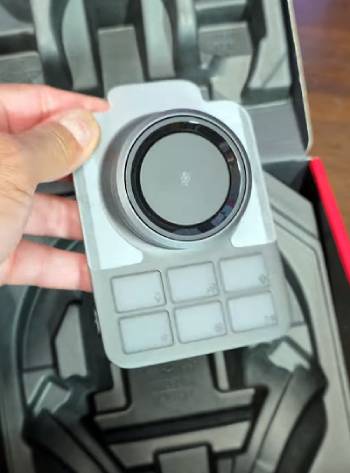
HyperX provides cool-gel memory foam, breathable fabric for gaming marathons.
Firm yet soft, anti-slip base.
Stays fixed, good for keyboards.
Carpio elevates and moves, targeting palm.
You pick HyperX for traditional cushion, Carpio innovative prevention.
HyperX affordable, Carpio premium.
- Deltahub Carpio 2.0 Vs. Gorilla Grip Gel Wrist Rest
Gorilla Grip uses thick gel, ergonomic contour for mouse/keyboard combo.
Non-slip, durable cover.
Budget-friendly, widespread.
But compresses wrist directly.
Carpio redistributes to palm.
You go Gorilla for value plushness, Carpio health-focused design.
Gorilla everyday, Carpio specialized.
- Deltahub Carpio 2.0 Vs. Razer Ergonomic Wrist Rest
Razer features plush leatherette, cooling gel for gaming setups.
Angled support, RGB options.
Fixed position, stylish.
Carpio portable gliding wins mobility.
You select Razer for immersion, Carpio portability.
Razer flashy, Carpio subtle.
- Deltahub Carpio 2.0 Vs. Gimars Memory Foam Set
Gimars bundles keyboard and mouse foam rests, breathable cover.
Soft elevation, affordable.
Covers broad area.
But stationary compression.
Carpio single-hand dynamic.
You favor Gimars for full coverage, Carpio targeted innovation.
Gimars versatile, Carpio precise.
Carpio stands out for movement freedom.
You appreciate its niche.
Frequently Asked Questions (FAQs)
Reduces wrist extension and strain risk, promotes arm movement, portable support for mouse use.
Top include HyperX for cooling foam, Glorious for gaming plush, Deltahub Carpio for gliding ergonomics.
Gel cools and contours, foam soft and affordable; both stationary, choose by preference.
When properly designed yes, reducing strain; poor ones compress carpal tunnel worsening issues.
Final Thoughts
After thorough testing, the Deltahub Carpio 2.0 excels in innovative support but demands adaptation and suits specific needs.
You gain proactive comfort if committed. Consider it seriously for wrist health—add one to your setup today.