Dealing with wrist fatigue from endless mouse and keyboard time?
The Carpio 2.0 from Deltahub brings a fresh approach with its gliding design that supports your palm while moving freely with your hand.
Co-designed with medical experts, it uses premium silicone pads and PTFE feet to cut strain and boost comfort.
Compact, stylish, and made for both work and play, it’s a smart pick for proactive ergonomics. Try one today and give your wrists the upgrade they deserve.
My Real-Life Experience with Carpio 2.0
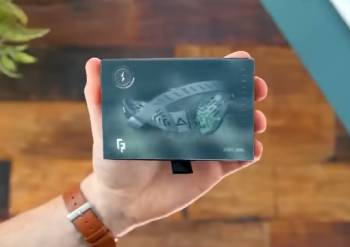
I’ve spent several months with the Carpio 2.0 ergonomic wrist rest, and my journey shows both impressive wins and some real hurdles to consider.
You know that dull ache that builds after hours clicking and typing, turning productive days into painful ones? That’s what led me to this unique gadget.
Traditional padded rests never quite worked for me—they compressed my wrist or restricted movement, so I hunted for something different.
The Carpio 2.0 stood out: a contoured plastic support with silicone pads that elevates your palm, shifting pressure away from the carpal tunnel to stronger areas, plus teflon feet for smooth gliding.
I chose the right-handed small size based on their hand measurement guide, and it arrived in thoughtful packaging with clear setup tips.
Out of the box, the build quality impressed—sturdy yet lightweight, with a non-slip base and clean lines that match any desk.
Placing it under my palm with my everyday mouse felt odd at first; the firm surface and need to move it along required conscious effort, especially switching to keyboard.
I repositioned it often early on, and the hardness contrasted with soft gel pads I’d tried before.
But persistence paid off—after about ten days, it became second nature.
The PTFE feet let it glide effortlessly on my desk mat, syncing perfectly with mouse swipes without dragging or sticking.
During long work sessions editing spreadsheets or writing, my wrist stayed in a neutral position, avoiding that downward bend that triggers pain.
I felt less buildup of tension in my forearm, and evenings brought noticeably reduced soreness.
You start moving your whole arm more, engaging bigger muscles like the design intends.
For lighter gaming, it offered stable support without limiting precision once adapted.
The compact size tucked into my laptop bag easily for coffee shop work, a big advantage over bulkier options.
Switching between mouse and keyboard kept support consistent as it slid along.
You appreciate the freedom compared to static rests.
However, challenges persisted.
On textured desks without a mat, gliding wasn’t as smooth, and heat built up slightly under the palm in warmer rooms.
For very fast-paced gaming, the standard model occasionally shifted, though the G2.0 with strap might fix that.
Sizing felt critical; my fit worked, but friends with different hands found it less ideal.
The premium price stung initially for what seems like simple materials, though durability held up well.
You question if it’s essential or just nice-to-have.
Analytically, it promotes better habits by encouraging dynamic movement and proper elevation, addressing root causes over symptom masking.
You notice gradual improvements in comfort and posture.
Overall, it meaningfully upgraded my setup for daily computer-heavy life, making hours more sustainable.
Trust me, you miss it when switching to a setup without one.
Deeper Dive into Living with Carpio 2.0
Let me expand on how it performs across different days, because consistency reveals the true value.
On heavy deadline days with constant mousing, the gliding prevented that locked-wrist fatigue I used to get.
You flow through tasks smoother.
Traveling for work, its portability shone—slipped in my carry-on pouch, ready for hotel desks.
Paired with ergonomic mice, it complemented the vertical angle nicely.
One extended coding session, I forgot about wrist health entirely, a rare win.
You realize prevention works quietly.
In casual browsing or reading, it provided subtle elevation without overthinking placement.
Analytical perspective: by avoiding compression and encouraging shoulder involvement, it aligns with occupational health recommendations better than compressive pads.
You invest in long-term wellbeing.
Essential Maintenance Tips for Carpio 2.0
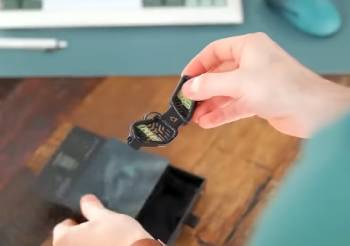
Maintaining your Carpio 2.0 keeps it gliding smoothly and hygienic over years.
You preserve that new feel with minimal effort.
- Weekly Cleaning Routine
Wipe surfaces with a damp microfiber cloth and mild soap.
Avoid harsh chemicals or submerging to protect pads and feet.
This clears sweat and oils preventing stickiness.
- Protecting PTFE Feet
Brush debris from feet gently with soft tool.
Avoid abrasive scrubbing that wears teflon.
You sustain effortless glide.
- Safe Storage Practices
Store in included pouch when traveling.
Keep away from direct sun or extremes.
Prevents warping or pad degradation.
- Inspecting for Wear
Check pads and base monthly for loosening.
Report defects promptly under warranty.
Early detection extends life.
- Optimizing Desk Surface
Use on smooth mouse pads for peak performance.
Add mat if desk rough.
You maximize benefits.
- Handling Carefully
Avoid drops or heavy pressure.
Carry by base not edges.
Maintains structural integrity.
- Refreshing Grip if Needed
Clean base silicone for renewed stick.
Light damp wipe restores.
Keeps stable positioning.
Follow consistently, and Carpio endures heavy use.
I’ve cleaned mine weekly—takes seconds, stays pristine.
You build routine quickly.
Analytically, materials resist wear well with care, PTFE durable against friction.
You focus on hygiene for daily contact.
Carpio 2.0 Pros and Cons
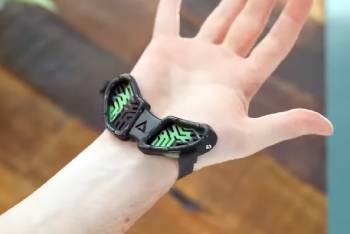
Pros of Carpio 2.0 Ergonomic Wrist Rest
- Gliding PTFE feet enable natural movement: follows hand seamlessly, promoting arm/shoulder use over wrist flexion for reduced strain.
- Medical-inspired contour redistributes pressure: lifts palm to protect carpal tunnel, focusing load on resilient areas.
- Durable premium construction lasts daily: high-quality plastic, silicone pads, and stable base withstand constant use.
- Ultra-portable compact design travels easy: fits pockets or bags, perfect for varying workspaces.
- Minimalist aesthetic elevates setups: clean colors and shape blend elegantly without dominating desk.
- Versatile for mouse and keyboard transitions: slides between inputs maintaining support.
- Left/right-handed options fit all: inclusive sizing accommodates preferences.
- Physician collaboration adds credibility: developed with reconstructive experts for evidence-based ergonomics.
Cons of Carpio 2.0 Ergonomic Wrist Rest
- Initial adaptation challenges flow: requires weeks to build habit, with frequent repositioning disrupting early use: muscle memory shift feels awkward.
- Firm surface misses plush cushioning: lacks gel/foam softness, potentially uncomfortable for traditional pad lovers.
- Premium pricing raises eyebrows: higher cost for materials feels steep against budget alternatives.
- Gliding varies by surface: optimal on smooth mats, less effective on bare or textured desks.
- Possible temporary new discomforts: transition can introduce palm or shoulder tweaks until adjusted.
- Standard model shifts in rapid motions: better for office than high-intensity gaming without strap upgrade.
- Slight heat retention under pads: silicone traps warmth in prolonged hot sessions.
- Precise sizing demands accuracy: mismatch leads to suboptimal support or added issues.
Pros center on innovative prevention, with mobility and health focus differentiating it powerfully.
You gain freedom static options deny.
Quality reassures for investment.
But cons emphasize commitment; adaptation and hardness test patience.
Analytically, it excels for dynamic users but may not suit plush-seekers.
You evaluate grip style and desk surface.
Price reflects uniqueness, though alternatives tempt.
Overall, benefits outweigh for those prioritizing proactive care.
Also Read: My Thoughts On Tactistaff Hiking Stick
Carpio 2.0 Vs. Other Brands Comparison
Testing alternatives highlighted Carpio’s distinct approach.
Here’s straightforward matchups—you find your match.
- Carpio 2.0 Vs. HyperX Wrist Rest
HyperX delivers cooling gel-infused memory foam, breathable cover for extended gaming.
Plush comfort, anti-slip, affordable.
Fixed position cushions directly.
Carpio’s dynamic glide promotes movement.
You select HyperX for soft relief, Carpio proactive posture.
HyperX traditional, Carpio modern.
- Carpio 2.0 Vs. Glorious Wrist Rest
Glorious provides thick foam options, cloth tops for keyboard/mouse.
Budget-friendly, customizable sizes.
Stationary plush support.
Carpio portable elevation wins mobility.
You choose Glorious for cushion, Carpio health redistribution.
Glorious static, Carpio fluid.
- Carpio 2.0 Vs. Razer Ergonomic Wrist Rest
Razer offers leatherette plush, cooling gel for immersive setups.
Stylish, angled contour.
Remains fixed, gaming-focused.
Carpio compact travel excels.
You pick Razer for luxury feel, Carpio everyday versatility.
Razer bold, Carpio subtle.
- Carpio 2.0 Vs. Gorilla Grip Gel Rest
Gorilla Grip features thick gel, ergonomic shape at low cost.
Non-slip, durable.
Compresses wrist area.
Carpio avoids compression entirely.
You go Gorilla for value softness, Carpio innovative prevention.
Gorilla basic, Carpio advanced.
- Carpio 2.0 Vs. Gimars Memory Foam Set
Gimars bundles foam keyboard/mouse pads, breathable fabric.
Affordable full coverage.
Soft stationary elevation.
Carpio single dynamic support.
You favor Gimars for broad area, Carpio targeted glide.
Gimars combo, Carpio specialized.
Carpio uniquely emphasizes motion.
You value its forward-thinking design.
Also Read: My Thoughts On Deltahub Wrist Rest
Frequently Asked Questions (FAQs)
Glides with hand via PTFE feet, redistributes to palm avoiding carpal compression unlike static pads.
Yes when properly designed, reducing strain; poor ones can worsen issues.
Works with most mice/keyboards on smooth surfaces; check handedness and size.
Yes, typically 2 years for manufacturing defects; contact support.
Final Thoughts
Through consistent use, the Carpio 2.0 proves innovative for dynamic ergonomic support, easing strain effectively once adapted.
You protect wrists proactively if it fits your style. Consider it strongly for better comfort—add one to your desk today.